


Secure Web Gateway Migration: Cutover and Rollback Checklist
- An SWG migration needs inventory, pilot, testing, phased rollout, and tested rollback like any production cutover.
- Authentication, TLS certificates and exceptions, traffic steering, and ICAP or DLP integrations carry the most risk.
- Run the new gateway in parallel and move users in waves rather than cutting over at once.
- Define rollback triggers and acceptance criteria before the first production wave, not during an incident.
- Migration is the best chance to retire years of unused rules and stale exceptions.
A secure web gateway migration moves web traffic inspection and policy from one proxy platform to another, whether from an on-premises appliance to a new appliance, to a cloud service, or to a hybrid model. This checklist covers the full sequence: inventory, target design, policy translation, rollback preparation, pilot, testing, phased cutover, and acceptance.
This article is part of the Hybrid Cloud Security guide. For Blue Coat ProxySG and Symantec Edge SWG specifics, see Blue Coat and ProxySG End of Life: Migration Planning.
Phase 1: Inventory
Phase 1 documents the current gateway estate, traffic steering, identity, TLS inspection, policy, and integrations before any design work.
Infrastructure
- Every gateway: model, software version, location, role, and end-of-life dates (for ProxySG and Edge SWG, check Broadcom’s lifecycle article)
- Traffic volume and peak throughput per site, with TLS decryption share
- User counts per site and for remote access
- Upstream and downstream proxy chaining, load balancers, and failover design
Traffic steering
- Explicit proxy settings, PAC files, and WPAD
- Transparent interception points (WCCP, policy-based routing)
- Tunnels from branches (IPsec, GRE)
- Agents on endpoints
- Direct-to-internet exceptions
Identity
- Authentication realms (SAML, Kerberos/IWA, LDAP, client certificates)
- Group mappings used in policy
- Unauthenticated traffic (servers, IoT, OT) and how it is handled
TLS inspection
- Inspection CA, key location, expiry, and distribution method
- Decryption bypass list with reasons and owners
Policy
- Full policy export, including rule order, categories, custom lists, and exceptions
- Rules with no hits in the past 90 days (candidates for retirement)
Integrations
- ICAP connections to DLP, antivirus, and sandboxing
- Log forwarding to SIEM and reporting tools
- Monitoring and alerting
Phase 2: Target design
Phase 2 decides where each site and user group will be inspected and how traffic, certificates, and logs will be handled.
- Decide where each site and user group will be inspected: on premises, cloud, or hybrid
- Define the traffic steering method for each: explicit proxy or PAC for managed networks, agents or browser controls for roaming users, tunnels for branches
- Confirm TLS inspection placement so each flow is decrypted once. NSA guidance advises inspecting once within the enterprise network and avoiding redundant inspection by chained proxies (NSA)
- Size capacity for decrypted peak throughput plus growth
- Design high availability and failure behavior
- Decide where logs and DLP evidence will be stored
- Plan the new inspection CA or transfer of the existing one, and confirm supported key storage and any required HSM integration
Phase 3: Policy translation
Phase 3 translates existing policy into the new platform through a structured, validated mapping rather than a direct file conversion.
- Map each source rule to its target equivalent, or mark it for retirement
- Map URL categories between vendors and review differences for high-impact categories
- Recreate custom lists, allowlists, and blocklists
- Translate authentication-dependent rules and confirm group mappings
- Recreate decryption bypasses, and review each for continued need
- Replace ICAP-based DLP handoffs with the platform’s own data protection service where possible, confirming where inspection takes place, or re-establish integrations
- Record every change and every retired rule with a reason, following your configuration change control process (NIST SP 800-128 describes security-focused configuration management practices)
Some platforms offer assisted import of existing policy. Treat any import as a starting point that still requires review and testing.
Phase 4: Rollback preparation
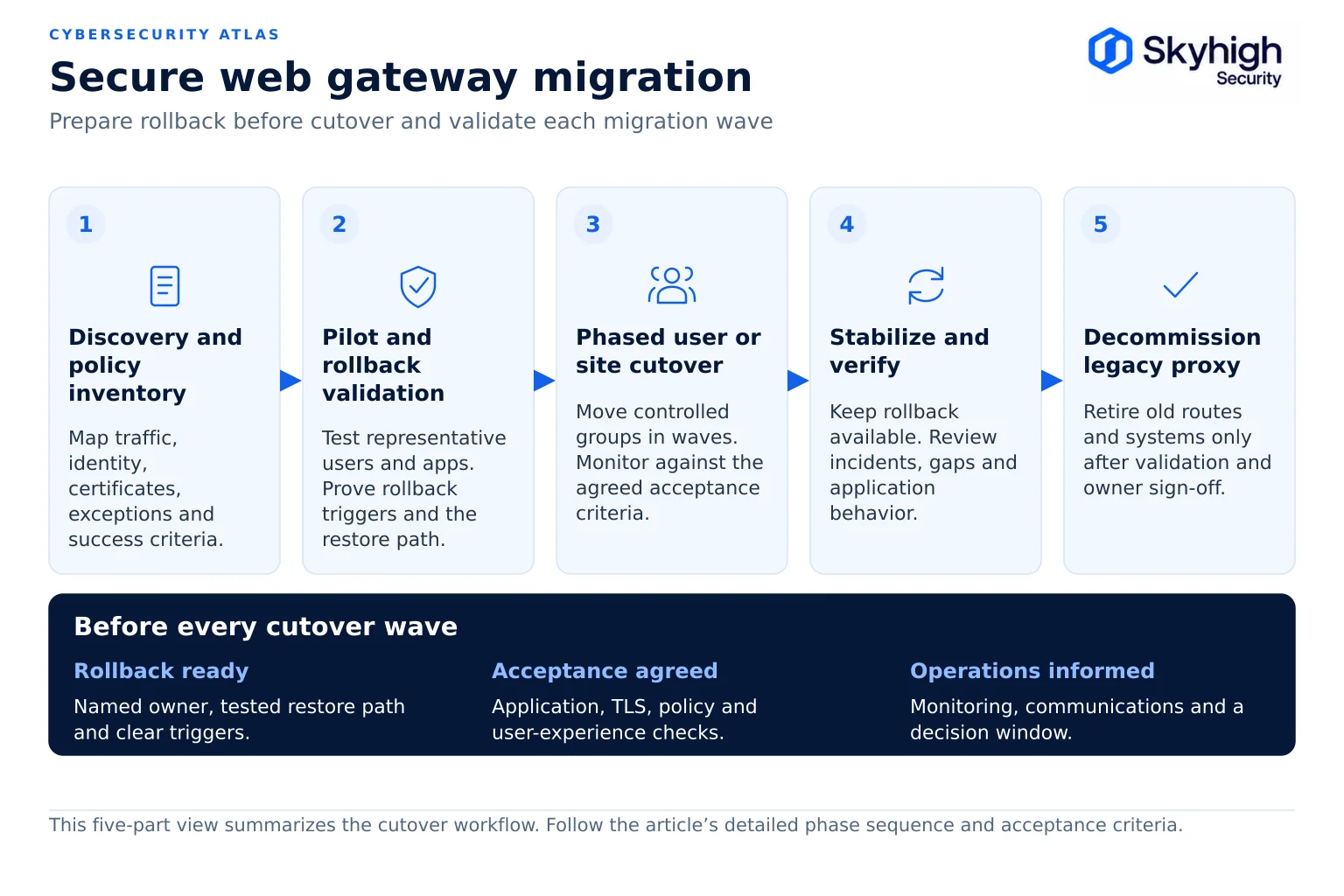
Phase 4 defines rollback triggers and mechanics before the pilot. Test rollback during the pilot and verify readiness before each production wave.
Rollback triggers (examples)
- Authentication failures above an agreed threshold
- A business-critical application unavailable for more than an agreed time
- Helpdesk tickets above a set multiple of baseline
- Security controls confirmed not to be enforcing
Rollback mechanics
- Keep the old gateways in service and patched until final acceptance
- Keep PAC file, DNS, and routing changes versioned so they can be reverted
- Account for DNS and PAC caching times in rollback estimates
- Confirm that the old inspection CA remains trusted on devices during the transition
- Assign who can authorize a rollback, and document the steps
- Test rollback during the pilot and verify readiness before every cutover wave
Phase 5: Pilot
Phase 5 runs a representative pilot group on the new gateway, in parallel with the old one, for at least one business cycle.
- Select pilot users who represent key departments, device types, and locations, including IT staff and a few business power users
- Run the new gateway in parallel with the old one
- Route pilot traffic to the new gateway through PAC, agent, or routing changes that can be reversed quickly
- Give pilot users a clear channel to report issues
- Hold the pilot for at least one full business cycle, including month-end if relevant
Phase 6: Testing
Phase 6 tests every area where users will notice a difference, from authentication to performance and failover.
| Test area | What to verify |
|---|---|
| Authentication | Users and groups are identified correctly; SSO works; unauthenticated system traffic behaves as designed |
| Category and URL policy | Allowed, blocked, and warned categories behave as in the source |
| TLS inspection | Certificates trusted on all managed devices; bypasses work; pinned apps function |
| Threat protection | Test malware samples and known-bad URLs are blocked |
| DLP | Test documents with each data class are detected on upload |
| Business applications | Top 50 business-critical web apps and SaaS work end to end |
| Performance | Page load times and throughput at peak are acceptable |
| Logging | Events reach the SIEM with the expected fields |
| Failover | Failure of a gateway node is handled without user impact |
Phase 7: Phased cutover
Phase 7 moves users and sites to the new gateway in waves, starting with the lowest-risk sites.
- Group users and sites into waves by risk and complexity, starting with low-risk sites
- Communicate each wave in advance, with a support contact
- Schedule waves outside critical business periods
- Staff a war room for the first hours of each wave
- Monitor helpdesk tickets, block rates, and error rates against baseline
- Pause between waves to resolve issues before moving on
Phase 8: Acceptance and decommission
Phase 8 confirms acceptance criteria are met, then retires the old gateways, certificates, and contracts.
Acceptance criteria (examples)
- All users and sites migrated
- Helpdesk volume back to baseline for two weeks
- All test cases passing in production
- Logs and reports verified by security operations and compliance
- Exception list reviewed and approved
Decommission
- Remove old gateways from PAC files, routing, and DNS
- Revoke and remove the old inspection CA from devices, if replaced
- Archive old logs according to retention policy
- Securely wipe and dispose of hardware
- Close out licenses and support contracts
Typical timeline
Timelines depend on estate size and policy complexity.
A single-site organization can complete a migration in weeks. Large, multi-site enterprises often run parallel deployment and phased adoption over six to twelve months, according to Skyhigh Security.
How Skyhigh supports SWG migration
Skyhigh supports SWG migration with parallel deployment, validated CPL policy import, and flexible deployment models.
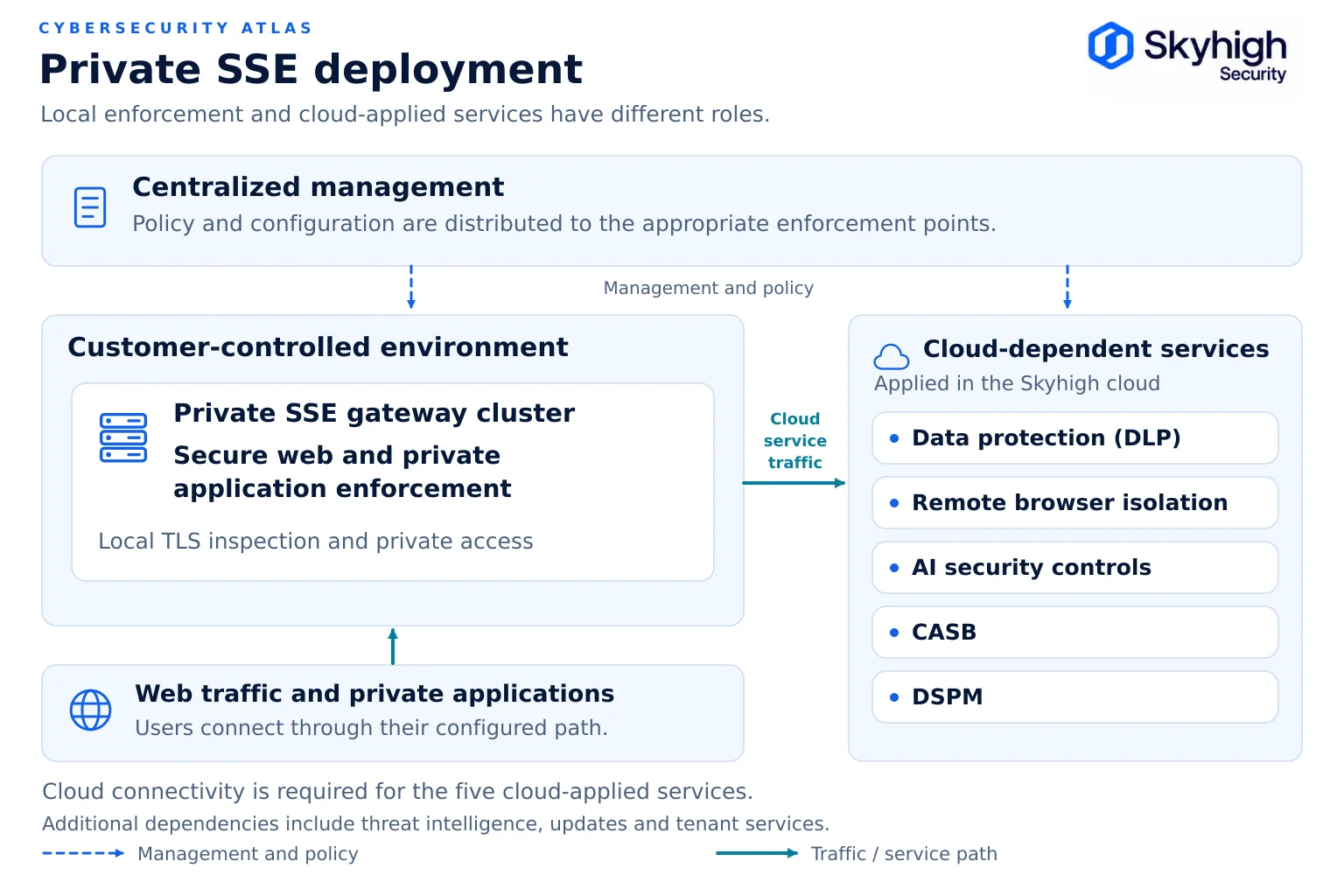
Skyhigh Hybrid SSE Mesh deploys alongside existing gateways so policy can be validated with parallel traffic before any cutover. Skyhigh re-expresses existing Blue Coat CPL policy in its unified policy console through a validated import process, and policy is authored in the Skyhigh cloud console. Web and private application policy can be enforced on the on-premises gateway, while traffic requiring cloud-applied data protection is forwarded to the Skyhigh cloud. Remote users are served through cloud points of presence. Skyhigh SWG runs on premises, hybrid, or in the cloud, so the migration does not force a change in deployment model. The Blue Coat Modernization Program adds services support and a commercial offset for eligible customers.
Sources
- NSA. Managing Risk from Transport Layer Security Inspection (November 2019). https://media.defense.gov/2019/Nov/18/2002212783/-1/-1/0/MANAGING%20RISK%20FROM%20TLS%20INSPECTION_20191106.PDF
- NIST. SP 800-128: Guide for Security-Focused Configuration Management of Information Systems. https://csrc.nist.gov/pubs/sp/800/128/upd1/final
- Broadcom. End of life and product lifecycle for Edge SWG (ProxySG) and Advanced Secure Gateway (KB 151102). https://knowledge.broadcom.com/external/article/151102/end-of-life-and-product-lifecycle-for-pr.html
- Skyhigh Security. “Modernizing Your Symantec Edge Secure Web Gateway With Skyhigh Hybrid SSE Mesh” (July 15, 2026). https://www.skyhighsecurity.com/industry-perspectives/modernizing-your-symantec-edge-secure-web-gateway-with-skyhigh-hybrid-sse-mesh.html
- Skyhigh Security. “Adopting Hybrid Just Got Easier With Skyhigh SSE Platform” (October 3, 2024). https://www.skyhighsecurity.com/cloud-security/adopting-hybrid-just-got-easier-with-skyhigh-sse-platform.html