




แนวทางปฏิบัติที่ดีที่สุดของ DSPM สำหรับความปลอดภัยของ Microsoft 365 และ Salesforce
- DSPM ตรวจหาตำแหน่งที่ข้อมูลสำคัญถูกเก็บไว้ทั่วทั้ง M365 และ Salesforce แล้วจัดลำดับความสำคัญของความเสี่ยงที่สูงสุด
- การติดตามสถานะอย่างต่อเนื่องมีประสิทธิภาพกว่าการตรวจสอบแบบจุดเวลา — การตั้งค่าและการเปลี่ยนแปลงสิทธิ์การเข้าถึงในระบบ SaaS เปลี่ยนแปลงทุกวัน
- DSPM เสริมความสมบูรณ์ให้กับ IAM, DLP, CASB และ SSE โดยเพิ่มชั้นบริบทข้อมูลที่ยังขาดอยู่
- ตัวชี้วัดความสำเร็จควรมีความสมดุลระหว่างการลดความเสี่ยง การเพิ่มประสิทธิภาพการดำเนินงาน และการส่งเสริมความร่วมมือ
- ให้จัดลำดับความสำคัญของวิธีแก้ไขปัญหาด้วยการวิเคราะห์อย่างละเอียด การจัดประเภทที่แม่นยำ และการให้คะแนนความเสี่ยงที่สามารถนำไปปฏิบัติได้
- การมองเห็นอย่างต่อเนื่องช่วยให้สามารถตอบสนองต่อความเสี่ยงใหม่ได้อย่างรวดเร็วขึ้น เมื่อรูปแบบการทำงานร่วมกันเปลี่ยนแปลงไป
- การบูรณาการกับเครื่องมือความปลอดภัยที่มีอยู่ช่วยรับประกันว่าผลการวิเคราะห์จาก DSPM จะนำไปสู่การลดความเสี่ยงอย่างเป็นรูปธรรม
- วัดทั้งการลดการสัมผัสและเวลาที่ใช้ในการแก้ไขปัญหา เพื่อติดตามการปรับปรุงการดำเนินงานที่แท้จริง
- การประเมินประสิทธิภาพของ DSPM อย่างสม่ำเสมอช่วยให้องค์กรสามารถปรับตัวให้เข้ากับรูปแบบการทำงานร่วมกันที่เปลี่ยนแปลงได้
การเปิดเผยข้อมูล SaaS ไม่ใช่ผลจากการตั้งค่าผิดพลาดเพียงครั้งเดียวหรือเหตุการณ์การละเมิดความปลอดภัยเพียงครั้งเดียว – แต่เกิดจากความซับซ้อนของการปฏิสัมพันธ์ระหว่างการขยายตัวอย่างไม่ควบคุมของข้อมูลที่ละเอียดอ่อน การตั้งค่าเริ่มต้นที่อนุญาตให้แบ่งปันข้อมูลอย่างเสรี ความต้องการในการทำงานร่วมกับฝ่ายภายนอก ตัวตนของผู้ใช้ชั่วคราว และความมองเห็นที่จำกัดบนแพลตฟอร์มสำคัญต่อธุรกิจ เช่น Microsoft 365 และ Salesforce
แม้ว่าแพลตฟอร์มเหล่านี้จะมีกลไกการควบคุมความปลอดภัยในตัว แต่พวกมันทำงานแบบแยกส่วน และต้องการให้ผู้ดูแลระบบทราบล่วงหน้าว่าข้อมูลสำคัญถูกจัดเก็บอยู่ที่ใด ก่อนที่จะสามารถจัดการข้อมูลเหล่านั้นได้อย่างมีประสิทธิภาพ ความท้าทายนี้ทำให้โซลูชันความปลอดภัยที่เน้นข้อมูลกลายเป็นส่วนสำคัญของกลยุทธ์ความปลอดภัยขององค์กร โดยเฉพาะอย่างยิ่งเมื่อองค์กรต่าง ๆ ตระหนักถึงความจำเป็นในการมองเห็นข้อมูลอย่างครบถ้วนทั่วทั้งระบบ SaaS ที่กำลังขยายตัว
รูปแบบความเสี่ยงของ Microsoft 365 และ Salesforce รวมถึงการแชร์ไฟล์มากเกินไป การให้สิทธิ์เข้าถึงแก่ผู้ใช้แบบแขก ชุดสิทธิ์ที่กว้างเกินไป และการร่วมมือกับฝ่ายภายนอกที่ไม่ได้รับการจัดการ ระบบควบคุมในตัวของแพลตฟอร์มช่วยได้ แต่ทำงานแบบแยกตามแต่ละแอป และต้องอาศัยความรู้ล่วงหน้าเกี่ยวกับตำแหน่งที่ข้อมูลสำคัญถูกเก็บไว้
วิธีการแบบดั้งเดิม เช่น การตรวจสอบด้วยมือ ระบบ DLP แบบอิสระ และCASBมักก่อให้เกิดช่องว่างด้านบริบท ซึ่งทำให้การกำหนดลำดับความสำคัญของความเสี่ยงอย่างมีประสิทธิภาพเป็นไปอย่างล่าช้าระบบการจัดการสถานะความปลอดภัยข้อมูล(DSPM) ให้ความสามารถในการค้นพบ จัดประเภท วิเคราะห์ความเสี่ยง และกำหนดลำดับความสำคัญของความเสี่ยงอย่างต่อเนื่องในทุกคลังข้อมูล SaaS — ซึ่งช่วยแก้ไขช่องว่างด้านความโปร่งใสที่ทีมความปลอดภัยขององค์กรต้องเผชิญในสภาพแวดล้อมการทำงานร่วมกันในปัจจุบัน
การลดความเสี่ยงจากการเปิดเผยข้อมูล SaaS อย่างมีประสิทธิภาพจำเป็นต้องหาจุดสมดุลระหว่างมาตรการควบคุมความปลอดภัยกับความต้องการด้านการทำงานร่วมกันของธุรกิจ DSPM จะทำงานได้อย่างมีประสิทธิภาพที่สุดเมื่อเป็นส่วนหนึ่งของกลยุทธ์ความปลอดภัยข้อมูลที่กว้างขึ้น ซึ่งรวมถึงการจัดการตัวตน การควบคุมการเข้าถึง และการบังคับใช้นโยบาย
แพลตฟอร์ม SaaS ให้ความสำคัญกับคุณสมบัติการทำงานร่วมกัน ซึ่งอาจก่อให้เกิดปัญหาด้านการกำกับดูแลสำหรับทีมความปลอดภัย Microsoft 365 และ Salesforce ต่างก็มีความสามารถในการแบ่งปันข้อมูลอย่างกว้างขวาง ซึ่งอาจทำให้ข้อมูลที่ละเอียดอ่อนถูกเปิดเผยออกไปนอกขอบเขตที่กำหนดไว้
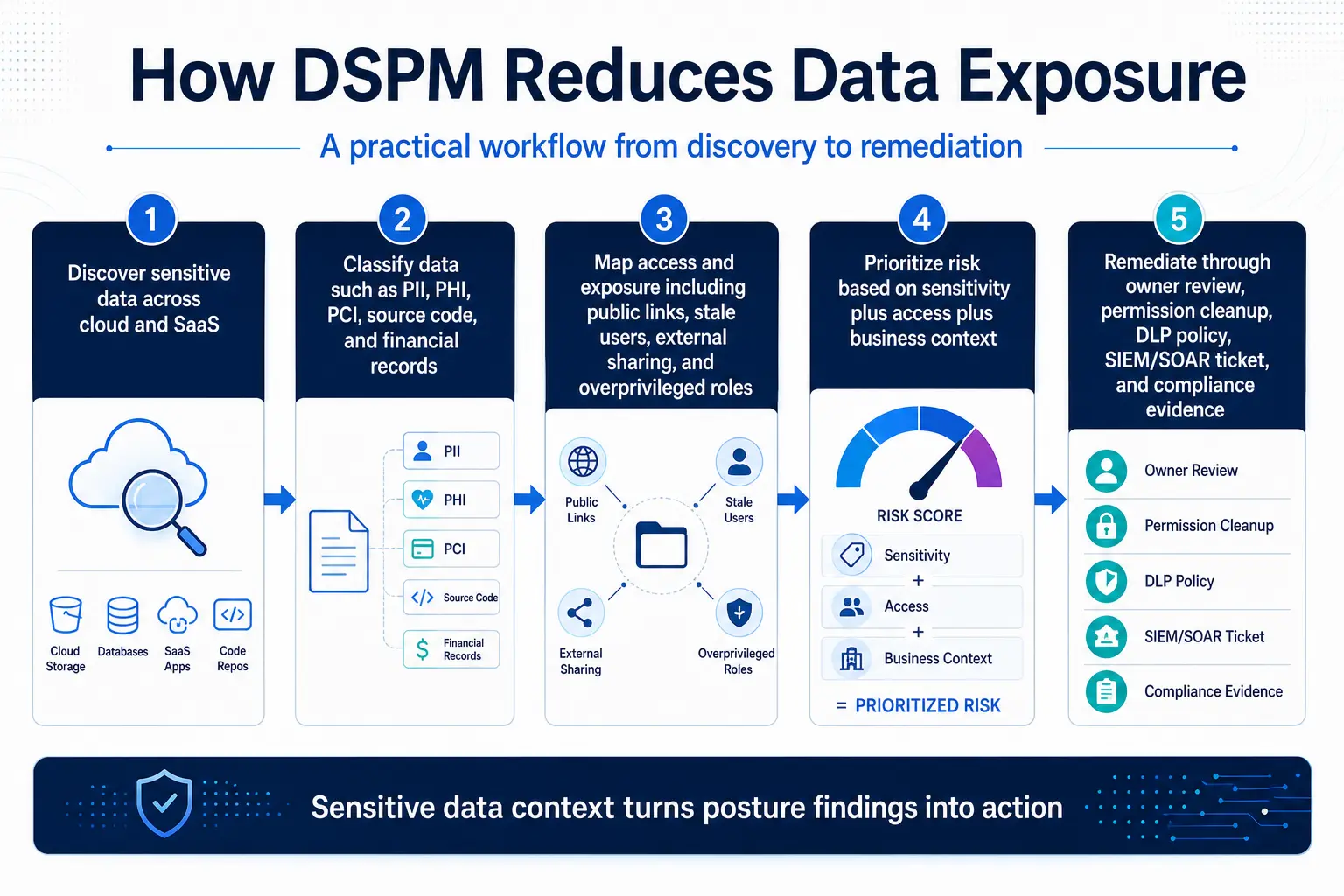
การเข้าใจรูปแบบการเปิดเผยข้อมูล SaaS
ใน Microsoft 365 การทำงานร่วมกันกับผู้ใช้ภายนอกสามารถทำได้ผ่านกลไกการแบ่งปันหลายรูปแบบ Microsoft SharePoint รองรับแบบการเข้าถึงจากภายนอกที่สามารถปรับแต่งได้ เช่น “ทุกคน” “ผู้เยี่ยมชมใหม่และที่มีอยู่” และ “ผู้เยี่ยมชมที่มีอยู่” ตามนโยบายระดับเทนท์ Microsoft OneDrive อนุญาตให้แบ่งปันไฟล์ผ่านลิงก์การเข้าถึงแบบไม่ระบุตัวตน ซึ่งอาจไม่จำเป็นต้องยืนยันตัวตน นอกจากนี้ การทำงานร่วมกันใน Microsoft Teams ยังสามารถขยายสิทธิ์การเข้าถึงของผู้ใช้ภายนอกไปยังการสนทนาที่แบ่งปัน เอกสารที่เชื่อมโยง และเนื้อหาที่เกี่ยวข้อง ได้ตามการตั้งค่าของเทนท์และตัวควบคุมการแบ่งปัน
ตัวเลือกการแบ่งปันข้อมูลเหล่านี้ช่วยสนับสนุนการร่วมมือทางธุรกิจที่ถูกต้องตามกฎหมาย แต่กลับสร้างพื้นที่ความเสี่ยงที่ขยายออกไปไกลเกินขอบเขตเครือข่ายองค์กร
ผู้ใช้แบบแขกเป็นช่องทางเสี่ยงสำคัญอีกประการหนึ่งในสภาพแวดล้อม Microsoft 365 หากองค์กรไม่ตรวจสอบการเข้าถึงจากภายนอกอย่างสม่ำเสมอ บัญชีผู้ใช้แบบแขกอาจยังคงอยู่เกินระยะเวลาการใช้งานที่ตั้งใจไว้ ทั้งนี้ ขึ้นอยู่กับสมาชิกกลุ่มและตั้งค่าการแบ่งปันระดับไซต์ ผู้ใช้แบบแขกอาจได้รับสิทธิ์การเข้าถึงที่กว้างกว่าที่ผู้ดูแลระบบตั้งใจไว้
การควบคุมการแบ่งปันไฟล์ใน OneDrive อาจเป็นเรื่องที่ยากที่จะดำเนินการอย่างสม่ำเสมอ เนื่องจากการตัดสินใจในการแบ่งปันมักเกิดขึ้นในระดับผู้ใช้แต่ละคน พนักงานอาจแบ่งปันเอกสารที่มีความลับกับฝ่ายภายนอกผ่านลิงก์ที่ไม่ระบุตัวตน การแบ่งปันผ่านลิงก์ที่ไม่ระบุตัวตนอาจทำให้การตรวจสอบตัวตนของผู้ใช้ลดลง เมื่อเทียบกับวิธีการแบ่งปันที่ต้องยืนยันตัวตน
ต่างจากการแบ่งปันผ่านอีเมล ซึ่งสร้างบันทึกการตรวจสอบ ลิงก์ OneDrive แบบไม่ระบุตัวตนทำให้ไม่สามารถตรวจสอบได้อย่างชัดเจนว่าใครเป็นผู้เข้าถึงเนื้อหาที่แบ่งปันนั้นจริง ๆ
Salesforce ก่อให้เกิดความท้าทายในการเปิดเผยข้อมูลที่ซับซ้อนไม่แพ้กัน ผ่านสถาปัตยกรรมการควบคุมการเข้าถึงที่มีความยืดหยุ่นสูง กฎการแบ่งปันข้อมูลที่ตั้งค่าไว้อย่างกว้างขวางอาจให้สิทธิ์การเข้าถึงอย่างกว้างขวางต่อข้อมูลที่ตรงกัน ซึ่งทำให้ความเสี่ยงในการเปิดเผยข้อมูลเพิ่มขึ้นอย่างมีนัยสำคัญ เมื่อเวลาผ่านไป การสะสมของวัตถุที่กำหนดเอง (custom objects) สนามข้อมูล (fields) ชุดสิทธิ์ (permission sets) และการตั้งค่าบทบาท (role configurations) อาจสร้างเส้นทางการเข้าถึงข้อมูลที่ไม่คาดคิด ซึ่งไม่สอดคล้องกับความต้องการทางธุรกิจ การกำกับดูแล หรือหลักการสิทธิ์ขั้นต่ำ (least privilege) ในปัจจุบันอีกต่อไป
การเข้าถึงของผู้ใช้แบบแขกและแอปของฝ่ายที่สามที่เชื่อมต่ออยู่สามารถขยายพื้นที่ความเสี่ยงใน Salesforce ได้มากยิ่งขึ้น สนามและวัตถุที่กำหนดเองใน Salesforce ทำให้ระบบมีความซับซ้อนเพิ่มขึ้น เนื่องจากอาจมีข้อมูลที่ละเอียดอ่อนซึ่งไม่ได้รับการคุ้มครองโดยนโยบายการกำกับดูแลมาตรฐาน
ตัวอย่างเช่น ข้อมูลที่ละเอียดอ่อนที่เก็บไว้ในช่องข้อมูลที่กำหนดเองอาจไม่ได้รับการจัดการอย่างสม่ำเสมอเท่ากับข้อมูลบันทึกมาตรฐาน หากการกำหนดระดับความลับและการควบคุมการเข้าถึงไม่ได้รับการตรวจสอบอย่างละเอียด แอปที่เชื่อมต่อกันอาจเพิ่มขึ้นเรื่อยๆ ตามเวลา โดยบางแอปยังคงมีสิทธิ์การเข้าถึงข้อมูลอย่างกว้างขวาง แม้หลังจากที่วัตถุประสงค์ทางธุรกิจเดิมได้สิ้นสุดลงแล้ว
การร่วมมือกับฝ่ายภายนอกใน Salesforce อาจเกี่ยวข้องกับกรณีการใช้งานของพันธมิตร ลูกค้า หรือการบูรณาการ ซึ่งแต่ละกรณีควรได้รับการตรวจสอบเพื่อให้แน่ใจว่ามีการกำหนดสิทธิ์การเข้าถึงตามหลักการ "สิทธิ์การเข้าถึงขั้นต่ำ" หากการควบคุมสิทธิ์การเข้าถึงถูกกำหนดขอบเขตไว้กว้างเกินไป ผู้ใช้จากภายนอกอาจสามารถเข้าถึงข้อมูลหรือวัตถุได้มากกว่าที่จำเป็น
ผลกระทบต่อธุรกิจและปัจจัยด้านค่าใช้จ่าย
ผลกระทบทางธุรกิจจากรูปแบบการเปิดเผยข้อมูลเหล่านี้ไม่เพียงจำกัดอยู่ที่ความเสี่ยงด้านการปฏิบัติตามกฎระเบียบเท่านั้น เมื่อข้อมูลที่ละเอียดอ่อนสามารถเข้าถึงได้อย่างกว้างขวาง องค์กรจะเผชิญกับความเสี่ยงที่เพิ่มขึ้นจากการถูกขโมยทรัพย์สินทางปัญญา การเสียเปรียบทางการแข่งขัน การถูกลงโทษตามกฎระเบียบ และความเสียหายต่อชื่อเสียง
รายงานเรื่องค่าใช้จ่ายจากการรั่วไหลข้อมูลของ IBM ปี 2025 พบว่า ค่าใช้จ่ายเฉลี่ยจากการรั่วไหลข้อมูลทั่วโลกอยู่ที่ 4.44 ล้านดอลลาร์สหรัฐ
ข้อจำกัดของวิธีการแบบดั้งเดิม
การตรวจสอบการเปิดเผยข้อมูล SaaS แบบมือต้องเผชิญกับปัญหาด้านความสามารถในการขยายตัวในระดับพื้นฐาน สภาพแวดล้อม Microsoft 365 ขนาดใหญ่อาจมีไฟล์จำนวนมากใน SharePoint, OneDrive และ Teams พร้อมด้วยสิทธิ์การแชร์ที่อาจเปลี่ยนแปลงบ่อยครั้งเมื่อผู้ใช้ทำงานร่วมกันในโครงการ ส่วนสภาพแวดล้อม Salesforce ขนาดใหญ่ก็อาจยากต่อการตรวจสอบแบบมือ เนื่องจากอาจมีข้อมูลบันทึกจำนวนมาก อובייジェクトที่กำหนดเอง ผู้ใช้ และสิทธิ์การเข้าถึงที่ซ้อนกันหลายชั้น
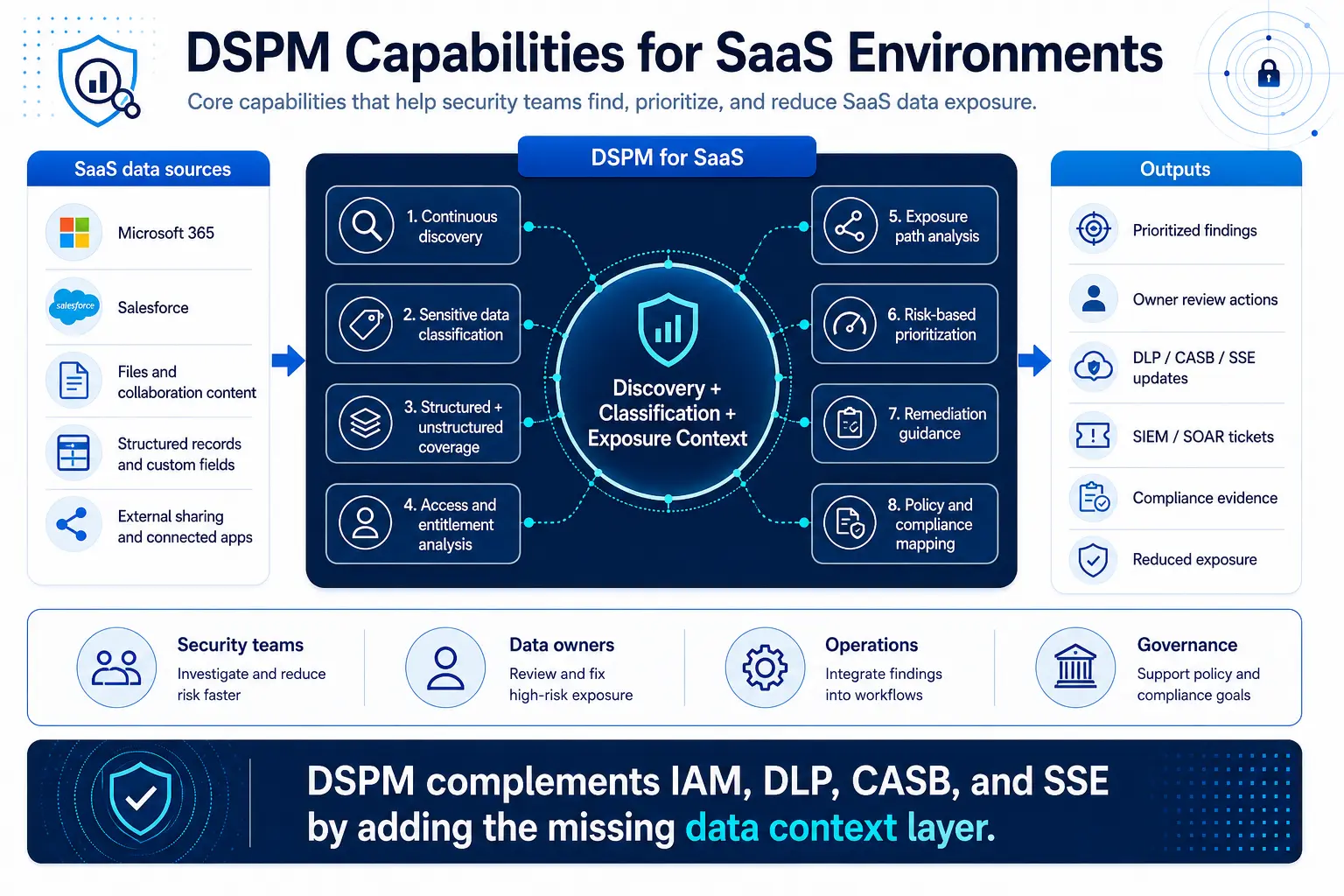
แบบดั้งเดิม Data Loss Prevention (DLP) ช่วยระบุเนื้อหาที่ละเอียดอ่อน แต่ไม่ได้ออกแบบมาเพื่อให้ความชัดเจนอย่างครบถ้วนเกี่ยวกับสถานะการเปิดเผยข้อมูล DLP มีความเชี่ยวชาญในการตรวจจับและบล็อกการละเมิดนโยบายเมื่อเกิดขึ้น อย่างไรก็ตาม DLP ไม่ให้ความชัดเจนอย่างต่อเนื่องเกี่ยวกับตำแหน่งที่ข้อมูลละเอียดอ่อนอยู่ปัจจุบัน วิธีที่ข้อมูลถูกแบ่งปัน ผู้ที่มีสิทธิ์เข้าถึง หรือมาตรการแก้ไขใดที่จะลดความเสี่ยงการเปิดเผยข้อมูลได้อย่างมีประสิทธิภาพที่สุด
โซลูชัน CASB ช่วยเพิ่มความสามารถในการมองเห็นและควบคุมที่มีค่าสำหรับสภาพแวดล้อม SaaS แต่โดยทั่วไปแล้วโซลูชันเหล่านี้มักเน้นไปที่พฤติกรรมของผู้ใช้ การเข้าถึงแอปพลิเคชัน และการบังคับใช้นโยบาย มากกว่าการจัดการสถานะข้อมูลอย่างครบถ้วน โซลูชัน CASB สามารถระบุกิจกรรมของผู้ใช้ที่มีความเสี่ยง บังคับใช้การควบคุมการเข้าถึง และป้องกันการแบ่งปันข้อมูลโดยไม่ได้รับอนุญาต อย่างไรก็ตาม โซลูชันเหล่านี้อาจไม่สามารถให้ภาพรวมที่ครบถ้วนเกี่ยวกับความเสี่ยงในการเปิดเผยข้อมูลที่มีอยู่ทั่วทุกไฟล์ บันทึก และการตั้งค่าการแบ่งปันข้อมูล
การแบ่งแยกกันของวิธีการแบบดั้งเดิมเหล่านี้ก่อให้เกิดความท้าทายในการดำเนินงาน การแจ้งเตือนจากระบบ DLP มุ่งเน้นไปที่การละเมิดนโยบาย การแจ้งเตือนจากระบบ CASB มุ่งเน้นไปที่พฤติกรรมของผู้ใช้ ส่วนการตรวจสอบแบบมือให้ภาพรวมแบบคงที่ของปัญหาการตั้งค่า วิธีการแบบดั้งเดิมมักขาดบริบททางธุรกิจที่จำเป็นสำหรับการจัดลำดับความสำคัญของความเสี่ยงอย่างมีประสิทธิภาพ
DSPM เปลี่ยนรูปแบบความปลอดภัยข้อมูล SaaS อย่างไร
DSPM เปลี่ยนวิธีคิดโดยค้นหาอย่างต่อเนื่องว่าข้อมูลที่ละเอียดอ่อนอยู่ที่ใด ถูกเปิดเผยอย่างไร และมาตรการแก้ไขใดจะช่วยลดความเสี่ยงได้เร็วที่สุด โปรแกรม DSPM ที่แข็งแกร่งสามารถระบุข้อมูลที่ละเอียดอ่อนใน Microsoft 365 และ Salesforce ได้ โดยไม่จำเป็นต้องให้ทีมความปลอดภัยตรวจสอบไฟล์หรือบันทึกทุกชิ้นด้วยมือ
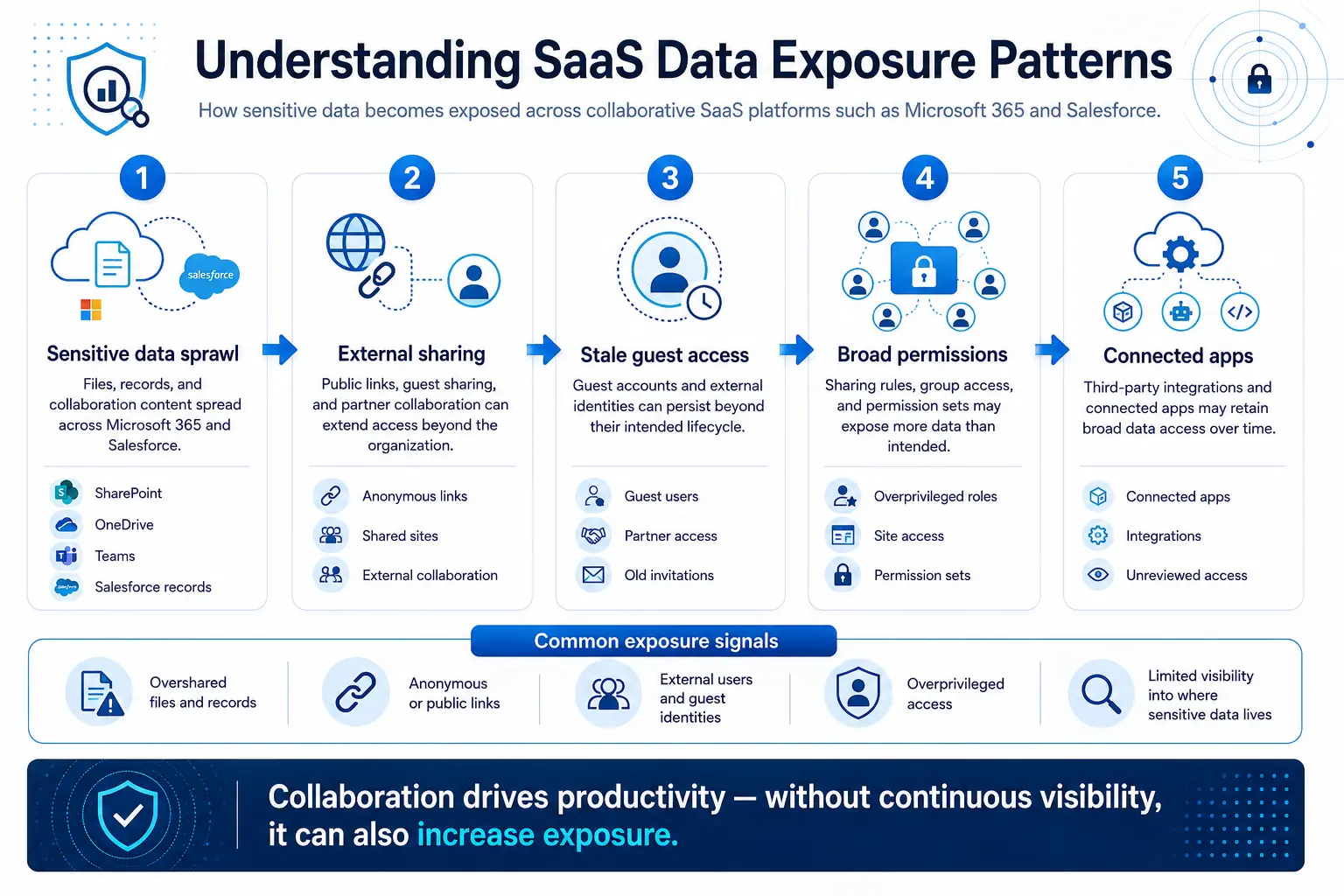
ระบบนี้จัดประเภทข้อมูลตามเนื้อหาและบริบท จากนั้นประเมินช่องทางที่อาจก่อให้เกิดความเสี่ยงต่อข้อมูลดังกล่าว ซึ่งรวมถึงลิงก์สาธารณะ การเข้าถึงแบบผู้เยี่ยมชม กฎการแบ่งปันข้อมูลที่ผ่อนปรนเกินไป และสิทธิ์การเข้าถึงที่หมดอายุ เมื่อระบุช่องทางความเสี่ยงได้แล้ว DSPM สามารถจัดลำดับความสำคัญของความเสี่ยงที่สำคัญที่สุดก่อน แทนที่จะทำให้ทีมต้องรับมือกับรายชื่อผลการตรวจสอบที่มีค่าต่ำจำนวนมากจนเกินความจำเป็น
ในทางปฏิบัติ สิ่งนี้หมายความว่าทีมความปลอดภัยสามารถมุ่งเน้นไปที่ข้อมูลที่สำคัญที่สุด ไม่ใช่เพียงข้อมูลที่ก่อให้เกิดการแจ้งเตือนเท่านั้น แนวทางที่ให้ความสำคัญกับข้อมูลเป็นอันดับแรกนี้ เป็นการเปลี่ยนแปลงอย่างพื้นฐาน จากการเฝ้าระวังความปลอดภัยแบบตอบสนอง ไปสู่การบริหารจัดการท่าทางป้องกันข้อมูลแบบเชิงรุก
คุณสมบัติหลักของ DSPM สำหรับสภาพแวดล้อม SaaS
การครอบคลุมข้อมูลทั้งแบบมีโครงสร้างและแบบไม่มีโครงสร้างเป็นสิ่งจำเป็น ความสามารถในการจัดลำดับความสำคัญของความเสี่ยงควรไปไกลกว่าการให้คะแนนความไวอย่างง่ายๆ คำแนะนำในการแก้ไขควรให้ข้อเสนอแนะที่ชัดเจนและสามารถนำไปปฏิบัติได้ ความสามารถในการบูรณาการกับกระบวนการทำงานด้านความปลอดภัยที่มีอยู่จะช่วยให้สามารถดำเนินการตามผลการตรวจสอบของ DSPM ได้อย่างมีประสิทธิภาพ
ความสามารถในการแผนนโยบายช่วยองค์กรเชื่อมโยงผลการวิเคราะห์ความเสี่ยงด้านข้อมูลกับข้อกำหนดการปฏิบัติตามกฎระเบียบที่เกี่ยวข้อง ความสามารถในการขยายระบบและประสิทธิภาพการทำงานมีความสำคัญอย่างยิ่งสำหรับการนำไปใช้ในองค์กรที่มีระบบข้อมูล Microsoft 365 และ Salesforce ขนาดใหญ่
สำหรับองค์กรที่มีข้อกำหนดด้านการกำกับดูแลที่เข้มงวด ความยืดหยุ่นในการปรับใช้ระบบและการสนับสนุนสถานที่จัดเก็บข้อมูล อาจเป็นเกณฑ์การประเมินที่สำคัญ
กลยุทธ์การดำเนินการ
การประเมิน DSPM ในทางปฏิบัติควรเริ่มต้นจากข้อมูลธุรกิจที่มีความเสี่ยงสูงที่สุด และช่องทางความร่วมมือที่ทำให้ข้อมูลดังกล่าวถูกเปิดเผยบ่อยที่สุด เริ่มจากสภาพแวดล้อม SaaS ที่เก็บข้อมูลธุรกิจที่ละเอียดอ่อนที่สุดของคุณ และสนับสนุนการร่วมมือกับฝ่ายภายนอกมากที่สุด — ซึ่งมักรวมถึง Microsoft 365 และ Salesforce
เริ่มจากแหล่งข้อมูลที่มีมูลค่าสูงและก่อให้เกิดความเสี่ยงทางธุรกิจมากที่สุด ทดลองใช้ความสามารถของ DSPM ในสภาพแวดล้อมที่ได้รับการควบคุม กำหนดตัวชี้วัดและเกณฑ์ความสำเร็จ ใช้ตัวชี้วัดเหล่านั้นเพื่อประเมินว่าแพลตฟอร์มสามารถช่วยลดความเสี่ยงได้หรือไม่ โดยไม่ส่งผลกระทบต่อความร่วมมือที่ถูกต้องตามกฎหมาย
DSPM มีประสิทธิภาพสูงสุดเมื่อใช้เพื่อเสริมสร้าง แทนที่จะแทนที่ มาตรการรักษาความปลอดภัยที่มีอยู่ การจัดการตัวตนและการเข้าถึง (Identity and Access Management) ยังคงเป็นปัจจัยที่กำหนดว่าใครควรได้รับสิทธิ์การเข้าถึง DLP ยังคงบล็อกหรือแจ้งเตือนเมื่อมีการถ่ายโอนข้อมูลที่มีความเสี่ยง CASB และ SSE ยังคงช่วยบังคับใช้นโยบายและติดตามกิจกรรมของ SaaS
DSPM เพิ่มชั้นบริบทที่ขาดหายไป ซึ่งช่วยให้ทีมความปลอดภัยสามารถมองเห็นภาพรวมของการเปิดเผยข้อมูลได้อย่างครบถ้วน ความสามารถในการมองเห็นที่กว้างขึ้นนี้คือปัจจัยที่ทำให้การจัดการความปลอดภัยข้อมูล SaaS เป็นเรื่องที่จัดการได้ง่ายขึ้น ในสภาพแวดล้อมที่มีการร่วมมือกันอย่างต่อเนื่องและสิทธิ์การเข้าถึงเปลี่ยนแปลงอย่างรวดเร็ว
เมื่อองค์กรต่าง ๆ เริ่มตระหนักถึงคุณค่าเชิงกลยุทธ์ของการมองเห็นข้อมูลอย่างครบถ้วนsecurity service edge ได้เริ่มผสานรวมความสามารถของ DSPM เข้ากับสถาปัตยกรรมความปลอดภัยแบบรวมศูนย์ของตนเองโดยตรง เพื่อมอบการปกป้องข้อมูลที่ไร้รอยต่อให้กับลูกค้าองค์กรทั่วทั้งระบบนิเวศ SaaS ของพวกเขา