




Browser aziendale o Remote Browser Isolation: quale approccio è più indicato?
- Enterprise browsers replace the browser itself with a Chromium based managed application that embeds security controls directly.
- RBI requires zero endpoint changes , making it the lower friction option for unmanaged devices, BYOD populations, contractors,.
- Enterprise browsers deliver native performance but create adoption and compatibility risk—especially when users depend on browser.
- SSE integrated RBI inherits your existing DLP, CASB, and SWG policies automatically, while standalone enterprise browsers often.
- Neither approach alone is a silver bullet. Most mature security programs use RBI as the default protective layer and reserve.
- Gartner is blunt: most organizations have never been able to dictate a single browser for productivity or security reasons, and.
- The decision hinges on user adoption friction, SSE integration depth, extension compatibility, data residency needs, and vendor.
Security architects face a real fork in the road: replace the browsers employees use every day with a purpose built enterprise browser, or keep Chrome, Edge, and Safari in place and secure them with remote browser isolation (RBI) through an SSE platform. Both approaches aim to lock down the same attack surface—the browser session—but they do it with fundamentally different architectures, tradeoffs, and operational consequences. This guide compares them head to head so you can pick the approach that matches your risk profile, your user population, and your existing security stack.
Che cos'è un browser aziendale?
Gartner defines a secure enterprise browser (SEB) as a solution that delivers enterprise security policies and controls through a centrally managed browser extension, and optionally, a full stack custom web browser (Gartner, Market Guide for Secure Enterprise Browsers, 2025). SEBs provide security and policy enforcement for web, SaaS, and private applications, as well as browser hardening delivered through the browser rather than at the endpoint OS or network level.
In practice, the market splits into two camps. Full stack replacements—such as Island Enterprise Browser or Palo Alto's Prisma Access Browser—ask users to switch from Chrome or Edge to a Chromium fork that bakes in DLP, identity aware access, watermarking, and session logging at the local DOM level. Extension based approaches add policy enforcement as a managed browser extension without requiring a full browser swap.
Picture a healthcare system that needs contractors in billing offices to access Epic through a browser but cannot install endpoint agents on the contractor's personal laptop. An enterprise browser loaded onto that device gives the security team local DLP controls, clipboard restrictions, and screen capture prevention—but only if the contractor agrees to install and use the unfamiliar browser. If the contractor opens Chrome out of habit, the controls disappear entirely.
What Is Remote Browser Isolation (RBI)?
Remote browser isolation takes the opposite approach: instead of replacing the browser, it moves the execution of web content to a cloud hosted container. RBI spins up a disposable browser instance in a remote, isolated environment and loads the page the user requested. The user sees and interacts with the page remotely, but none of the actual web content executes on the local machine. Because the RBI solution includes its own browser implementation, controls such as clipboard restriction, download blocking, watermarking, and DLP inspection can be enforced within the isolated session—largely mirroring what enterprise browser solutions offer, without requiring any endpoint change.
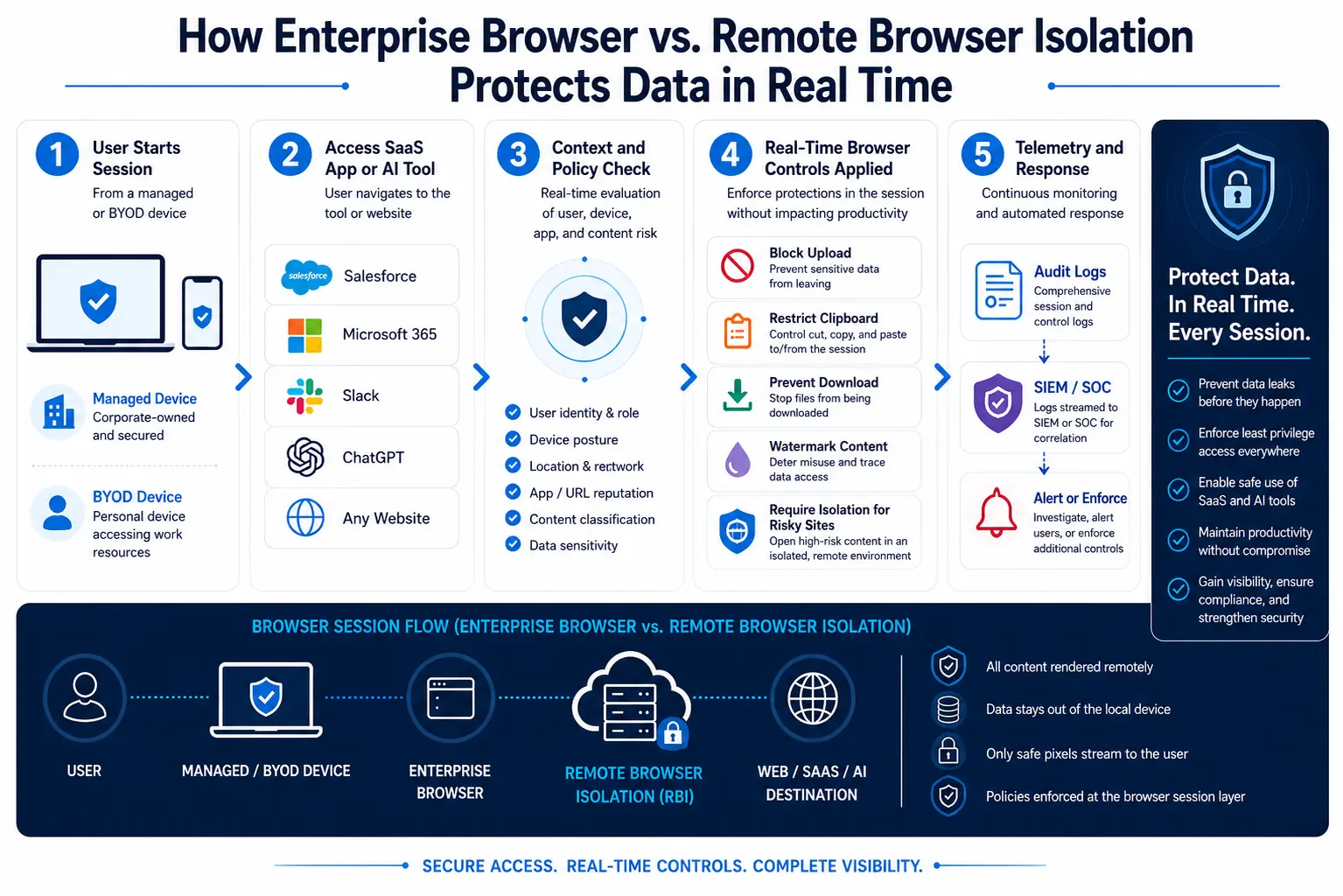
The critical difference: the user never changes browsers. A marketing director clicks a link in a phishing email; the SWG routes the URL to an isolated session; the page renders in a disposable cloud container; only a pixel stream reaches the endpoint. If the page harbors a zero day exploit or a credential harvesting form, the malicious code executes in the container and is destroyed when the session closes.
NIST SP 800 207 (2020) explicitly references browser isolation as a measure enterprises can employ to mitigate or compensate when dealing with unmanaged devices connecting to enterprise portals. The Cloud Security Alliance (CSA) likewise recommends deploying remote browser isolation for privileged or elevated risk sessions to neutralize both endpoint compromise and malicious web based threats (CSA, "Reimagining the Browser as a Critical Policy Enforcement Point," January 2026).
Key Differences: Enterprise Browser vs. RBI
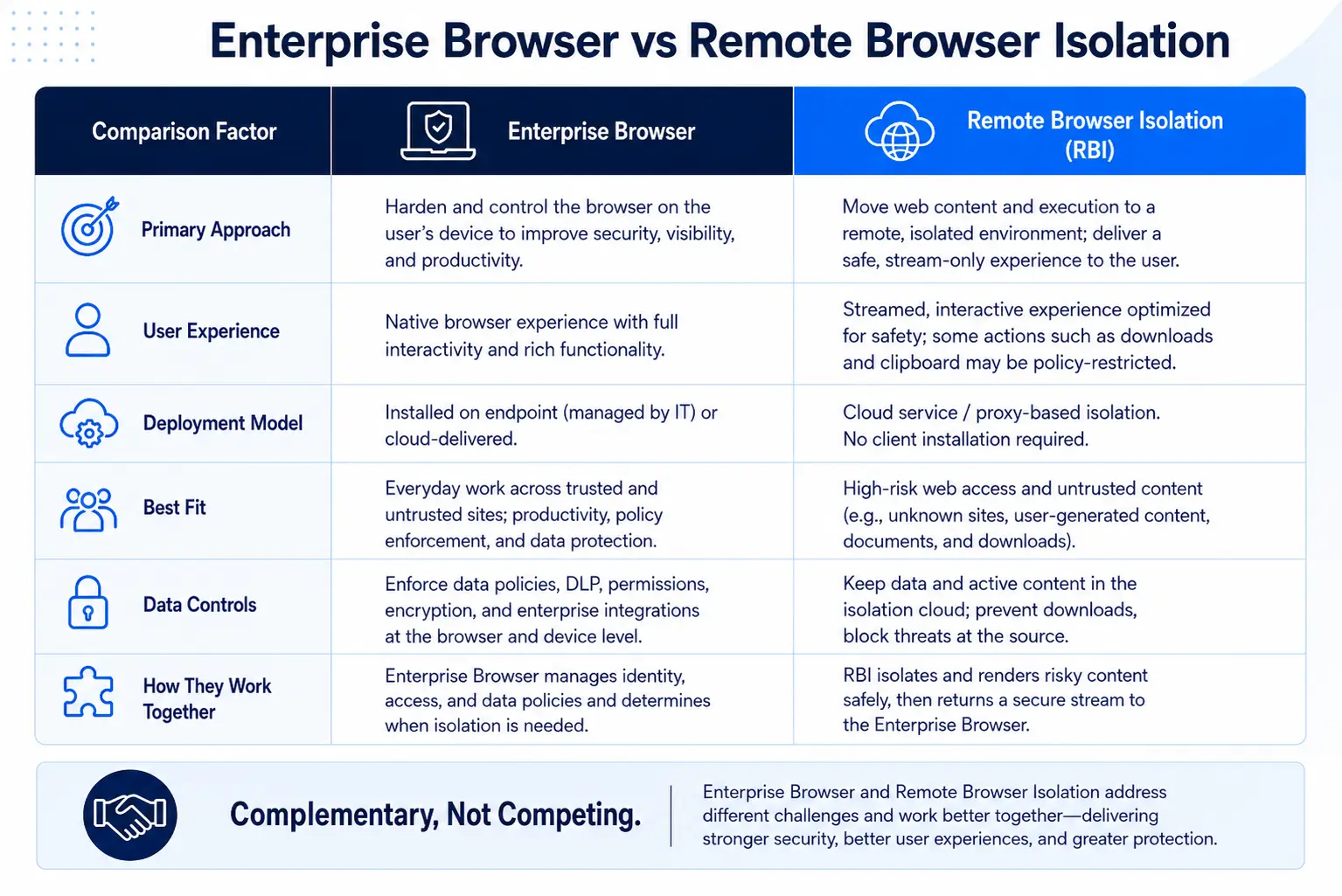
The following table summarizes the operational and architectural differences security architects should evaluate. For a deeper analysis of each approach's strengths and limitations, see Enterprise Browsers vs. RBI: Pros, Cons, and Best Fit for the Enterprise.
Enterprise Browser vs Remote Browser Isolation
Adoption Friction, Compatibility, and the Threat Landscape
Adoption friction is where the decision often gets made—or derailed. Gartner's October 2025 analysis, "Focus on Securing Browsers, Not Forcing a Secure Browser," noted that over the past few decades, most organizations have not been able to dictate a single browser for productivity or security reasons—and the emergence of secure enterprise browsers does not change this reality.
Any security architect who has tried to standardize a corporate browser knows the political landmines. Developers insist on Chrome with a specific set of debugging extensions. Finance teams rely on Edge's integration with Microsoft 365 and SharePoint. Accessibility users depend on browser specific assistive technologies. A mandate to switch to a Chromium fork means re testing every web application, auditing every extension, and fielding a wave of help desk tickets from users whose bookmarks, saved passwords, and autofill profiles did not migrate cleanly.
With RBI, users need little education—solutions are typically designed to be transparent to the user. If your SWG solution uses cloud based RBI, no infrastructure changes are required.
The threat data reinforces why this friction matters so much. Industry threat intelligence consistently shows that the vast majority of intrusions now bypass traditional malware entirely, with adversaries exploiting compromised credentials to infiltrate systems as legitimate users and move laterally undetected. Voice phishing campaigns have surged dramatically, and access broker activity—where stolen session tokens and credentials are traded at scale—continues to accelerate year over year. When attackers bypass malware based defenses entirely, the browser session becomes the last viable enforcement point, and months of browser migration delays leave that enforcement point unguarded.
Consider a scenario every SOC analyst recognizes: an employee in finance receives a Teams message from a compromised vendor account containing a link to a "shared invoice." The link leads to an adversary in the middle phishing page designed to steal the session token. With RBI, the phishing page renders in a cloud container, the credential harvesting form can be blocked from accepting input, and the entire session is logged and discarded. With an enterprise browser, the same page renders locally, but in browser threat detection must catch the phishing indicators in the DOM before the user submits credentials.
SSE Integration and Policy Consistency
Here is where RBI has a structural advantage that matters operationally. When RBI is a native capability inside your Secure Web Gateway and broader SSE platform, it shares the same policy engine, the same DLP classifiers, the same CASB shadow IT catalog, and the same logging pipeline. A DLP policy that blocks credit card numbers from being uploaded to unsanctioned SaaS apps works identically whether the user is browsing normally, browsing through an isolated session, or accessing a private application through ZTNA.
Forrester's SSE Wave (Q1 2024) highlighted that SSE solutions can do things once considered impossible—like allowing users to access a corporate OneDrive but preventing them from copying sensitive files to a personal OneDrive. For contractors and third parties, agentless RBI can provide a watermarked view of data with no ability to save, print, or exfiltrate it.
Enterprise browsers, by contrast, often operate as a parallel policy plane. The enterprise browser has its own DLP engine, its own logging console, and its own definition of "sensitive data." If your SSE platform already classifies 400 custom data types, you must recreate or sync those classifications into the enterprise browser. That duplication creates policy drift—the number one cause of DLP exceptions becoming permanent gaps.
Imagine a pharmaceutical company with strict DLP rules for clinical trial data. The SSE platform already tags compound identifiers, patient cohort IDs, and pre publication results across email, SaaS, and web uploads. Deploying an enterprise browser means the security team must replicate every one of those classifiers in the browser's separate DLP engine—and keep both in sync every time the classification library changes. With Skyhigh SSE's integrated RBI, those classifiers apply automatically inside isolated sessions because there is only one policy engine.
When Each Approach Makes Sense
Enterprise browsers earn their place in tightly scoped, high control scenarios:
Kiosk and shared workstation environments. A retail chain deploys a locked down enterprise browser on 500 in store terminals. Employees use only three web applications. Extensions are irrelevant. The browser replaces a VDI instance at a fraction of the cost.
Clean room access for M&A due diligence. A private equity firm creates a temporary virtual data room accessible only through an enterprise browser with watermarking, screen capture prevention, and session recording. The browser is installed on managed laptops issued specifically for the deal.
Regulated workflows requiring local audit logging. A defense contractor needs browser level keystroke logging and session recording for classified document access. The enterprise browser captures these artifacts locally, meeting compliance requirements that cloud hosted RBI cannot.
Gartner predicts that by 2030, enterprise browsers will be the core platform for delivering workforce productivity and security software on managed and unmanaged devices. That vision may eventually materialize—but today, only about 25% of enterprises will use managed browsers or extensions by 2026, up from under 10% previously. The gap between the vision and current adoption tells you how much change management remains.
RBI is the stronger choice for the majority of enterprise use cases—especially those involving diverse device populations, rapid deployment, and existing SSE investments:
Unmanaged device and contractor access. A global consulting firm with 15,000 contractors across 40 countries needs those contractors to access ServiceNow and Salesforce without installing anything on personal devices. Cloud based RBI serves each session in isolation, enforces DLP on every upload and download, and destroys the session when the contractor logs off.
Phishing link detonation. When the SWG cannot definitively categorize a URL, RBI renders it in isolation rather than blocking it outright—solving the chronic help desk problem of over blocking legitimate sites. Chromium based browsers account for approximately 75% of the total browser market share (Gartner, October 2025), making them an exceptionally lucrative target for attackers. RBI neutralizes that risk regardless of which Chromium based browser the user runs.
GenAI data leakage prevention. A product engineering team uses ChatGPT and Claude through the browser. RBI policies allow the conversation but disable clipboard paste of code snippets classified as proprietary and block file uploads to unsanctioned AI tools.
Zero day exploit containment. Because RBI executes web code in a disposable cloud container, a zero day browser exploit detonates harmlessly in the container and never touches the endpoint—an architectural guarantee that no local execution model can match.
Decision Framework: How to Choose
Use this five step framework to determine which approach—or which combination—fits your environment.
Step 1: Map your user populations. Separate managed device employees, BYOD employees, contractors, partners, and kiosk users. For any population where you cannot mandate browser installation, RBI is the practical default.
Step 2: Audit your SSE investment. If you already run an SSE platform with integrated RBI, turning on isolation for uncategorized or risky sites is a configuration change, not a procurement cycle. Adding an enterprise browser means a new vendor, a new policy console, and a new integration.
Step 3: Test extension and app compatibility. Catalog the browser extensions your organization uses. If your workforce depends on 20+ Chrome extensions for development, accessibility, or productivity, forcing a browser switch creates friction that degrades both security and morale.
Step 4: Evaluate threat isolation requirements. CISA's Zero Trust Maturity Model (v2.0, 2023) describes an optimal maturity state where access is determined on a per request, least privilege basis and RBI is automatically enforced for all privileged, unmanaged, or high risk web sessions. If your zero trust roadmap aligns with CISA's optimal maturity, RBI is the architecturally aligned control.
Step 5: Calculate total cost of ownership. Include not just license costs but user training, extension re certification, help desk ticket volume, policy duplication effort, and the opportunity cost of delayed deployment. Enterprise browsers have higher hidden costs in environments with diverse browser dependencies.
For most large enterprises, the practical answer is RBI as the default broad workforce control, with enterprise browsers reserved for the 5–10% of tightly scoped use cases where local DOM level controls are essential. That layered approach avoids the browser replacement battle while still closing the browser isolation security gap.