


ความเสี่ยงด้านความปลอดภัยของเบราว์เซอร์: ทำไมเบราว์เซอร์จึงกลายเป็นจุดปลายทางใหม่
- เบราว์เซอร์คือพื้นที่ทำงานหลัก ซึ่งรวมถึงการเข้าถึงบริการ SaaS การใช้เครื่องมือ AI การแบ่งปันไฟล์ การยืนยันตัวตน และการทำงานร่วมกับฝ่ายที่สาม
- การโจมตีที่ไม่มีมัลแวร์กำลังครองตลาด ส่วนใหญ่ของการบุกรุกในปัจจุบันสามารถหลีกเลี่ยงระบบป้องกันที่อิงกับไฟล์ได้อย่างสมบูรณ์ ทำให้ระบบป้องกันที่อิงกับลายเซ็นและ...
- การขโมยข้อมูลการเข้าสู่ระบบเป็นปัญหาของเบราว์เซอร์ ตามรายงานดังกล่าว ข้อมูลการเข้าสู่ระบบที่ถูกขโมยเป็นช่องทางเข้าถึงแรกใน 22% ของกรณีการละเมิดข้อมูล
- เครื่องมือ AI ทำให้พื้นที่การรั่วไหลของข้อมูลขยายตัว พนักงานมักคัดลอกข้อมูลที่ละเอียดอ่อนเข้าสู่เครื่องมือ GenAI ผ่านเบราว์เซอร์ ซึ่งก่อให้เกิดข้อมูลใหม่
- การโจมตีแบบ Drive-by ยังคงเป็นวิธีการที่ใช้งานได้จริง มีกลุ่มผู้ก่อภัยคุกคามและตระกูลมัลแวร์ที่รู้จักกัน 41 กลุ่ม ซึ่งถูกสังเกตว่ากำลังใช้วิธีการโจมตีแบบ Drive-by
- อุปกรณ์ที่ไม่ได้รับการจัดการจะเพิ่มความเสี่ยงขึ้น ตามรายงานระบุว่า 46% ของอุปกรณ์ที่มีข้อมูลการเข้าสู่ระบบของบริษัทในบันทึกของโปรแกรมขโมยข้อมูล เป็นอุปกรณ์ที่ไม่ได้รับการจัดการ
- ทำให้เบราว์เซอร์ที่พนักงานใช้อยู่แล้วปลอดภัยขึ้น การเปลี่ยน Chrome, Edge หรือ Firefox เป็นเบราว์เซอร์ที่พัฒนาขึ้นเองไม่ใช่ทางเดียว —.
เบราว์เซอร์คือที่ที่พนักงานของคุณทำงานอยู่ นี่คือที่ที่พนักงานใช้เพื่อยืนยันตัวตนกับแอปพลิเคชัน SaaS, วางข้อมูลลูกค้าลงในเครื่องมือ AI, ดาวน์โหลดไฟล์ที่ละเอียดอ่อน, ร่วมมือกับพันธมิตรภายนอก และเข้าถึงระบบภายในผ่าน SSO อย่างไรก็ตาม สถาปัตยกรรมความปลอดภัยส่วนใหญ่ยังคงมองเบราว์เซอร์เป็นเพียงแอปพลิเคชันหนึ่งจากหลายแอปพลิเคชันบนอุปกรณ์ปลายทาง — ซึ่งต้องปฏิบัติตามนโยบาย EDR ทั่วไปเช่นเดียวกับโปรแกรมอ่าน PDF หรือโปรแกรมส่งข้อความ ช่องว่างระหว่างวิธีการทำงานจริงกับวิธีการบังคับใช้ความปลอดภัยนี้ ปัจจุบันกลายเป็นจุดบอดที่ใหญ่ที่สุดในด้านความปลอดภัยขององค์กร
ข้อมูลข่าวกรองเกี่ยวกับภัยคุกคามในอุตสาหกรรมแสดงให้เห็นว่า การบุกรุกส่วนใหญ่ในปี 2024 ไม่ใช้มัลแวร์ ซึ่งหมายความว่า การบุกรุกเหล่านั้นอาศัยข้อมูลรับรองที่ถูกต้อง กระบวนการยืนยันตัวตนที่เชื่อถือได้ และการผสานระบบที่ได้รับการอนุมัติ — ซึ่งเป็นกิจกรรมที่เริ่มต้นและดำเนินผ่านเบราว์เซอร์ หากกลยุทธ์ความปลอดภัยของคุณสิ้นสุดที่เอเจนต์ที่ปลายทาง คุณกำลังป้องกันขอบเขตที่ไม่สอดคล้องกับพื้นที่การโจมตีอีกต่อไป
การรั่วไหลข้อมูลใน 90 วินาที: สถานการณ์ที่ระบบ EDR ของคุณไม่เคยพบเห็น
ลองจินตนาการถึงบ่ายวันพฤหัสบดีในบริษัทบริการทางการเงินระดับกลาง นักวิเคราะห์ระดับสูงเปิด Salesforce ใน Chrome เพื่อดึงข้อมูลรายได้ลูกค้าประจำไตรมาสมาใช้ในการทบทวนภายใน เธอคัดลอกตารางข้อมูลลูกค้า 200 ราย — ชื่อ, มูลค่าสัญญา, วันที่ต่อสัญญา — และวางลงใน ChatGPT พร้อมขอให้ระบบร่างสรุปเพื่อใช้ในประชุมข้ามแผนก เมื่อพอใจกับผลลัพธ์ เธอจึงดาวน์โหลดรายงานวิเคราะห์ที่ AI สร้างขึ้นเป็นไฟล์ PDF และเก็บไว้ใน OneDrive ส่วนตัว เพื่อสามารถทบทวนบน iPad ของเธอในช่วงสุดสัปดาห์
ทุกขั้นตอนเกิดขึ้นภายในเซสชันเบราว์เซอร์เดียว ตัวแทนที่จุดปลายทางสังเกตเห็น Chrome ส่งคำขอ HTTPS ระบบ DLP เครือข่ายตรวจพบการส่งข้อมูลที่เข้ารหัสไปยังโดเมนที่ได้รับการอนุมัติ ไม่มีไฟล์ใดถูกบันทึกลงดิสก์ท้องถิ่นจนกระทั่งการดาวน์โหลดไฟล์ PDF ครั้งสุดท้าย — ณ จุดนั้น ข้อมูลได้หลุดพ้นจากการควบคุมขององค์กรไปแล้วในสองทิศทาง: ไปยังเซิร์ฟเวอร์ของเครื่องมือ AI และไปยังบัญชีเก็บข้อมูลบนคลาวด์ส่วนตัว
นี่ไม่ใช่กรณีผิดปกติที่สมมติขึ้น แต่เป็นความเป็นจริงที่เกิดขึ้นทุกวันในองค์กรต่าง ๆ ที่การทำงานผ่านเบราว์เซอร์ได้พัฒนาไปเร็วกว่ามาตรการรักษาความปลอดภัยที่อิงกับเบราว์เซอร์ ผู้โจมตีที่ใช้เทคโนโลยี AI ได้เพิ่มกิจกรรมโจมตีขึ้นอย่างน่าตกใจทุกปี และการบุกรุกในปัจจุบันเกิดขึ้นผ่านตัวตนที่เชื่อถือได้ แอปพลิเคชัน SaaS และโครงสร้างพื้นฐานคลาวด์ เมื่อเบราว์เซอร์เป็นตัวกลางในการโต้ตอบกับข้อมูลเกือบทุกครั้ง และระบบรักษาความปลอดภัยของคุณไม่สามารถมองเห็นสิ่งที่เกิดขึ้นภายในเซสชันเบราว์เซอร์ได้ คุณก็กำลังทำงานโดยไม่มีข้อมูลที่ชัดเจน
ทำไมวิธีการเก่าๆ จึงล้มเหลวในระดับเบราว์เซอร์
ระบบความปลอดภัยขององค์กรส่วนใหญ่ถูกออกแบบมาสำหรับโลกที่ภัยคุกคามปรากฏตัวในรูปแบบไฟล์ เดินทางผ่านเครือข่าย และลงสู่จุดปลายทาง สถาปัตยกรรมดังกล่าวมีประสิทธิภาพเมื่อการทำงานเกิดขึ้นในแอปพลิเคชันที่ติดตั้งในเครื่องท้องถิ่น และข้อมูลถูกเก็บไว้บนเซิร์ฟเวอร์ไฟล์ แต่การเปลี่ยนแปลงโครงสร้างสามประการได้ทำให้โมเดลนี้ล่มสลาย
เอเจนต์ที่ติดตั้งบนอุปกรณ์ปลายทางไม่สามารถเข้าถึงข้อมูลภายในเซสชันเบราว์เซอร์ได้
เครื่องมือ EDR ติดตามพฤติกรรมของกระบวนการ การเขียนไฟล์ และการเรียกใช้ระบบ โดยมอง Chrome หรือ Edge เป็นกระบวนการเดียว — ไม่ใช่ 30 แท็บ 5 แอปพลิเคชัน SaaS และ 3 ส่วนขยายเบราว์เซอร์ที่ทำงานอยู่ภายในนั้น เมื่อพนักงานคัดลอกข้อมูลส่วนบุคคลของลูกค้า (PII) จากแท็บ CRM และวางลงในแท็บผู้ช่วย AI ตัวแทนที่ปลายทางจะไม่บันทึกกิจกรรมที่น่าสงสัยใดๆ ไม่มีไฟล์ ไม่มีมัลแวร์ ไม่มีกระบวนการที่ผิดปกติ — มีเพียงการดำเนินการคลิปบอร์ดระหว่างสองบริบทของเบราว์เซอร์เท่านั้น
ระบบ DLP ของเครือข่ายสูญเสียความสามารถในการตรวจสอบเมื่อมีการเข้ารหัสและใช้ SaaS
การเข้ารหัส TLS และการเปลี่ยนมาใช้ SaaS ทำให้อุปกรณ์ DLP เครือข่ายแบบดั้งเดิมไม่สามารถตรวจจับการส่งข้อมูลที่เข้ารหัสไปยังโดเมนที่ได้รับอนุญาตได้ อุปกรณ์เหล่านี้ไม่สามารถแยกแยะระหว่างกรณีที่พนักงานอัปโหลดเอกสารการตลาดที่ได้รับการอนุมัติไปยัง SharePoint กับกรณีที่พนักงานอัปโหลดรายชื่อลูกค้าไปยังบัญชี Dropbox ส่วนตัว — เพราะทั้งสองกรณีนี้ดูคล้ายกันเป็นคำขอ HTTPS POST ไปยังบริการคลาวด์ที่ได้รับการยอมรับ รายงาน DBIR 2025 ของ Verizon ยืนยันว่าข้อมูลรับรองที่ถูกขโมยเป็นช่องทางเข้าถึงเริ่มต้นใน 22% ของเหตุการณ์การละเมิดข้อมูล และข้อมูลรับรองเหล่านั้นเกือบจะถูกรายงานผ่านเบราว์เซอร์เสมอ
ไฟร์วอลล์ที่จัดประเภทตาม URL ไม่สามารถจับความละเอียดอ่อนได้
เกตเวย์เว็บที่ปลอดภัยแบบเดิม ซึ่งบล็อกหรืออนุญาตโดเมนทั้งโดเมน ไม่สามารถบังคับใช้การควบคุมอย่างละเอียดตามที่กระบวนการทำงานของเบราว์เซอร์สมัยใหม่ต้องการได้ การบล็อก ChatGPT อย่างสิ้นเชิงจะทำให้ทีมที่ให้ความสำคัญกับประสิทธิภาพการทำงานรู้สึกถูกกีดกัน ส่วนการอนุญาตใช้งานก็ไม่สามารถควบคุมได้ว่าพนักงานจะวางข้อมูลอะไรเข้าไปใน ChatGPT โมเดลการอนุญาต/บล็อกแบบทวิภาค — ที่ออกแบบมาสำหรับยุคที่คำว่า "ไม่ปลอดภัย" หมายถึง "โดเมนที่เป็นอันตรายที่รู้จัก" — ไม่สามารถควบคุมวิธีการใช้งานเครื่องมือที่ได้รับอนุญาตได้โดยโครงสร้าง การเข้าใจความแตกต่างระหว่างเกตเวย์เว็บแบบเดิมและแบบรุ่นใหม่เป็นขั้นตอนแรกในการปิดช่องว่างนี้
สิ่งที่เปลี่ยนแปลง: เบราว์เซอร์ได้กลายเป็นระบบปฏิบัติการสำหรับการทำงาน
การรวมตัวของสามแนวโน้มได้เปลี่ยนเบราว์เซอร์จากเครื่องมือแสดงผลที่เรียบง่ายให้กลายเป็นพื้นที่ทำงานหลักขององค์กร — และกลายเป็นจุดเสี่ยงต่อการโจมตีที่เปิดเผยมากที่สุด
SaaS ได้เข้ามาแทนที่โครงสร้างระบบแอปพลิเคชัน
เมื่อ 5 ปีที่แล้ว แอปพลิเคชันสำคัญของพนักงานด้านความรู้ทั่วไป ได้แก่ โปรแกรมอีเมลที่ติดตั้งในเครื่อง ชุดโปรแกรมสำนักงาน และเครื่องมือสำหรับธุรกิจเฉพาะทาง แต่ในปัจจุบัน พนักงานคนเดียวกันนี้สามารถเข้าถึง Salesforce, Microsoft 365, Workday, ServiceNow, Slack และ Jira ได้ทั้งหมดผ่านแท็บของเบราว์เซอร์ ทุกเหตุการณ์การยืนยันตัวตน การโต้ตอบข้อมูล และกระบวนการทำงานร่วมกัน ล้วนผ่านทางเบราว์เซอร์ ผู้โจมตีกำลังใช้ประโยชน์จากความเชื่อถือในระบบระบุตัวตนบนคลาวด์ การบูรณาการ SaaS และกระบวนการยืนยันตัวตน โดยใช้ข้อมูลรับรองที่ถูกต้อง ผู้ให้บริการระบุตัวตนที่ถูกบุกรุก และโทเค็น OAuth ที่ถูกขโมย ตามรายงานภัยคุกคามระดับโลกปี 2026 ของ CrowdStrike การใช้บัญชีที่ถูกต้องอย่างผิดวัตถุประสงค์คิดเป็น 35% ของเหตุการณ์บนคลาวด์ทั้งหมด โดยผู้โจมตีที่มีความเชื่อมโยงกับรัฐ
GenAI ได้เปิดช่องทางใหม่สำหรับการส่งข้อมูลออก
เมื่อพนักงานคัดลอกและวางโค้ดแหล่งที่เป็นกรรมสิทธิ์ ข้อมูลลูกค้า หรือแผนกลยุทธ์ลงในเครื่องมือ GenAI เบราว์เซอร์คือช่องทางหลัก ไม่มีการถ่ายโอนไฟล์ให้ระบบ DLP ที่จุดปลายทางตรวจสอบ และไม่มีอีเมลขาออกให้เกตเวย์อีเมลตรวจจับ ข้อมูลเคลื่อนผ่านช่องข้อความในเบราว์เซอร์ และเว้นแต่คุณจะมีระบบควบคุมในเซสชัน ข้อมูลจะเคลื่อนที่โดยไม่มีการกำกับดูแลด้านความปลอดภัยใดๆ เมื่อ AI ถูกผสานเข้ากับแพลตฟอร์ม SaaS และกระบวนการทำงาน ผู้โจมตีได้เริ่มใช้ประโยชน์จากเครื่องมือ GenAI ที่ถูกต้องตามกฎหมายในองค์กรหลายสิบแห่ง โดยแทรกคำสั่งที่เป็นอันตรายเพื่อขโมยข้อมูลรับรองและข้อมูล
การเข้าถึงแบบไม่ได้รับการจัดการและ BYOD ได้กลายเป็นสิ่งถาวร
การแพร่ระบาดของโรคโควิด-19 ได้ทำให้การใช้แล็ปท็อปของผู้รับจ้าง อุปกรณ์ส่วนตัว และรูปแบบการเข้าถึงผ่านเบราว์เซอร์ส่วนตัว (BYOB) กลายเป็นเรื่องปกติ ซึ่งรูปแบบเหล่านี้ไม่เคยถูกครอบคลุมโดยเอเจนต์ที่ติดตั้งบนอุปกรณ์ปลายทาง รายงาน DBIR 2025 ของ Verizon พบว่า 46% ของอุปกรณ์ที่มีข้อมูลการเข้าสู่ระบบของบริษัทในบันทึกของโปรแกรมขโมยข้อมูล (infostealer) เป็นอุปกรณ์ที่ไม่ได้รับการจัดการ — ซึ่งเป็นช่องว่างที่อันตรายระหว่างการควบคุมขององค์กรกับพฤติกรรมของผู้ใช้ เมื่อผู้รับจ้างเปิด Salesforce tenant ของคุณในเบราว์เซอร์ส่วนตัวของพวกเขา ตัวแทน EDR ของคุณไม่ได้ทำงาน ระบบ DLP ของเครือข่ายไม่ได้ทำงานแบบอินไลน์ และนโยบายการจัดประเภท URL ของคุณไม่ได้ถูกบังคับใช้ เซสชันเบราว์เซอร์คือจุดควบคุมเดียวที่คุณมี — และองค์กรส่วนใหญ่ไม่มีมาตรการใดที่จุดนี้เลย
คู่มือของฝ่ายตรงข้าม: วิธีที่ความเสี่ยงของเบราว์เซอร์เกิดขึ้นจริง
การเข้าใจความเสี่ยงด้านความปลอดภัยของเบราว์เซอร์จำเป็นต้องนำเทคนิคเฉพาะของฝ่ายโจมตีมาเชื่อมโยงกับเซสชันของเบราว์เซอร์ โดยมีสองประเภทหลัก
การขโมยข้อมูลรับรองและการยึดครองเซสชัน
เบราว์เซอร์คือที่เก็บข้อมูลรับรองการเข้าสู่ระบบที่ใหญ่ที่สุดในโลก รหัสผ่านที่บันทึกไว้ คุกกี้เซสชัน โทเค็น OAuth และข้อมูลยืนยัน SSO ทั้งหมดล้วนถูกเก็บไว้หรือผ่านเบราว์เซอร์ มัลแวร์ประเภท Infostealer มุ่งเป้าไปที่ที่เก็บข้อมูลรับรองการเข้าสู่ระบบของเบราว์เซอร์โดยเฉพาะ — โดยเก็บรวบรวมรหัสผ่านที่บันทึกไว้จากโปรไฟล์ของ Chrome, Edge และ Firefox ตามรายงาน Verizon 2025 DBIR การมีส่วนร่วมของฝ่ายที่สามในเหตุการณ์การละเมิดข้อมูลเพิ่มขึ้นเป็นสองเท่า จนถึง 30% ของเหตุการณ์ทั้งหมด ซึ่งมักเกิดขึ้นได้เนื่องจากข้อมูลรับรองที่ถูกขโมยจากเซสชันเบราว์เซอร์บนอุปกรณ์ที่ไม่ได้รับการจัดการ ลองพิจารณาตัวอย่างผู้รับจ้างด้านการตลาดในบริษัทด้านการดูแลสุขภาพที่ใช้รหัสผ่าน SSO ของบริษัทซ้ำบนเว็บไซต์ช้อปปิ้งส่วนตัว เมื่อเว็บไซต์ดังกล่าวถูกโจมตี รหัสผ่านนั้นปรากฏในรายการข้อมูลที่ถูกขโมย และผู้โจมตีเข้าสู่ระบบ SSO ของผู้รับจ้างจากจุดออก VPN ที่บ้าน ทั้งกระบวนการนี้เริ่มต้นและสิ้นสุดในเบราว์เซอร์
การโจมตีแบบ Drive-by และการโจมตีผ่านเบราว์เซอร์
เทคนิค MITRE ATT&CK T1189, Drive by Compromise, อธิบายว่าผู้โจมตีอาจเข้าถึงระบบได้อย่างไรผ่านผู้ใช้ที่เข้าชมเว็บไซต์ในระหว่างการท่องเว็บตามปกติ นี่ไม่ใช่สิ่งตกค้างจากยุค Internet Explorer — มีกลุ่มผู้โจมตีและตระกูลมัลแวร์ที่รู้จักกัน 41 กลุ่ม ซึ่งถูกสังเกตว่าใช้เทคนิคนี้ในโลกจริง ผู้โจมตีใช้กลไกการแจ้งเตือนแบบ push ของเบราว์เซอร์เพื่อส่งเหยื่อล่อฟิชชิ่งที่คงอยู่และลิงก์เปลี่ยนเส้นทางที่เป็นอันตราย ซึ่งยังคงอยู่แม้เมื่อปิดแท็บ — เนื่องจากการแจ้งเตือนแบบ push ได้รับการอนุญาตในระดับเบราว์เซอร์ ไม่ใช่ระดับแท็บ ต่างจากวิธีการ drive-by แบบดั้งเดิม เทคนิคนี้อาศัยการวิศวกรรมทางสังคมเพื่อชักจูงให้ผู้ใช้ให้สิทธิ์การแจ้งเตือน ทำให้มันมีประสิทธิภาพแม้กับเบราว์เซอร์ที่ได้รับการอัปเดตแพตช์อย่างครบถ้วน
การโจมตีแบบ "watering hole" ในยุคปัจจุบันมุ่งเป้าไปที่เว็บไซต์เฉพาะของอุตสาหกรรม — เช่น การบุกรุกพอร์ทัลของผู้จัดหาที่ทีมจัดซื้อของคุณเข้าใช้งานทุกวัน การแทรก JavaScript ที่เป็นอันตรายลงในหน้าลงทะเบียนการประชุม หรือการส่งโฆษณาที่เป็นอันตรายผ่านเครือข่ายโฆษณาที่ถูกต้องตามกฎหมาย Gartner ระบุว่า แพตช์ zero-day สำหรับ Chromium อาจใช้เวลา 24–72 ชั่วโมง ก่อนที่จะถูกติดตั้งในเบราว์เซอร์ระดับองค์กรแบบ full stack — ซึ่งเป็นช่วงเวลาที่ผู้โจมตีใช้ประโยชน์อย่างเต็มที่ (Gartner, "Focus on Securing Browsers, Not Forcing a Secure Browser," ตุลาคม 2025) เทคโนโลยีการแยกเบราว์เซอร์ถูกพัฒนาขึ้นเพื่อปิดช่องว่างนี้โดยเฉพาะ โดยดำเนินการเนื้อหาเว็บในสภาพแวดล้อมที่แยกออกก่อนที่จะแสดงผลให้ผู้ใช้
วิศวกรรมทางสังคมด้วยความเร็วของเบราว์เซอร์
การโจมตีแบบฟิชชิ่งผ่านเสียง (vishing) เพิ่มขึ้นอย่างรุนแรงในปี 2024 และต่อเนื่องจนถึงปี 2025 โดย Cisco Talos รายงานว่า vishing คิดเป็นมากกว่า 60% ของการตอบสนองต่อเหตุการณ์ที่เกี่ยวข้องกับฟิชชิ่งทั้งหมดในไตรมาสที่ 1 ปี 2025 — ทำให้มันกลายเป็นช่องทางฟิชชิ่งที่พบบ่อยที่สุดที่ทีมของพวกเขาเคยพบเจอ แคมเปญเหล่านี้จำนวนมากจะนำเหยื่อไปยังหน้าเว็บที่ออกแบบมาเพื่อเก็บข้อมูลรับรองการเข้าสู่ระบบ — ซึ่งเป็นสำเนาที่เหมือนจริงทุกพิกเซลของหน้าล็อกอินของ Microsoft, Okta หรือ Google ตามที่ Google Threat Intelligence (Mandiant) ได้บันทึกไว้เมื่อเร็วๆ นี้ ผู้โจมตีจะโทรมาโดยปลอมตัวเป็นทีมสนับสนุน IT นำเหยื่อไปยังพอร์ทัล SSO ที่ดูเหมือนของจริง และจับข้อมูลทั้งรหัสผ่านและโทเค็น MFA ในเวลาจริงขณะที่เหยื่อกำลังป้อนข้อมูลเหล่านั้น ห่วงโซ่การโจมตีทั้งหมดเกิดขึ้นภายในเบราว์เซอร์ และไม่ทิ้งร่องรอยมัลแวร์ใดๆ ให้เอเจนต์ที่ปลายทางตรวจจับได้
สิ่งที่ทีมความปลอดภัยควรทำในขณะนี้
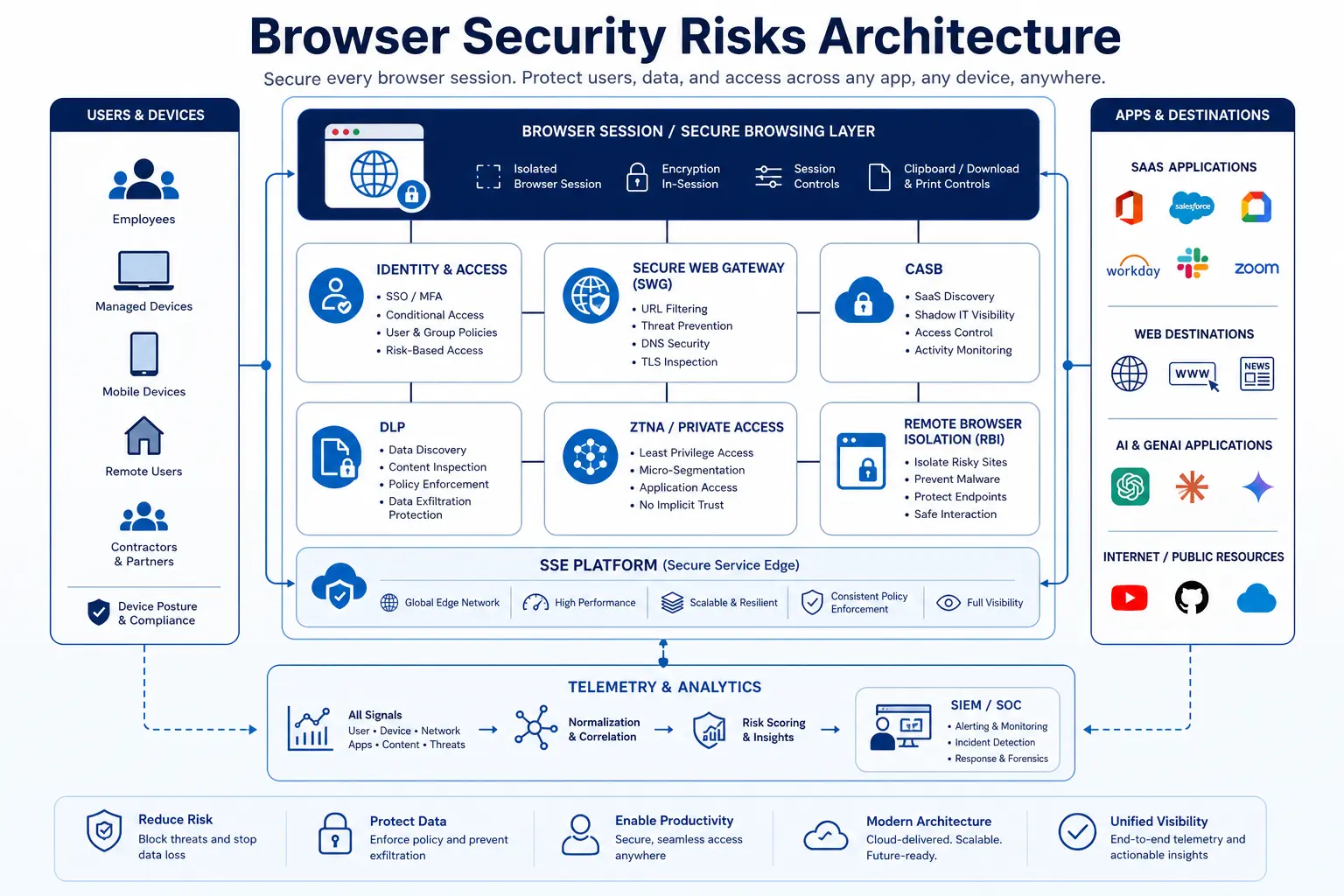
การลดช่องว่างด้านความปลอดภัยของเบราว์เซอร์ไม่จำเป็นต้องรื้อถอนโครงสร้างพื้นฐานด้านความปลอดภัยที่มีอยู่ หรือบังคับใช้เบราว์เซอร์แบบปิดที่พนักงานอาจไม่ยอมรับ แต่จำเป็นต้องขยายมาตรการควบคุมความปลอดภัยที่ได้รับการพิสูจน์แล้ว — DLP, CASB, SWG, RBI และ ZTNA — ไปยังเซสชันเบราว์เซอร์ ซึ่งเป็นจุดที่ข้อมูลถูกส่งผ่านจริง
ใช้การควบคุมข้อมูล ณ จุดดำเนินการ
กำหนดนโยบาย DLP เพื่อตรวจสอบการดำเนินการในคลิปบอร์ด การอัปโหลดไฟล์ การดาวน์โหลดไฟล์ และการส่งข้อมูลจากช่องกรอกในแบบฟอร์มภายในเซสชันของเบราว์เซอร์ เมื่อพนักงานคัดลอกรายชื่อลูกค้าจาก Salesforce และพยายามวางลงในเครื่องมือ AI ที่ไม่ได้รับอนุญาต นโยบายดังกล่าวควรตรวจพบรูปแบบข้อมูลที่ละเอียดอ่อนและบล็อกการวาง — ไม่ใช่บันทึกเหตุการณ์นั้นสามวันต่อมา แพลตฟอร์ม SSESkyhigh Security บังคับใช้การควบคุม DLP แบบเรียลไทม์เหล่านี้ในแอปพลิเคชันเว็บ SaaS และแอปพลิเคชันส่วนตัว ผ่านเครื่องยนต์นโยบายแบบรวมศูนย์
แยกการท่องเว็บที่มีความเสี่ยงสูงออกโดยไม่บล็อกมัน
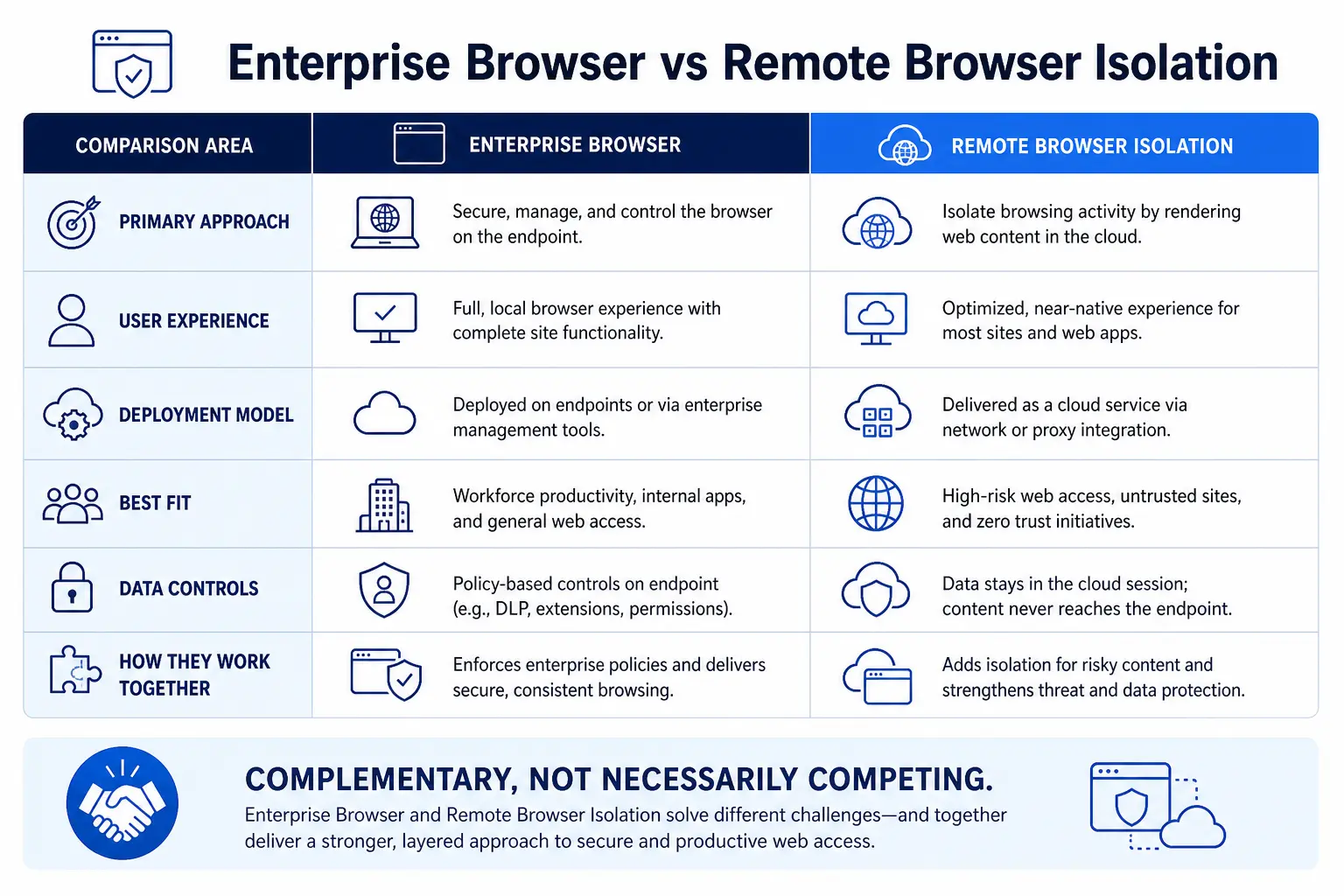
ไม่จำเป็นต้องบล็อกเว็บไซต์ที่ไม่รู้จักทุกเว็บไซต์ Remote browser isolation แสดงเนื้อหาเว็บในคอนเทนเนอร์คลาวด์ที่ปลอดภัย และสตรีมภาพแสดงผลไปยังเบราว์เซอร์ของผู้ใช้ หากนักวิเคราะห์การจัดซื้อจำเป็นต้องเข้าชมพอร์ทัลของผู้จัดหาที่ไม่คุ้นเคย RBI จะช่วยให้พวกเขาสามารถท่องเว็บได้ตามปกติ พร้อมทั้งรับประกันว่าไม่มีโค้ดอันตรายใดที่เข้าถึงอุปกรณ์ปลายทางของพวกเขา นี่คือคำตอบที่ปฏิบัติได้จริงสำหรับ MITRE ATT&CK T1189: การกำจัดสภาพแวดล้อมการดำเนินการของช่องโหว่ โดยไม่จำกัดความสามารถในการทำงานของผู้ใช้
บังคับใช้การควบคุมระดับเซสชันสำหรับอุปกรณ์ที่ไม่ได้รับการจัดการ
เมื่อผู้รับจ้าง พันธมิตร หรือพนักงานใช้อุปกรณ์ส่วนตัวเพื่อเข้าถึงแอปพลิเคชัน SaaS ของบริษัท ให้บังคับใช้การควบคุมเซสชันแบบ reverse proxy หรือ RBI เพื่อป้องกันการดาวน์โหลด บล็อกการคัดลอก/วางเนื้อหาที่ละเอียดอ่อน และใส่ลายน้ำบนหน้าจอ — ทั้งหมดนี้โดยไม่ต้องใช้เอเจนต์ที่ปลายทาง NIST SP 800 207 กำหนด Zero Trust เป็นแนวทางตอบสนองต่อแนวโน้มเครือข่ายองค์กร ซึ่งรวมถึงผู้ใช้ระยะไกล BYOD และสินทรัพย์บนคลาวด์ โดยเน้นการปกป้องทรัพยากรมากกว่าการปกป้องส่วนต่าง ๆ ของเครือข่าย การควบคุมเซสชันในเบราว์เซอร์เป็นจุดบังคับใช้ที่ทำให้หลักการนี้สามารถนำไปปฏิบัติได้จริงสำหรับการเข้าถึง SaaS
เพิ่มการมองเห็นต่อระบบ AI ที่ไม่ได้รับการควบคุมและบริการ SaaS ที่ไม่ได้รับอนุญาต
ใช้การรวม CASB และ SWG เพื่อตรวจพบและจัดประเภทเครื่องมือ AI และบริการคลาวด์ทุกชนิดที่พนักงานเข้าถึงผ่านเบราว์เซอร์ ใช้กฎนโยบายที่อิงตามระดับความเสี่ยง: อนุญาตให้ใช้เครื่องมือ GenAI ที่ได้รับการอนุมัติพร้อมการตรวจสอบ DLP ให้คำแนะนำผู้ใช้เกี่ยวกับบริการที่มีความเสี่ยงระดับกลาง และบล็อกปลายทางที่มีความเสี่ยงสูง หากไม่มีความสามารถในการมองเห็นนี้ แท็บเบราว์เซอร์ทุกแท็บจะกลายเป็นช่องทางที่อาจถูกใช้เพื่อนำข้อมูลออกได้
ความเร่งด่วนและการจัดลำดับความสำคัญ: ทำไมเรื่องนี้จึงไม่สามารถรอได้
Gartner คาดการณ์ว่าภายในปี 2028 องค์กร 25% จะเสริมความแข็งแกร่งให้กับเครื่องมือการเข้าถึงระยะไกลที่ปลอดภัยและเครื่องมือความปลอดภัยของจุดปลายทางที่มีอยู่ โดยการนำเทคโนโลยีเบราว์เซอร์องค์กรที่ปลอดภัยมาใช้อย่างน้อยหนึ่งประเภท ปัจจุบัน มีองค์กรน้อยกว่า 10% ที่ได้นำเบราว์เซอร์องค์กรที่ปลอดภัยมาใช้ ซึ่งหมายความว่าองค์กรส่วนใหญ่ยังคงใช้สถาปัตยกรรมความปลอดภัยของเบราว์เซอร์แบบเดิมที่ใช้เมื่อสามปีที่แล้ว ในขณะที่พื้นที่การโจมตีได้ขยายตัวขึ้นอย่างพื้นฐาน
การคำนวณนั้นเรียบง่ายและไม่น่าพอใจ ตามรายงานการสอบสวนการรั่วไหลข้อมูลปี 2025 ของ Verizon (Verizon 2025 Data Breach Investigations Report) การใช้ข้อมูลรับรองอย่างผิดกฎหมายเป็นช่องทางเข้าถึงเริ่มต้นหลักสำหรับการรั่วไหลข้อมูล — คิดเป็น 22% ของการรั่วไหลข้อมูลที่ได้รับการยืนยันทั้งหมด โดยมีถึง 88% ของการโจมตีแอปพลิเคชันเว็บพื้นฐานที่เกี่ยวข้องกับการใช้ข้อมูลรับรองที่ถูกขโมย เบราว์เซอร์คือจุดที่การเข้าถึงเริ่มต้นนี้มักเกิดขึ้น — ผ่านหน้าฟิชชิ่ง กระบวนการ OAuth ที่ถูกบุกรุก ส่วนขยายที่เป็นอันตราย หรือการโจมตีแบบ credential stuffing ต่อระบบล็อกอิน SaaS รายงาน DBIR ยังบันทึกถึงการเพิ่มขึ้นอย่างรวดเร็วของวิธีการ bypass MFA ซึ่งรวมถึงการดักจับข้อมูลโดยผู้โจมตีที่อยู่กลางทาง (adversary-in-the-middle), การขโมยโทเค็น และการโจมตีแบบ prompt bombing ซึ่งหมายความว่า แม้แต่องค์กรที่ได้นำ MFA มาใช้แล้วก็ยังไม่สามารถหลีกเลี่ยงความเสี่ยงได้ เมื่อผู้โจมตีได้รับโทเค็นเซสชันที่ถูกต้องแล้ว พวกเขาก็จะเข้าสู่แอปพลิเคชัน SaaS ของคุณด้วยสิทธิ์การเข้าถึงที่เท่าเทียมกับพนักงานของคุณ และเอเจนต์ที่ติดตั้งบนอุปกรณ์ปลายทางของคุณก็ไม่มีสิ่งใดที่จะแจ้งเตือนได้
Gartner ระบุว่า เบราว์เซอร์ที่ใช้ Chromium เป็นพื้นฐานมีสัดส่วนประมาณ 75% ของส่วนแบ่งตลาดเบราว์เซอร์ทั้งหมด ("Focus on Securing Browsers, Not Forcing a Secure Browser," ตุลาคม 2025) ซึ่งทำให้เบราว์เซอร์กลายเป็นจุดโจมตีหลักเพียงจุดเดียวที่องค์กรเกือบทุกแห่งต้องเผชิญร่วมกัน คำถามไม่ใช่ว่าจะลงทุนในความปลอดภัยของเบราว์เซอร์หรือไม่ แต่คำถามคือว่าจะทำสิ่งนี้ทันที — ในขณะที่ยังมีเวลาที่จะนำมาตรการควบคุมมาใช้ — หรือหลังจากที่การละเมิดความปลอดภัยผ่านเบราว์เซอร์บังคับให้ต้องดำเนินการ
โมเดลความพร้อม Zero Trust v2.0 ของ CISA ให้แนวทางในการดำเนินการปรับปรุงระบบอย่างต่อเนื่องที่เกี่ยวข้องกับ Zero Trust ซึ่งจัดแบ่งออกเป็นห้าเสาหลัก ได้แก่: ความเป็นบุคคล (Identity), อุปกรณ์ (Devices), เครือข่าย (Networks), แอปพลิเคชันและเวิร์กโหลด (Applications and Workloads), และข้อมูล (Data) โดยเบราว์เซอร์อยู่จุดตัดกันของทั้งห้าเสาหลักนี้ เบราว์เซอร์คืออุปกรณ์ที่ใช้ยืนยันตัวตน เป็นแอปพลิเคชันที่ใช้เข้าถึงข้อมูล และเป็นเส้นทางเครือข่ายที่ทุกธุรกรรม SaaS ไหลผ่าน การรักษาความปลอดภัยของเซสชันเบราว์เซอร์ไม่ใช่โครงการเฉพาะกลุ่ม — แต่เป็นข้อกำหนดพื้นฐานสำหรับความสุกงอมของ Zero Trust
การสร้างกลยุทธ์ความปลอดภัยสำหรับเบราว์เซอร์: เริ่มจากจุดไหนดี
ทีมความปลอดภัยไม่จำเป็นต้องทำทุกสิ่งทุกอย่าง ให้จัดลำดับความสำคัญตามระดับความเสี่ยงและความเป็นไปได้ในการดำเนินการ
ขั้นตอน 1 — การมองเห็น (สัปดาห์ที่ 1–4) เปิดใช้งานการตรวจค้น CASB และการบันทึกข้อมูล SWG เพื่อระบุทุกแอปพลิเคชัน SaaS เครื่องมือ AI และบริการคลาวด์ที่พนักงานเข้าถึงผ่านเบราว์เซอร์ วัดปริมาณการใช้งาน IT และAI แบบเงาระบุประเภทข้อมูลที่ละเอียดอ่อนใดที่กำลังถูกส่งผ่านเซสชันเบราว์เซอร์
ขั้นตอนที่ 2 — การควบคุมแบบอินไลน์ (เดือนที่ 2–3) ดำเนินการนำนโยบาย DLP ไปใช้บน secure web gateway เพื่อตรวจสอบการอัปโหลด การดาวน์โหลด การคัดลอก/วาง และการส่งข้อมูลผ่านแบบฟอร์ม เริ่มต้นด้วยประเภทข้อมูลที่มีความเสี่ยงสูงที่สุด ได้แก่ ข้อมูลส่วนบุคคล (PII) ข้อมูลทางการเงิน โค้ดต้นแบบ และข้อมูลสุขภาพที่อยู่ภายใต้การกำกับดูแล
ขั้นตอนที่ 3 — การแยกระบบและการเข้าถึงที่ไม่ได้รับการจัดการ (เดือนที่ 3–6)remote browser isolation สูง โดเมนที่ยังไม่ถูกจัดประเภท และเซสชัน SaaS บนอุปกรณ์ที่ไม่ได้รับการจัดการ ดำเนินการควบคุม CASB แบบรีเวิร์สพร็อกซีสำหรับการเข้าถึงของผู้รับจ้างและ BYOD ต่อแอปพลิเคชัน SaaS ที่สำคัญ
ขั้นตอนที่ 4 — การบังคับใช้อย่างต่อเนื่อง (กำลังดำเนินการอยู่) ผสานข้อมูลเทเลเมทรีของเซสชันเบราว์เซอร์เข้ากับแพลตฟอร์ม SIEM และ XDR ของคุณ วิเคราะห์ความสัมพันธ์ระหว่างเหตุการณ์ที่เกิดขึ้นในเบราว์เซอร์ — เช่น ตำแหน่งการเข้าสู่ระบบที่น่าสงสัย รูปแบบการเข้าถึงข้อมูล SaaS ที่ผิดปกติ การใช้เครื่องมือ AI ที่ผิดปกติ — กับสัญญาณจากอุปกรณ์ปลายทางและข้อมูลระบุตัวตน เพื่อตรวจจับภัยคุกคามข้ามโดเมน
วิธีการแบบเป็นขั้นตอนนี้สอดคล้องกับแนวทางที่ NIST SP 800 207 และ CISA Zero Trust Maturity Model แนะนำให้ดำเนินการแบบค่อยเป็นค่อยไปจากระดับความพร้อมแบบดั้งเดิมสู่ระดับความพร้อมที่เหมาะสมที่สุด โดยแต่ละขั้นตอนจะช่วยลดพื้นที่ความเสี่ยงที่ชัดเจนลง พร้อมทั้งสร้างระบบความปลอดภัยของเบราว์เซอร์ที่ครอบคลุมขึ้นเรื่อยๆ