




RBI 대 VDI: 안전한 액세스를 위한 브라우저 격리 방식 비교
- VDI delivers a full virtual desktop environment — operating system, applications, and file system — streamed to any endpoint.
- RBI isolates only the browser session , executing web rendering in a remote container and streaming a safe visual output to the.
- Cost differentials are significant. Forrester's 2025 State of VDI report notes that DaaS seats typically range from $30 to $100+.
- Deployment complexity favors RBI. VDI requires image management, persistent storage, GPU planning, and desktop admin expertise.
- Most organizations need both — VDI for the minority of users who require full desktop access, and RBI (often within an SSE.
- Zero trust frameworks align with RBI. CISA's Zero Trust Maturity Model v2.
- The decision is not either/or. The right framework matches each user persona to the minimum viable access technology, eliminating.
Many organizations adopted VDI years ago to centralize desktop control for remote workers, contractors, and regulated workloads. But the access landscape has fundamentally shifted: most enterprise work now happens in a browser pointed at SaaS applications, not in a locally installed Windows desktop. When the real requirement is secure browser based access — not a full virtual desktop — Remote Browser Isolation (RBI) delivers the same data protection at a fraction of the cost and complexity. This comparison unpacks the architectural differences, cost models, deployment realities, and decision criteria that IT and security leaders need to choose the right approach.
What Is VDI — and What Problem Does It Actually Solve?
Virtual Desktop Infrastructure (VDI) provisions a complete desktop environment — operating system, installed applications, file system, peripherals — on a centralized server and streams the display to the user's device via a remote display protocol. VDI is hosted in a company's own data center, and it is up to the customer to buy, deploy, and manage the infrastructure and provide the operating environment. Cloud hosted DaaS shifts the infrastructure to a provider, but the architecture remains conceptually similar: a full Windows (or Linux) desktop per user session.
VDI shines in specific scenarios. A financial modeler running complex Excel workbooks connected to proprietary Bloomberg terminals and in house risk engines needs a full desktop stack — browser isolation alone cannot deliver COM+ add ins or desktop only compliance tooling. Similarly, a healthcare IT team mandating that no patient data touches contractor endpoints can use non persistent VDI desktops that destroy the session image at logoff, keeping PHI within the data center perimeter.
Gartner's 2025 Magic Quadrant for DaaS projects that by 2027, virtual desktops will be cost effective for 95% of workers, up from 40% in 2019 — yet virtual desktops will serve as the primary workspace for roughly one in five workers. "Cost effective" does not mean "right sized." That ratio reveals something important: four out of five workers will not use a virtual desktop as their primary environment. For the vast majority, a lighter approach is the better fit.
What Is RBI — and How Does It Differ Architecturally?
Remote Browser Isolation (RBI) executes web content inside a secure, ephemeral container in the cloud. The page never renders on the local device; instead, the user receives a pixel stream, a reconstructed DOM, or a network vector rendering of the page. All malicious scripts, drive by downloads, and exploit payloads are contained and destroyed when the session ends.
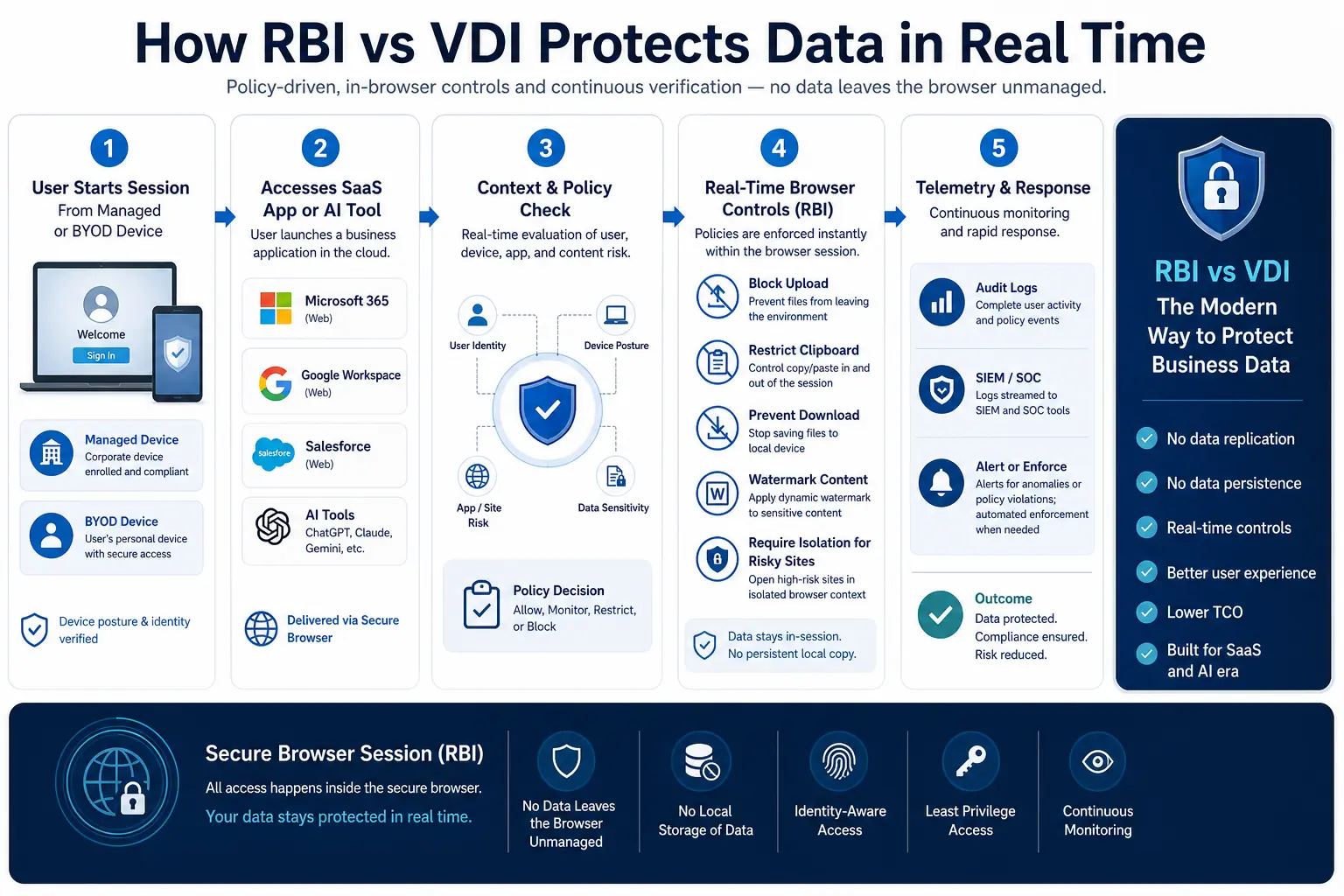
Consider a consulting firm that onboards 200 contractors for a six month audit engagement. Each contractor needs access to Salesforce, ServiceNow, and a custom internal claims portal — all SaaS or web applications. An RBI service integrated into the firm's secure web gateway policy routes each session through an isolated browser container. The contractor sees a normal browsing experience; the firm enforces DLP on clipboard, upload, download, and print actions without provisioning a single virtual desktop, managing Windows images, or shipping hardware.
The RBI market has expanded rapidly: from $0.78 billion in 2024 to a projected $1.04 billion in 2025, reflecting a CAGR of 33.1% (The Business Research Company, 2025). This growth is driven by organizations discovering that browser isolation addresses the exact use case — secure web and SaaS access — that once justified most VDI deployments.
RBI vs VDI: Key Differences at a Glance
The following comparison table maps the dimensions that matter most when choosing between these approaches.
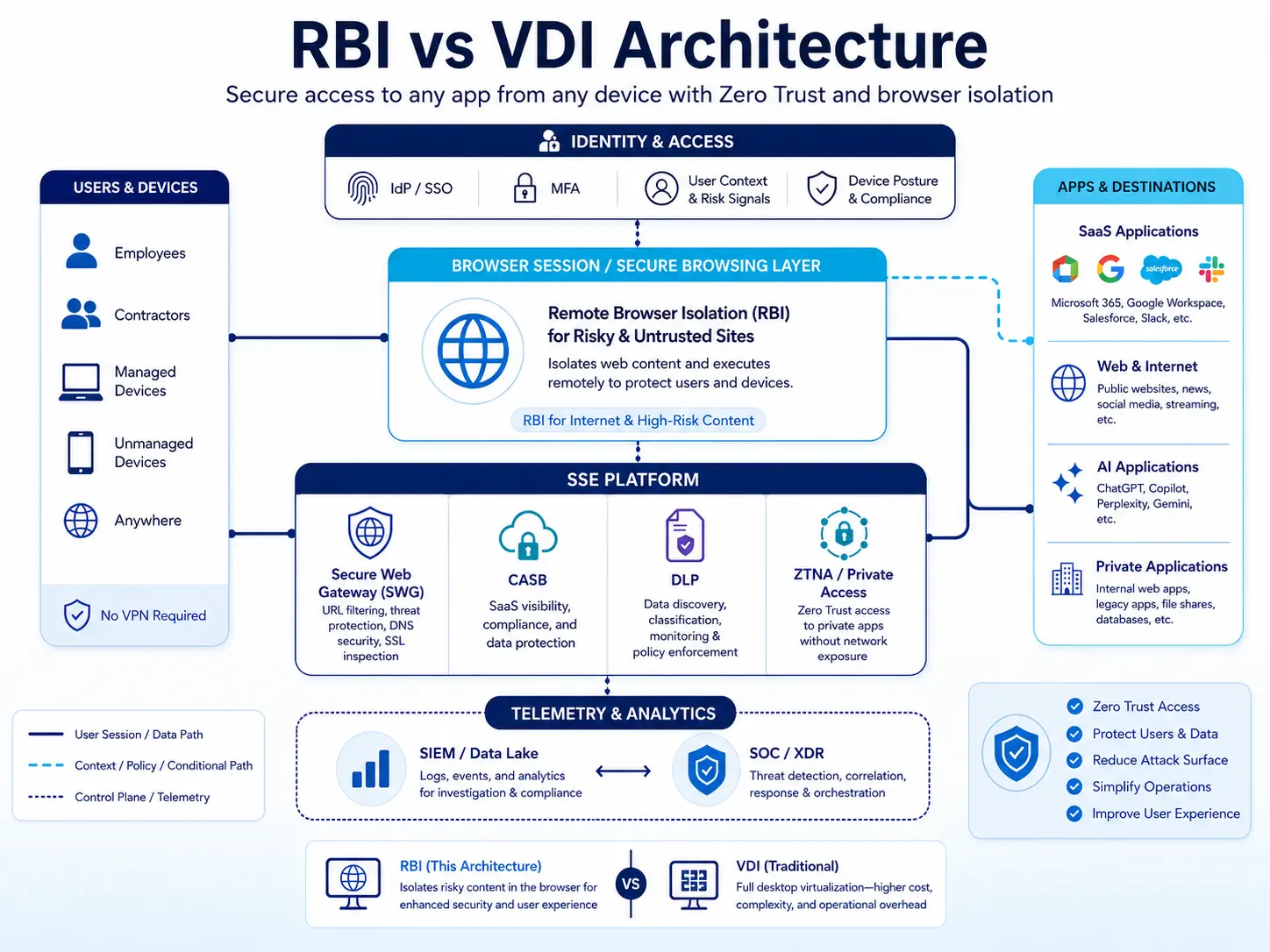
VDI/DaaS vs Remote Browser Isolation
The VDI Seat That Should Be an RBI Session
Here is a scenario that security architects encounter constantly. A mid size insurance firm pays for DaaS seats provisioned for 350 external claims adjusters. Each adjuster accesses exactly three web applications: a SaaS claims management platform, a cloud based document review tool, and an internal portal built on a modern web stack. No one runs Excel macros, installs local software, or uses peripheral devices. At typical DaaS pricing, the annual bill for those seats alone runs well into six figures — before accounting for image management labor, storage IOPS tuning, login storm troubleshooting, and the periodic fire drill when a display protocol update breaks clipboard redirection.
Replacing those VDI seats with RBI sessions delivered through an SSE platform eliminates image management entirely. DLP policies are enforced inline on copy, paste, download, and print — without bolt on agents. Adjusters connect from their own devices via an HTML5 browser; no client installation required. The SSE platform's CASB policies govern which SaaS applications each adjuster can reach, while the RBI service ensures no data touches the local endpoint.
For the subset of internal power users who genuinely need full desktops — the actuaries running heavy analytical models, the IT admins managing on prem infrastructure — VDI remains the right tool. The mistake is applying a cost heavy virtual desktop to every user when most of them only need a secure browser.
When VDI Is Still the Right Answer
VDI earns its cost in scenarios where a full desktop environment is non negotiable:
Legacy Win32 applications. A manufacturer's engineering team relies on a 15 year old CAD plug in that only runs on Windows 10 with a specific .NET framework version. Containerizing that application inside a browser session is not feasible. VDI delivers the exact OS image the application expects, with GPU backed rendering for performance intensive 3D modeling.
Regulated desktops with full audit trails. A government contractor working under ITAR or CMMC Level 3 may need to demonstrate that all computing occurred inside a controlled environment with session recording, keystroke logging, and physical data residency guarantees at the VM level. VDI — especially non persistent desktops destroyed after each session — satisfies these controls more directly than browser isolation alone.
Desktop intensive workflows. Call center agents juggling a CRM, a telephony client, a screen sharing tool, and a knowledge base simultaneously may perform better in a VDI session that is optimized end to end for that multi application workflow, particularly when the organization has already invested in display protocol optimization and profile management.
Gartner is not predicting the outright demise of VDI — on premises deployments persist, especially in security conscious organizations that demand physical infrastructure control. But net new desktop virtualization deployments are almost exclusively DaaS, signaling that even VDI loyalists are shifting workloads to the cloud.
When RBI Is the Better Fit
RBI aligns precisely with the access patterns that dominate most enterprises today:
Contractor and third party access to SaaS. A consulting firm onboards 500 auditors who need Workday, Slack, and a custom web portal. Provisioning VDI desktops for 500 temporary users means managing licenses, images, profiles, and deprovisioning at project end. RBI gives each contractor a secured browser session with DLP enforced data controls — no desktop to build, no desktop to tear down. The 2025 Verizon DBIR found that third party involvement surged to 30% of all breaches, doubling from the prior year — making fast, secure contractor onboarding a risk reduction imperative, not just a convenience.
Unmanaged and BYOD device access. NIST SP 800 46 Rev. 2 recommends organizations plan for the assumption that telework client devices will become infected with malware. RBI enforces exactly this principle: the device never processes web content directly, so even a compromised BYOD laptop cannot extract data from the isolated session. Organizations that need to protect cloud apps from unmanaged devices find RBI a natural fit.
High risk browsing and phishing defense. The 2025 Verizon DBIR analyzed over 22,000 security incidents, with stolen credentials accounting for 22% of breaches. Phishing pages and browser based exploit kits target the endpoint directly. RBI renders those pages in a disposable container — even if a user clicks a malicious link, the payload never reaches the local device.
AI tool governance. An employee pastes customer records into an unapproved AI chatbot via the browser. With RBI integrated into an SSE platform, DLP policies intercept the paste action, block the sensitive data, and log the attempt — all without an endpoint agent.
A Decision Framework for RBI vs VDI
Rather than picking one technology and forcing every user into it, map each user persona to the minimum viable access method:
Step 1: Inventory access patterns. For each user group, list the applications accessed, the device types used, and whether the workflow requires a full OS or only a browser. Most organizations find that the large majority of their user base works exclusively in web and SaaS applications.
Step 2: Score each persona against decision criteria.
Step 3: Layer zero trust controls. CISA's Zero Trust Maturity Model v2.0 provides practitioners with a concrete implementation roadmap emphasizing automation, analytics, and rigorous governance across five pillars. At optimal maturity, RBI is automatically and transparently enforced for all privileged, unmanaged, or high risk web sessions. For VDI sessions, enforce conditional access policies that verify device posture, user identity, and session context before granting the full desktop.
Step 4: Run the cost model. Calculate VDI TCO per user per month — including compute, storage, licensing, image management labor, help desk support, and periodic hardware refresh. Compare it against the RBI cost embedded in your SSE platform subscription. Gartner forecasts DaaS spending will grow from $4.3 billion in 2025 to $6.0 billion by 2029 at a 7.9% compound annual growth rate — and notes that the on premises VDI market is contracting as customers migrate workloads to DaaS. For browser only personas, the cost delta heavily favors RBI.
Step 5: Consolidate policy management. The strongest architectures unify VDI and RBI under a single policy engine. DLP rules that block PII download from Salesforce should apply identically whether the user accesses Salesforce through a VDI browser or an RBI session. An SSE platform that includes CASB, SWG, DLP, and RBI provides this unified enforcement without maintaining parallel policy stacks.
How RBI and VDI Complement Each Other in Enterprise Architectures
The comparison is not a zero sum contest. Most enterprises will maintain VDI for a defined subset of personas while shifting the majority of browser based access to RBI within an SSE framework.
A practical hybrid looks like this: A financial services firm runs 200 persistent VDI desktops for traders who need Bloomberg Terminal, proprietary analytics, and real time market data feeds — all desktop dependent workflows. The same firm uses RBI for 2,000 operations staff, relationship managers, and external auditors who access Salesforce, ServiceNow, and internal web portals. The firm's Skyhigh SSE platform enforces consistent DLP and access policies across both populations, while the browser isolation service handles the heavy lifting of session containment for the larger group.
Forrester's 2025 State of VDI report notes that new end user computing technologies like Zero Trust Network Access and enterprise browsers are creating more options for VDI customers. This trend reflects the operational reality: VDI is no longer the default answer for secure remote access — it is one tool in a broader secure access toolkit. The CSA's 2026 research on browser as policy enforcement point reinforces this shift, describing the browser as the universal access conduit for SaaS applications, developer tooling, and privileged AI resources — an access layer that RBI secures without requiring a full desktop stack.