



What Is Remote Browser Isolation and How Does RBI Work

Quick Summary
  • RBI shifts the security model from detection to containment. Instead of inspecting web content for known threats, isolation.
  • The browser is now a top attack vector. Nearly half of all security incidents in 2024 involved browser based activity, including.
  • Three isolation rendering approaches exist—pixel pushing, DOM mirroring, and network vector rendering—each with different.
  • Selective isolation lets organizations balance security and user experience by applying full RBI only to uncategorized, risky, or.
  • RBI is most effective when integrated into an SSE platform with SWG, CASB, DLP, and ZTNA controls, not deployed as a standalone.
  • Zero trust frameworks explicitly call for isolation controls. CISA's Zero Trust Maturity Model and NIST guidance both recommend.
  • Adoption friction centers on latency and user experience , which modern rendering techniques and selective isolation policies can.

Remote browser isolation (RBI) executes web content in a disposable cloud container instead of on the user's endpoint, ensuring that malicious code from phishing pages, zero day exploits, and drive by downloads never reaches the corporate device or network. For security architects evaluating browser isolation technology as part of a zero trust strategy, RBI offers a fundamentally different security model: rather than trying to detect every threat in web traffic, it assumes all web content is untrusted and physically separates execution from the endpoint. This approach is gaining urgency as the browser becomes the primary workspace—and primary attack surface—across every enterprise.

What Is Remote Browser Isolation

Remote browser isolation is a cybersecurity technology that physically separates a user's web browsing activity from their local device and corporate network. When a user navigates to a website, the page loads and executes inside a secure, ephemeral cloud container rather than within the browser on their laptop or workstation. The user sees and interacts with a safe visual representation of the page; all underlying code—HTML, CSS, JavaScript, embedded objects—stays confined to the remote environment. When the session ends, the container is destroyed along with any malicious payloads it may have encountered. When delivered as a cloud hosted service, this technology is known as remote browser isolation.

Here is how the process works in practice: a marketing director receives an email with a link to a supposed industry report. She clicks it. Instead of the link loading directly in Chrome on her laptop, traffic is routed through the organization's secure web gateway, which directs the uncategorized URL into an RBI session. A disposable cloud container spins up, loads the page, and renders it. The marketing director sees a fully interactive version of the page—she can scroll, click, and read—but no HTML, JavaScript, or executable content ever reaches her machine. If the link leads to a phishing page laced with a zero day exploit, the malicious code executes inside the container, which is destroyed when the session ends. Her endpoint stays clean. No data exfiltration occurs. The SOC might never need to triage an incident because the attack was contained before it started.

This model fundamentally departs from traditional detection based security. Unlike antivirus engines or URL reputation filters that rely on known threat patterns and signatures, browser isolation takes a zero trust approach—treating all web content as potentially hostile regardless of reputation. That distinction matters because legacy tools are structurally blind to zero hour attacks, the threats that have no signature yet.

Why Remote Browser Isolation Matters Now

The browser is no longer just a window to the internet. It is the enterprise workspace where email, SaaS applications, CRM systems, financial platforms, and AI tools converge. That concentration of sensitive activity makes the browser an extremely attractive target.

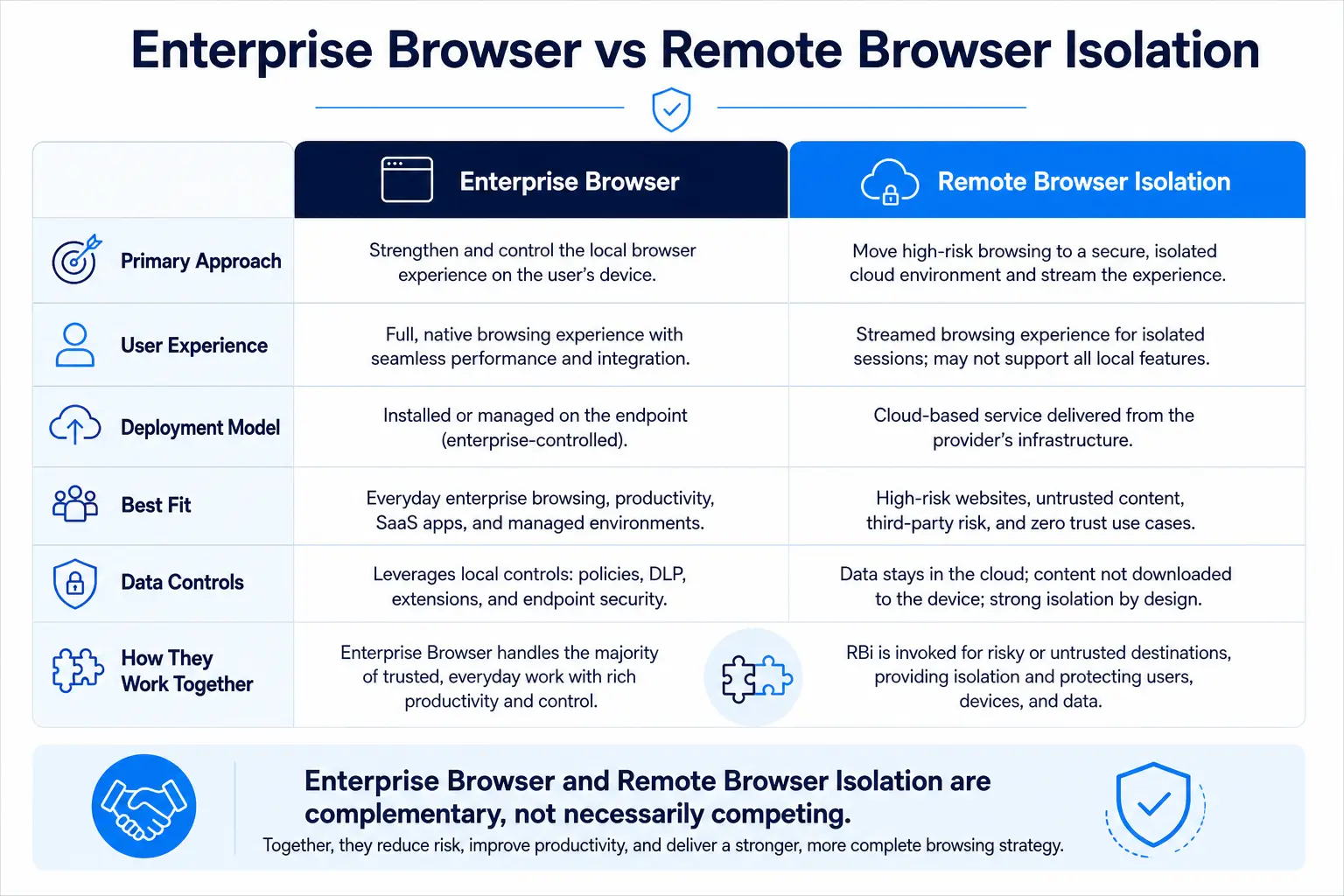
Comparison chart of enterprise browser vs remote browser isolation across approach, user experience, deployment, best fit, and data controls

Nearly half of the security incidents investigated in 2024 (44%) involved malicious activity launched or facilitated through employees' browsers, including phishing, abuse of URL redirects, and malware downloads (Unit 42 2025 Global Incident Response Report). Meanwhile, the 2025 State of Browser Security Report from Menlo Security reveals a 140% surge in phishing attacks targeting browsers over the past year, with zero hour phishing incidents—attacks too new for any signature database—increasing 130%.

The financial impact is severe. The global average cost of a data breach reached $4.88 million in 2024, according to IBM's Cost of a Data Breach Report. Compromised credential attacks took an average of 292 days to identify and contain. Many of those credential theft chains start in the browser—a user lands on a convincing phishing page, enters credentials, and the attacker is inside the environment for nearly ten months before containment.

Consider a concrete scenario: a financial analyst at a mid size bank receives a browser notification that appears to come from the bank's document management system. The link routes to a pixel perfect clone of the login page, hosted on a legitimate cloud platform to evade URL reputation filters. Without browser isolation, the analyst enters credentials, and the attacker gains access to internal systems. With RBI in place, the phishing page loads inside a cloud container; even if the analyst attempts to enter credentials, the session can be configured to block credential input on uncategorized domains or strip form submissions entirely. The attack chain breaks at the first link.

NIST SP 800 46 Rev. 2 underscores the threat model that makes RBI essential: the document assumes that telework client devices will become infected with malware and recommends layered controls including network access solutions that verify the client's security posture before granting access. RBI operationalizes this assumption—by never trusting the endpoint to safely process web content in the first place.

How Remote Browser Isolation Works: Three Rendering Approaches

All RBI solutions share the same core architecture: web content is fetched and executed in a remote, isolated environment (typically an ephemeral cloud container), and only a safe representation of the page is delivered to the user's local browser. The critical distinction lies in how that safe representation is generated and transmitted. There are three primary approaches.

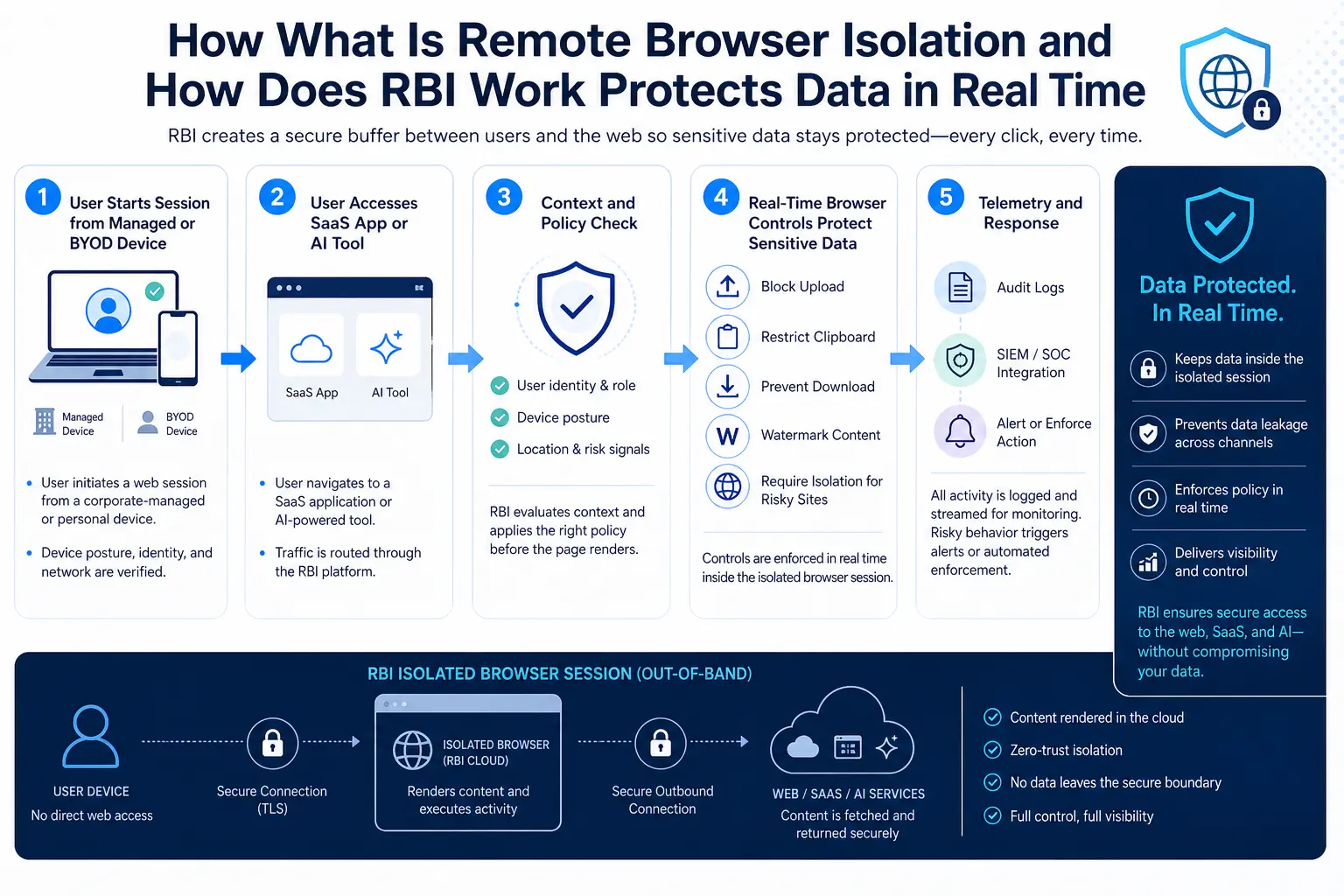
Five-step workflow showing how RBI protects data in real time from session start through policy check to telemetry and response

Pixel Pushing (Pixel Streaming)

This approach renders web content on a remote server and sends a visual representation of the webpage to the user's device as an interactive image or video stream. Think of it like a live video feed of a browser session running on someone else's computer—the user's device is a thin display client.

Security advantage: Maximum isolation. No original web code or scripts ever reach the endpoint. All potential attack vectors embedded in the site's code remain isolated on the remote server.

Tradeoff: Continuously encoding and transmitting video streams is bandwidth intensive and costly at scale. Even when highly optimized, unavoidable latency results in a noticeably different user experience. On high DPI displays, text can appear fuzzy; mobile users on variable connections experience degraded quality.

Best fit: High security environments where sensitivity outweighs user experience—OSINT research, privileged admin access to critical systems, or browsing in classified environments.

DOM Mirroring (DOM Reconstruction)

With DOM reconstruction, webpages are loaded in an isolated environment, analyzed at the Document Object Model level, and rewritten to remove potential threats. Once the content is sanitized, a cleaned version is sent to the user's device, where the endpoint browser renders it using its own engine.

Security advantage: Lightweight and fast. The endpoint receives a near native browsing experience that preserves GPU acceleration and standard scrolling behavior.

Tradeoff: The underlying technologies—HTML, CSS, web fonts—are themselves attack vectors. Attempting to remove malicious content through sanitization is inherently imperfect; novel exploitation techniques may slip through. Complex dynamic pages may break or render incorrectly.

Best fit: General purpose enterprise browsing where performance and user experience matter most, and where the organization tolerates a slightly lower isolation ceiling for the sake of productivity.

Network Vector Rendering (NVR)

NVR intercepts draw commands from the graphics engine used in Chromium and Firefox, encrypts them, and streams them to the local browser. Because NVR streams vector draw commands rather than actual website code, it achieves lower bandwidth consumption than pixel pushing while maintaining a strong isolation boundary.

Security advantage: No website code reaches the endpoint, similar to pixel pushing, but bandwidth consumption is significantly lower because vector draw commands are far more compact than pixel video frames.

Tradeoff: NVR adoption is narrower and may depend on specific browser engine support. It sits between pixel pushing and DOM mirroring in both security and performance characteristics.

Best fit: Organizations that need near pixel pushing security without the bandwidth overhead—distributed workforces on variable network connections.

Full Isolation vs. Selective Isolation: Choosing the Right Policy Model

Most organizations do not need—or want—to isolate every browsing session. The performance overhead and compute costs of full isolation are hard to justify when the majority of traffic goes to well known, categorized SaaS applications. This is where selective isolation becomes a practical strategy.

Full isolation routes all web traffic through RBI. Every page, every session, every user. This approach makes sense for high security segments: a government agency handling classified information, a financial trading floor, or a healthcare research lab accessing external data sources. The security guarantee is absolute, but so is the cost and the latency impact.

Selective isolation applies RBI only to traffic that exceeds a defined risk threshold. Typical triggers include:

Uncategorized or newly registered domains. A contractor clicks a link to a domain registered 48 hours ago. The SWG flags it as uncategorized; RBI isolates the session automatically.

Risky URL categories. Sites categorized as file sharing, personal email, or ad networks are isolated while corporate SaaS traffic flows directly.

Embedded email links. Every URL in inbound email—regardless of reputation—is opened through RBI, neutralizing the primary phishing delivery mechanism.

Sensitive user segments. Executives, finance, and HR users who handle regulated data browse with isolation by default; general staff use it only for risky destinations.

The key integration point is the secure web gateway, which classifies and routes traffic in real time. SWG policy determines which sessions enter RBI and which pass through standard inspection. When the SWG is part of a broader SSE platform, isolation decisions can incorporate CASB risk scores, DLP classification, user identity, device posture, and real time threat intelligence—creating a context aware policy that balances security with productivity.

How RBI Fits into Zero Trust and SSE Architecture

Browser isolation does not operate in a vacuum. Deployed standalone, it addresses web based malware and phishing but leaves gaps around data exfiltration, SaaS shadow IT, and identity based attacks. The real value emerges when RBI is integrated into a zero trust architecture alongside complementary controls.

CISA's Zero Trust Maturity Model v2.0 (2023) enables a shift away from traditional perimeter focused approaches, permitting organizations to isolate hosts, enforce encryption, segment activity, and implement security controls closer to applications and data. RBI maps directly to these principles: it isolates the browsing environment, enforces encryption between the container and the endpoint, and segments risky web activity from the corporate network.

The Cloud Security Alliance's 2026 technical blueprint on browser security goes further, repositioning the browser as a first-class Policy Enforcement Point (PEP) within a comprehensive Zero Trust Architecture that unifies least-privileged access controls, phishing-resistant multifactor authentication, device posture validation, adaptive session governance, and remote browser isolation. CSA specifically recommends deploying remote browser isolation for privileged or elevated risk sessions to neutralize both endpoint compromise and malicious web based threats.

In practical SSE architectures, RBI works alongside:

SWG for URL filtering, threat intelligence, and traffic routing decisions.

CASB for visibility into sanctioned and unsanctioned SaaS usage, with the option to isolate sessions to shadow IT services while blocking upload/download actions.

DLP to inspect content flowing through isolated sessions and prevent sensitive data from being pasted, uploaded, or printed during risky browsing.

ZTNA / Private Access to isolate sessions from unmanaged devices accessing internal applications—a contractor on a personal laptop accesses the corporate intranet through an isolated session where copy, paste, and download are disabled.

According to the 2024 Gartner Magic Quadrant for SSE, by 2026, 85% of organizations seeking to secure their web, SaaS, and private applications will obtain the security capabilities from an SSE offering. RBI is listed among the expected capabilities of a mature SSE platform, reinforcing that isolation is no longer optional for organizations serious about enterprise browser security.

Evaluating RBI Solutions: What Security Architects Should Prioritize

Not all RBI implementations are equal. When evaluating solutions, focus on criteria that directly affect security posture, operational complexity, and user acceptance.

1. Rendering method and isolation ceiling. Understand whether the solution uses pixel pushing, DOM mirroring, NVR, or a hybrid approach. Ask the vendor what content—if any—executes on the endpoint browser. A DOM mirroring solution that sends sanitized JavaScript to the endpoint has a different threat surface than a pixel pushing solution that sends only image frames.

2. User experience and latency. Request a proof of concept in your actual network environment. Have users load their ten most used SaaS applications through the isolated session and measure page load time, scrolling fluidity, copy paste behavior, and file upload/download workflows. If the experience degrades noticeably, user adoption will fail—and users will find workarounds that bypass isolation entirely.

3. SSE integration depth. The isolation engine should share policy, identity context, DLP rules, and threat intelligence with SWG, CASB, and ZTNA components. If you must manage RBI policy in a separate console with a separate rule language, you are buying a point product, not a platform capability. Skyhigh Security's SSE platform integrates RBI with SWG, CASB, DLP, and ZTNA under a single policy engine—an example of the unified approach security architects should demand.

4. Unmanaged device support. One of the highest value use cases for RBI is enabling secure access from devices the organization does not control—contractor laptops, partner devices, personal tablets. The solution should support clientless (agentless) deployment where users connect through a standard browser without installing agents or proprietary software.

5. Data control granularity. Can the solution disable copy paste, printing, screenshotting, and file downloads on a per policy basis? For an isolated session where a contractor accesses Salesforce, you want read only access with copy paste blocked and no local file caching.

6. Scalability and cloud footprint. Each isolated session consumes compute resources. Ask about the provider's cloud infrastructure, geographic presence, session concurrency limits, and how costs scale as you add users or increase the percentage of traffic that is isolated.

7. Compatibility with existing browsers. The strongest adoption path preserves users' existing browsers—Chrome, Edge, Firefox, Safari—rather than requiring a proprietary browser replacement. As the enterprise browser vs. RBI comparison explores, RBI integrated SSE solutions let you secure the browsers employees already use without forcing a disruptive migration.

Common Mistakes in RBI Deployments

Isolating everything on day one. Full isolation for all traffic sounds secure in a slide deck, but it creates performance complaints that erode user trust. A better approach: start with high risk categories—uncategorized domains, email embedded URLs, and unmanaged device sessions. Expand isolation coverage as you measure user impact and build confidence.

Deploying RBI as a standalone product. RBI without SWG integration cannot make intelligent routing decisions. RBI without DLP cannot prevent a user from typing sensitive data into a web form during an isolated session. RBI without CASB has no visibility into whether the destination is sanctioned cloud storage or a personal file sharing account. Isolation solves one problem—preventing malicious content from reaching the endpoint—but data security requires the full SSE stack.

Ignoring the unmanaged device use case. Many organizations buy RBI for managed endpoints but neglect contractors and third party users on BYOD devices. These users represent some of the highest risk sessions. NIST SP 800 46 Rev. 2 explicitly warns that all components of telework technologies, including BYOD client devices, should be secured against expected threats as identified through threat models. RBI is one of the most practical ways to do this without requiring device management enrollment.

Failing to integrate isolation with identity. A flat isolation policy that treats every user identically wastes resources and frustrates low risk users. Tie isolation policies to identity groups, role based access controls, and adaptive risk scoring. An executive browsing from a managed device on the corporate network may not need isolation; the same executive browsing from a hotel Wi Fi network on a personal tablet should be isolated automatically. The Unit 42 2025 Global Incident Response Report found that 70% of incidents involved three or more attack vectors—context aware policies that factor in identity, device, and destination are essential to breaking multi vector attack chains.

Protect Your Data Everywhere
Skyhigh Security delivers unified data protection with industry-leading DLP, CASB, and DSPM — all in a single converged SSE platform.

Frequently Asked Questions

Remote browser isolation runs web pages inside a secure cloud container instead of on your computer. You see and interact with the page normally, but all the code executes remotely. If the page contains malware or a phishing kit, the threat stays locked in the container—which is destroyed when you close the tab.
Zero day exploits target vulnerabilities in the browser's rendering engine. Because RBI executes web code in a remote container rather than on the local browser, even an unpatched zero day vulnerability on the endpoint is irrelevant—the malicious code never reaches the local browser. The exploit fires inside the container, which is ephemeral and isolated from the corporate network.
Pixel pushing streams a video like representation of the remote browsing session to the endpoint. No web code reaches the device, providing maximum security but higher bandwidth consumption and potential latency. DOM mirroring sanitizes the page's HTML structure and sends a cleaned version to the endpoint browser for local rendering, providing better performance but exposing the endpoint to a residual risk if sanitization misses a threat vector.
No. RBI and SWG serve complementary roles. The SWG inspects, classifies, and routes web traffic and enforces URL policy. RBI handles the execution and rendering of sessions that the SWG identifies as risky. Without an SWG, the RBI solution has no traffic classification intelligence and cannot make selective isolation decisions. The two are most effective when integrated into a single SSE platform.
Modern RBI solutions, particularly those using DOM mirroring or NVR rendering, have reduced latency significantly compared to first generation pixel pushing implementations. For selective isolation deployments—where only uncategorized or risky traffic enters isolation—most users experience no perceptible difference for everyday browsing. Organizations should pilot the solution against their actual SaaS application portfolio before committing.
RBI is one of the most practical technologies for securing access from unmanaged devices because it requires no endpoint agent or device enrollment. A contractor can open a standard browser, authenticate through the organization's identity provider, and access applications through an isolated session that prevents local data caching, copy paste, and file downloads. The data never leaves the cloud container.
Yes. RBI directly implements core zero trust principles: never trust web content by default, verify and isolate every session, and enforce least privilege controls on what users can do during browsing. CISA's Zero Trust Maturity Model and CSA's browser security guidance both recommend isolation controls, and Gartner includes RBI as a standard capability in mature SSE platforms.
Financial services, healthcare, government, and any organization handling regulated data see the highest ROI from RBI. Organizations with large contractor or partner populations accessing internal applications from unmanaged devices also benefit significantly. However, any enterprise where the browser is the primary work tool—which is nearly all of them—can reduce exposure by isolating risky browsing sessions.
In most implementations, files downloaded during an isolated session are intercepted by the RBI platform, scanned by integrated threat detection engines, and optionally converted to safe formats (such as Content Disarm and Reconstruction) before being released to the endpoint. Uploads can be inspected by DLP engines to prevent sensitive data from leaving the organization through isolated sessions.
An enterprise browser replaces the user's standard browser with a proprietary application that includes built in security controls. RBI, by contrast, works with any standard browser—Chrome, Edge, Firefox, Safari—and adds isolation at the network or cloud layer. The approaches are not mutually exclusive but serve different architectures; RBI fits naturally into SSE integrated security stacks without requiring browser replacement. Protect your users and data at the browser layer without replacing the browsers they already use. Skyhigh Security's Remote Browser Isolation integrates with SWG, CASB, DLP, and ZTNA to deliver context aware isolation as part of a unified SSE platform. Explore Skyhigh RBI →
See How Skyhigh Security Can Help
Learn how Skyhigh Security protects your sensitive data across cloud, web, and private applications.
デモを依頼する
What Is Remote Browser Isolation and How Does RBI Work 0% read