




What Is an Enterprise Browser and Why Secure Browsing Matters for Modern Enterprises
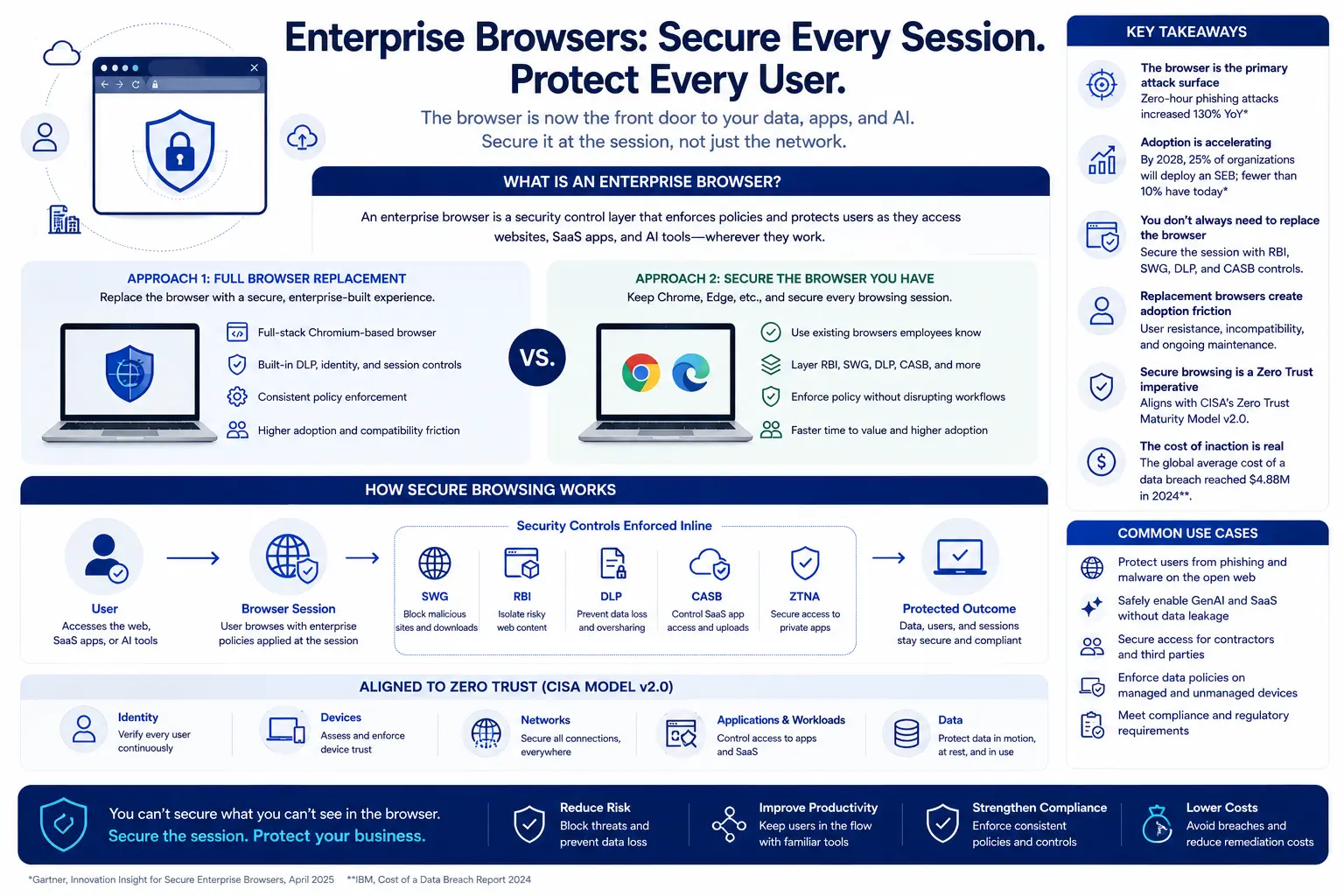
- An enterprise browser is a security control layer, not just a browsing application.
- Adoption is nascent but accelerating. Gartner predicts that by 2028, 25% of organizations will augment existing secure remote.
- The browser is the primary attack surface for credential theft and phishing.
- You don't necessarily need to replace the browser—you need to secure the session.
- Replacement model enterprise browsers carry significant adoption friction.
- Browser security is a zero trust imperative. CISA's Zero Trust Maturity Model v2.
- Cost of inaction is measurable. The global average cost of a data breach reached $4.
The web browser has quietly become the most consequential—and most underprotected—application in the enterprise. Every SaaS login, every AI prompt, every file upload and download, every contractor accessing an internal portal: it all happens inside a browser tab. Gartner notes that secure enterprise browsers "embed enterprise security controls into the native web browsing experience using a customized browser or extension for existing browsers, instead of adding bolt on controls at the endpoint or network layer." Yet most organizations still treat the browser as a commodity, relying on consumer grade Chrome or Edge with no policy enforcement at the session level. This gap is the single largest blind spot in enterprise security architecture today.
What Is an Enterprise Browser?
An enterprise browser is a browser level security control designed to enforce organizational policies—data loss prevention, access controls, threat inspection, and session governance—at the point where users interact with web applications, SaaS platforms, and the open internet.
Gartner defines an SEB as a solution that delivers enterprise security policies and controls through a centrally managed browser extension, and optionally, a full stack custom web browser. SEBs provide security and policy enforcement for web, SaaS, and private applications, as well as browser hardening delivered through the browser rather than at the endpoint OS or network level. They also enable visibility, control, and auditability of web application data accessed by end users from managed, lightly managed, or unmanaged devices without the need for in line decryption of web traffic.
In practice, the enterprise browser category includes two fundamentally different approaches:
Full browser replacement: A Chromium based application that replaces Chrome or Edge entirely—examples include Island Enterprise Browser and Palo Alto Networks' Prisma Access Browser. These embed DLP, identity integration, and session controls directly into a proprietary browser.
Secure the existing browser approach: Browser extensions, remote browser isolation, SWG inspection, and CASB policies applied to the browsers employees already use. This approach avoids ripping out Chrome while still enforcing data controls, blocking malicious content, and isolating risky sessions.
Consider a concrete example: a claims adjuster at an insurance firm uses Chrome to access Salesforce, an internal underwriting portal, and occasionally a generative AI assistant for summarizing case notes. Under a replacement model, IT would ask the adjuster to switch to a proprietary browser, relearn bookmarks and extensions, and accept that some internal web apps may render differently. Under a secure the existing browser model, IT layers RBI on risky or uncategorized URLs, applies DLP to prevent PII from being pasted into the AI tool, and uses a SWG to block malicious downloads—all without changing the adjuster's daily workflow.
Why Secure Browsing Matters Now
Three forces have converged to make browser security an operational necessity rather than a nice to have.
1. The browser is the new perimeter. Gartner's April 2025 Innovation Insight notes that web browsers are the primary access method for most modern corporate applications and provide an endpoint agnostic enterprise security control point. When a field sales rep logs into the CRM from a hotel Wi Fi network, the browser is the only thing standing between that session and a credential harvesting proxy. Traditional firewalls and VPN concentrators never see the session at all.
2. Browser based attacks are surging. The Menlo Security 2025 State of Browser Security Report found that zero hour phishing attacks increased 130% compared to the prior year. One in five browser based attacks in 2024 used evasive techniques designed to bypass traditional network and endpoint based security controls. These are not simple URL blocking problems. Attackers use legitimate SaaS domains, browser in the browser overlays, and AI generated phishing lures that legacy web gateways struggle to catch.
3. Credential theft starts in the browser. The Verizon 2025 DBIR reports that 88% of basic web application attacks involved stolen credentials. A marketing manager saves her Salesforce password in Chrome's autofill. An infostealer on a personal device she also uses for work copies every saved credential and posts them for sale on a dark web marketplace. Six weeks later, an attacker walks into the CRM with a valid session token. No alarm fires until the data exfiltration is already complete.
The IBM Cost of a Data Breach Report 2024 found that breaches involving stolen credentials took an average of 292 days to identify and contain—the longest of any attack vector. Nearly ten months of dwell time. Browser level controls that detect anomalous session behavior, enforce phishing resistant authentication, and prevent credential caching on unmanaged devices compress that window from months to minutes.
How Enterprise Browser Security Works
Enterprise browser security operates across four functional layers. Understanding them helps you evaluate vendor approaches and spot marketing fluff.
Layer 1: Threat isolation and inspection
Remote browser isolation renders web content in a cloud sandbox and streams only safe pixels (or sanitized DOM elements) to the user's endpoint. A financial analyst clicks a link in an email that leads to a never before seen domain. With RBI, the page executes in an isolated container. Even if it contains a drive by exploit or a credential harvester, the malicious code never touches the analyst's machine. The user sees a normal looking page; security sees a contained threat.
A secure web gateway sits upstream, inspecting TLS decrypted traffic, enforcing URL category policies, and blocking known bad destinations before the browser even requests the page. Together, RBI and SWG close both the known threat and zero hour threat gaps.
Layer 2: Data loss prevention at the session level
DLP at the browser layer intercepts copy/paste, file upload, file download, and print actions inside the browser session itself. Imagine a contract recruiter with access to your HRIS through a managed browser session. The recruiter can view candidate records but cannot download a CSV, paste Social Security numbers into a personal email tab, or screenshot the page—because DLP policies are enforced at the rendering layer, not just at the network egress.
Layer 3: Identity and access controls
Browser security integrates with identity providers (Okta, Entra ID) and CASB policies to enforce conditional access. A contractor logs in from an unmanaged personal laptop. Rather than granting full SaaS access or blocking the session entirely, the policy engine routes the session through RBI with upload/download restrictions, clipboard blocking, and watermarking. The contractor can do their job. The organization retains control of its data.
Layer 4: Visibility and analytics
Session telemetry—which user accessed which application, from which device posture, and what actions they attempted—feeds into the security operations workflow. This is the layer that transforms the browser from a blind spot into a sensor.
How Browser Security Fits into the Enterprise Architecture
Browser security does not operate in a vacuum. It integrates into—or conflicts with—every layer of your existing security stack. The architectural question is not "Do we need browser security?" It is "Where does browser security sit relative to SSE, CASB, DLP, endpoint, and identity?"
NIST SP 800 46 Rev. 2 provides foundational guidance on security considerations for remote access solutions, recommending that organizations secure all components of telework technologies and develop policies covering device types, access levels, and BYOD controls. The browser is now the dominant telework technology, yet many organizations' remote access architectures still treat it as a transparent, uncontrolled pipe.
A well integrated security service edge (SSE) platform unifies SWG, CASB, DLP, ZTNA, and RBI under a single policy engine. When a user opens a SaaS application, the SSE platform evaluates identity, device posture, location, and data sensitivity to determine whether to allow the session directly, route it through RBI, apply DLP restrictions, or block access entirely. The browser is the enforcement point; the SSE platform is the policy brain.
Consider the real world friction of the alternative. A healthcare organization deploys a standalone enterprise browser for 500 nurses accessing an EHR system. It works well for that use case. But the same nurses also use Chrome for a patient scheduling SaaS app, Edge for a state Medicaid portal, and Safari on their personal phones for shift scheduling. Now IT is managing four browser contexts with different security postures. The standalone enterprise browser solved one problem while fragmenting the security architecture.
The SSE integrated approach enforces consistent policy across all four browser contexts—without requiring browser replacement. DLP policies follow the data regardless of which browser opens the session. Web and cloud security controls apply uniformly.
The Adoption Friction Problem: Replace the Browser vs. Secure the Browser
Gartner notes that SEBs enable segmented access from unmanaged or lightly managed end user devices and BYOD environments, where deploying endpoint agents would be inappropriate due to privacy or maintenance reasons. That use case is compelling. The strategic question is how you deliver those controls.
The replacement model requires employees to abandon their default browser and use a proprietary application. The vendor controls the rendering engine, the extension ecosystem, and the update cycle. Security teams gain deep session level control.
The cost is adoption friction. Chrome holds over 65% of global desktop market share. Employees have years of muscle memory, saved passwords, synced bookmarks, and extension workflows built around it. Asking them to switch creates helpdesk tickets, shadow IT workarounds (employees opening Chrome anyway for "the things that don't work"), and perpetual browser compatibility testing for every internal web application.
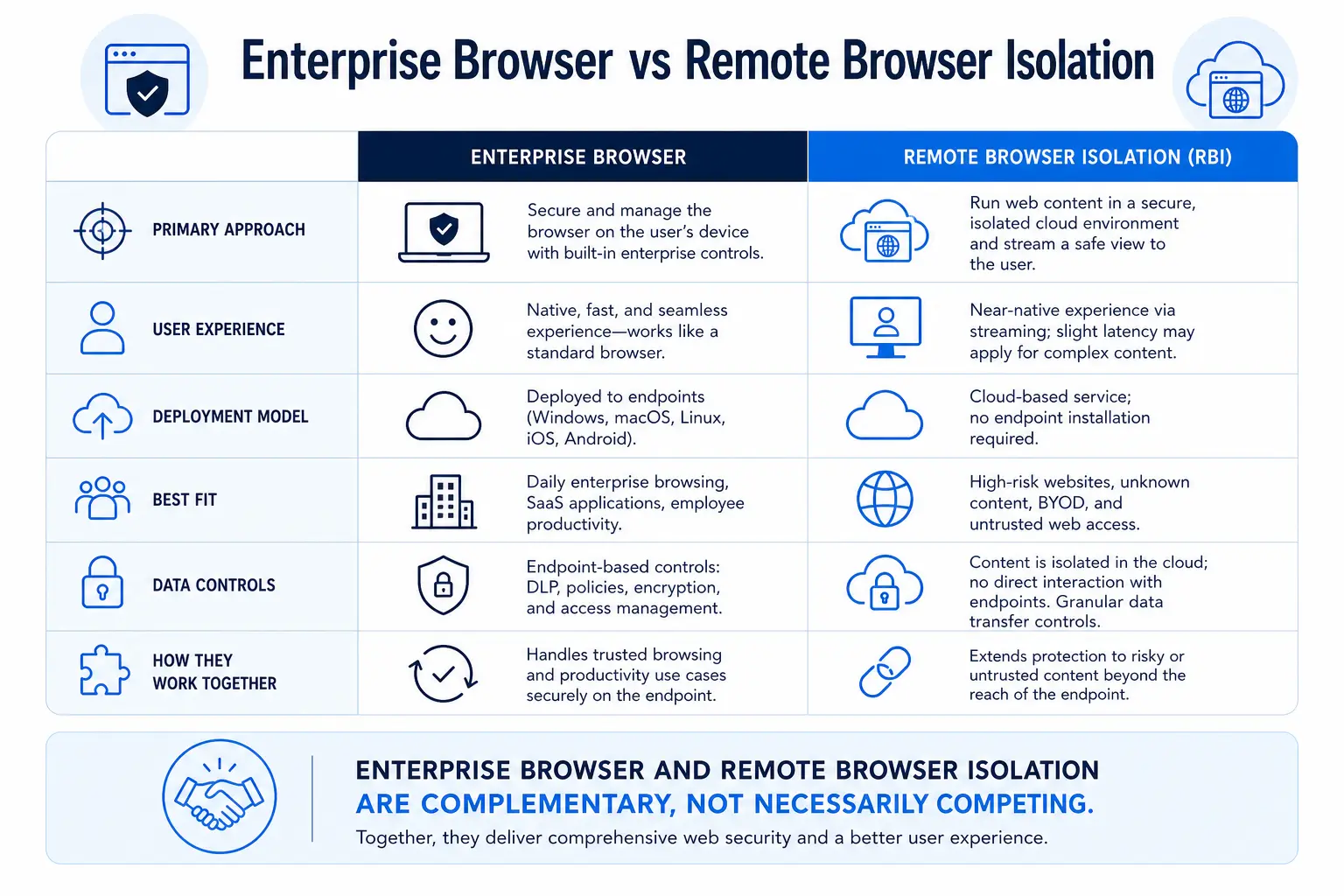
For a deeper comparison of how these two models stack up, Skyhigh Security's analysis of enterprise browsers vs. RBI examines the pros, cons, and best fit for the enterprise.
The secure the existing browser model keeps Chrome, Edge, or Safari in place and wraps security around the session using RBI, SWG, DLP, CASB, and ZTNA controls delivered through an SSE platform. The user experience stays familiar. Policy enforcement is invisible until a user attempts something risky—pasting PII into an AI tool, downloading a file from a shadow SaaS app, or navigating to a phishing page.
The tradeoff: the SSE approach requires TLS inspection (which creates its own certificate management and privacy considerations) and cannot enforce controls at the DOM level as deeply as a proprietary browser. For most enterprise use cases—protecting SaaS access, enforcing DLP, isolating risky browsing, securing contractor access—the SSE integrated model delivers equivalent protection without the adoption tax.
Evaluation Criteria: Choosing a Browser Security Strategy
When evaluating enterprise browser security, ask these questions before talking to any vendor:
Replacement Browser vs SSE Integrated Browser Security
The Role of Zero Trust in Browser Security
Browser security and zero trust are not separate initiatives—they are the same initiative viewed from different angles.
CISA's Zero Trust Maturity Model v2.0 provides an approach to continued modernization related to zero trust within a rapidly evolving technology landscape, guiding agencies in designing and implementing transition plans in accordance with Executive Order 14028. The model is structured around five pillars—Identity, Devices, Networks, Applications and Workloads, and Data—plus three cross cutting capabilities: Visibility and Analytics, Automation and Orchestration, and Governance.
Every one of those pillars intersects at the browser:
Identity: Authentication and session tokens live in the browser. Adversary in the middle attacks steal session cookies through the browser.
Devices: The browser is the first application to touch a potentially compromised endpoint. Device posture checks gate browser based access.
Networks: TLS inspection at the SWG intercepts browser traffic before it reaches the SaaS application.
Applications and Workloads: SaaS applications are consumed through the browser. CASB policies enforce sanctioned versus unsanctioned app access.
Data: Sensitive data is viewed, copied, downloaded, and uploaded through the browser. DLP at the browser layer is the last line of defense before data leaves the organization.
A practical scenario: a regional bank's loan officer accesses an internal lending application through ZTNA / Private Access while sitting in a coffee shop. The Skyhigh SSE platform verifies the officer's identity (Okta MFA), checks device posture (managed laptop, encrypted disk, current OS patch level), routes the session through the SWG for threat inspection, applies DLP rules that prevent download of loan documents containing customer PII, and logs every action for audit. No VPN. No proprietary browser. Just policy enforced access through the browser the officer already uses.
What Happens When You Ignore Browser Security
The Verizon 2025 DBIR found that third party involvement in breaches doubled year over year, now accounting for 30% of all breaches. Many of those third party compromises began with contractors or partners accessing SaaS applications through unmanaged browsers with no DLP, no session governance, and no isolation.
Picture this sequence: A consulting firm's analyst accesses your Workday instance through an unmanaged personal laptop. The analyst's Chrome profile syncs credentials to a personal Google account. A family member downloads a game mod containing an infostealer on the same laptop. The infostealer harvests every saved browser password, including your Workday credentials. Six weeks later, an attacker uses those credentials to access your Workday environment and export W 2 data for 8,000 employees.
This is not a theoretical scenario—it mirrors the pattern the Verizon DBIR documented in the Snowflake breach cluster, where compromised credentials from infostealer infected devices enabled access to cloud environments that lacked MFA enforcement.
NIST SP 800 46 Rev. 2 emphasizes the importance of securing sensitive information stored on telework devices and transmitted through remote access across external networks. The browser is now the primary telework device. It stores credentials, session tokens, cached data, and clipboard contents. Leaving it unmanaged is equivalent to leaving a VPN tunnel permanently open with no authentication.