


سياسة "أحضر جهازك الخاص" (BYOD) ووصول المقاولين: تأمين الأجهزة غير الخاضعة للإدارة عبر المتصفح
- أصبحت الأجهزة غير المدارة الآن نقطة الوصول الافتراضية. وتفترض نموذج «الثقة الصفرية» عدم وجود ثقة ضمنية بناءً على موقع الشبكة أو الأصل.
- الأمن القائم على المتصفح يلغي الاعتماد على وكيل نقطة النهاية.
- لا يُعد كل من VDI و MDM خيارين عمليين بالنسبة لمجموعات الأجهزة المؤقتة أو الشخصية.
- تُعد البيانات الخفية الناتجة عن الوصول غير الخاضع للإدارة عاملاً قابلاً للقياس يؤثر على التكلفة.
- تتناول أطر عمل «الثقة الصفرية» بشكل صريح السيناريوهات المتعلقة بالأجهزة غير الخاضعة للإدارة.
- يقلل التنفيذ التدريجي من المخاطر والعوائق التي تعترض عملية التبني. ابدأ بسياسات CASB وSWG، ثم أضف RBI للتطبيقات الحساسة.
- تتوقع شركة «غارتنر» نمواً سريعاً في مجال أمن طبقة المتصفح. وبحلول عام 2028، ستقوم 25% من المؤسسات بنشر متصفح آمن واحد على الأقل.
تحتاج إحدى شركات الاستشارات إلى 200 متعاقد للوصول إلى أنظمة «SharePoint» و«Salesforce» الداخلية في إطار مهمة مدتها ستة أشهر. ولا يمكن تثبيت برامج الوكلاء على أجهزة الكمبيوتر المحمولة الشخصية الخاصة بهم، كما أن التسجيل في نظام إدارة الأجهزة المحمولة (MDM) غير وارد بالنسبة للأجهزة التي يستخدمها المتعاقدون أيضًا في المعاملات المصرفية الشخصية وعرض الصور العائلية، في حين أن إنشاء بيئة VDI لمجموعة مؤقتة من المستخدمين سيؤدي إلى تجاوز ميزانية المشروع. يُعد المتصفح — وهو التطبيق المفتوح بالفعل على كل جهاز من أجهزة الكمبيوتر المحمولة هذه — نقطة التنفيذ الأكثر عملية المتاحة لديك. يرشد هذا الدليل مسؤولي الأمن عبر نهج تدريجي لتأمين وصول أجهزة BYOD والمتعاقدين من خلال ضوابط قائمة على المتصفح، بدءًا من المتطلبات الأساسية وصولاً إلى معايير النجاح القابلة للقياس.
المتطلبات الأساسية: ما تحتاجه قبل البدء
قبل تكوين ضوابط الوصول المستندة إلى المتصفح لمستخدمي «أحضر جهازك الخاص» (BYOD) والمقاولين، تأكد من توفر هذه الأساسيات. فتجاهلها هو السبب الأكثر شيوعًا لتعثر عمليات النشر.
يجب أن تدعم البنية التحتية للهوية المستخدمين الخارجيين. يجب أن يتعامل مزود الهوية (IdP) الخاص بك مع الهويات الموحدة للمتعاقدين، وليس الموظفين فقط. تخيل سيناريو شركة استشارية: يرسل مدير المشروع تعليمات التسجيل إلى 200 متعاقد يوم الاثنين. إذا كان مزود الهوية (IdP) الخاص بك غير قادر على إصدار هويات محددة النطاق ومحدودة المدة مرتبطة بنطاق خارجي، فستقضي ذلك الأسبوع في إنشاء الحسابات يدويًّا — وستنسى إلغاء تفعيلها عند انتهاء فترة العمل. تتناول مواصفة NIST SP 800-46 Rev. 2 بشكل صريح المتطلبات الأمنية الخاصة بمبدأ «أحضر جهازك الخاص» (BYOD) والأجهزة التي يتحكم فيها المقاولون والشركاء التجاريون والموردون، مع التركيز على أهمية تأمين المعلومات الحساسة المخزنة على هذه الأجهزة والمرسلة عبرها.
قائمة التطبيقات حسب طريقة الوصول. قم بإعداد قائمة بالتطبيقات التي يحتاجها المتعاقدون، سواء كانت تطبيقات SaaS (يمكن الوصول إليها عبر وكيل توجيه أو وكيل عكسي)، أو تطبيقات ويب داخلية (يمكن الوصول إليها عبر ZTNA)، أو تطبيقات «العميل الثقيل» القديمة (التي قد تظل تتطلب استخدام VDI). وتتمحور معظم أحمال عمل المتعاقدين حول تطبيقات SaaS — مثل SharePoint وSalesforce وServiceNow — مما يجعل تطبيق السياسات عبر المتصفح خيارًا عمليًّا بالنسبة لغالبية الجلسات.
تصنيف البيانات من أجل ربط سياسات منع تسرب البيانات (DLP). إذا لم تقم بتصنيف العناصر التي تشكل بيانات حساسة في التطبيقات التي سيصل إليها المتعاقدون، فإن سياسات منع تسرب البيانات (DLP) إما ستحظر أكثر من اللازم أو ستتجاهل كل شيء. كحد أدنى، حدد معايير تفعيل السياسات الخاصة بالمعلومات الشخصية (PII) والسجلات المالية والملكية الفكرية.
قرار بشأن بنية الشبكة. توصي وثيقة NIST SP 800-46 المؤسسات بالنظر في استخدام حلول التحكم في الوصول إلى الشبكة التي تتحقق من الحالة الأمنية لجهاز العميل قبل السماح له باستخدام الشبكة الداخلية، والنظر في استخدام شبكة منفصلة لجميع أجهزة العملاء الخارجية، بما في ذلك أجهزة «أحضر جهازك الخاص» (BYOD) والأجهزة التي تديرها أطراف ثالثة. وبالنسبة للوصول عبر المتصفح، فإن هذا يعني توجيه كل حركة مرور الأجهزة غير المدارة عبر منصة SSE الخاصة بكم بدلاً من منحها وصولاً مباشراً إلى الشبكة.
المرحلة الأولى: تحديد نطاق الرؤية ووضع السياسة الأساسية بالتعاون مع CASB و SWG
ابدأ بالإجابة على السؤال الأساسي: ما الذي تفعله الأجهزة غير المدارة فعليًّا في تطبيقات SaaS الخاصة بك اليوم؟
قم بنشر CASB في وضع الوكيل العكسي لاعتراض الجلسات القادمة من الأجهزة غير الخاضعة للإدارة التي تصل إلى تطبيقات SaaS المصرح بها. لا يتطلب الوكيل العكسي أي وكيل — حيث يقوم المتعاقد ببساطة بالمصادقة من خلال مزود الهوية (IdP) الخاص بك ويتم توجيهه بشكل شفاف عبر نقطة تطبيق CASB. في سيناريو شركة الاستشارات، عندما يقوم متعاقد بتسجيل الدخول إلى Salesforce من جهاز MacBook شخصي، يكتشف CASB الجلسة، ويصنف الجهاز على أنه غير مُدار بناءً على عدم وجود شهادة عميل، ويطبق سياسة الأجهزة غير المُدارة الخاصة بك: وصول للقراءة فقط إلى سجلات الفرص، وعدم السماح بالتصدير المجمّع، ووضع علامة مائية على العروض المعروضة على الشاشة.
وفي الوقت نفسه، قم بتوجيه حركة المرور على الويب الواردة من هؤلاء المستخدمين عبر جهاز SWG الخاص بك لفرض سياسات الاستخدام المقبول، وحظر الوصول إلى الفئات عالية المخاطر، وفحص الملفات التي يتم تنزيلها بحثًا عن البرامج الضارة. ويُعد جهاز SWG خط دفاعك الأول ضد أي متعاقد ينقر على رابط تصيد احتيالي في علامة تبويب بريد إلكتروني شخصي بينما يكون مسجَّل الدخول في نظام SharePoint الخاص بشركتك في الوقت نفسه.
ما الذي يجب قياسه في هذه المرحلة:
عدد جلسات الأجهزة غير المدارة التي تم اكتشافها يوميًا
تطبيقات SaaS التي يتم الوصول إليها عبر أجهزة غير خاضعة للإدارة (اكتشاف تطبيقات SaaS غير الرسمية)
تم حظر انتهاكات السياسة (التنزيلات المجمعة، والوصول غير المصرح به إلى التطبيقات)
متوسط المدة من تاريخ طلب انضمام المقاول حتى حصوله على حق الوصول الفعلي
توفر لك هذه المرحلة البيانات القياسية اللازمة لتبرير الاستثمارات في المراحل اللاحقة. فإذا كشفت منصة CASB الخاصة بك أن المتعاقدين يقومون بتنزيل قوائم العملاء على أجهزتهم الشخصية كل أسبوع، فإن الحجة التجارية للمرحلة الثانية تصبح واضحة من تلقاء نفسها.
المرحلة الثانية: إضافة ميزة Remote Browser Isolation جلسات شديدة الحساسية
بمجرد تحقيق الرؤية الكاملة، تتمثل الخطوة التالية في القضاء تمامًا على نقطة النهاية باعتبارها ناقلًا للتهديدات بالنسبة لتطبيقاتك الأكثر حساسية. وهنا يأتي دور remote browser isolation أقوى إجراء تحكم متاح للأجهزة غير المدارة.
لنتخيل سيناريو عمليًّا: يحتاج أحد المتعاقدين في شركة استشارية إلى مراجعة سجلات العملاء في Salesforce التي تتضمن معلومات تعريف شخصية (PII) — مثل الأسماء والعناوين وقيم الصفقات. باستخدام RBI، تعمل جلسة Salesforce داخل حاوية قائمة على السحابة. يتمكن المتعاقد من رؤية التطبيق والتفاعل معه بشكل طبيعي عبر متصفح Chrome أو Safari، لكن لا تصل أي بيانات للتطبيق أو رموز الجلسة أو محتوى الصفحة إلى الجهاز المحلي مطلقًا. وإذا تعرض الكمبيوتر المحمول الشخصي للمتعاقد للاختراق بواسطة برنامج تسجيل المفاتيح أو برنامج سرقة المعلومات، فلن تجد البرمجيات الخبيثة أي شيء مفيد لتلتقطه لأن الجلسة لا تُنفذ محليًّا أبدًا.
كما يتيح نظام RBI إمكانية التحكم الدقيق في البيانات داخل الجلسة المعزولة. يمكنك تعطيل وظائف النسخ واللصق، وحظر الطباعة، ومنع تنزيل الملفات، وتطبيق علامات مائية ديناميكية تُدمج هوية المستخدم في لقطات الشاشة. وعند انتهاء الجلسة، يتم إتلاف الحاوية، دون ترك أي بقايا بيانات على الجهاز غير المُدار.
يتوافق هذا النهج بشكل مباشر مع مبادئ «الثقة الصفرية ». ويقر معيار NIST SP 800 207 صراحةً بأن الأجهزة الموجودة على الشبكة قد لا تكون مملوكة للمؤسسة أو قابلة للتكوين من قبلها، وأن الخدمات المتعاقد عليها قد تتضمن أصولًا غير مملوكة للمؤسسة وتحتاج إلى الوصول إلى الشبكة لأداء دورها. ويُعد نهج «RBI» (الوصول القائم على التطبيق) التطبيق العملي لهذا المبدأ: حيث تمنح التطبيق حق الوصول دون الوثوق بالجهاز.
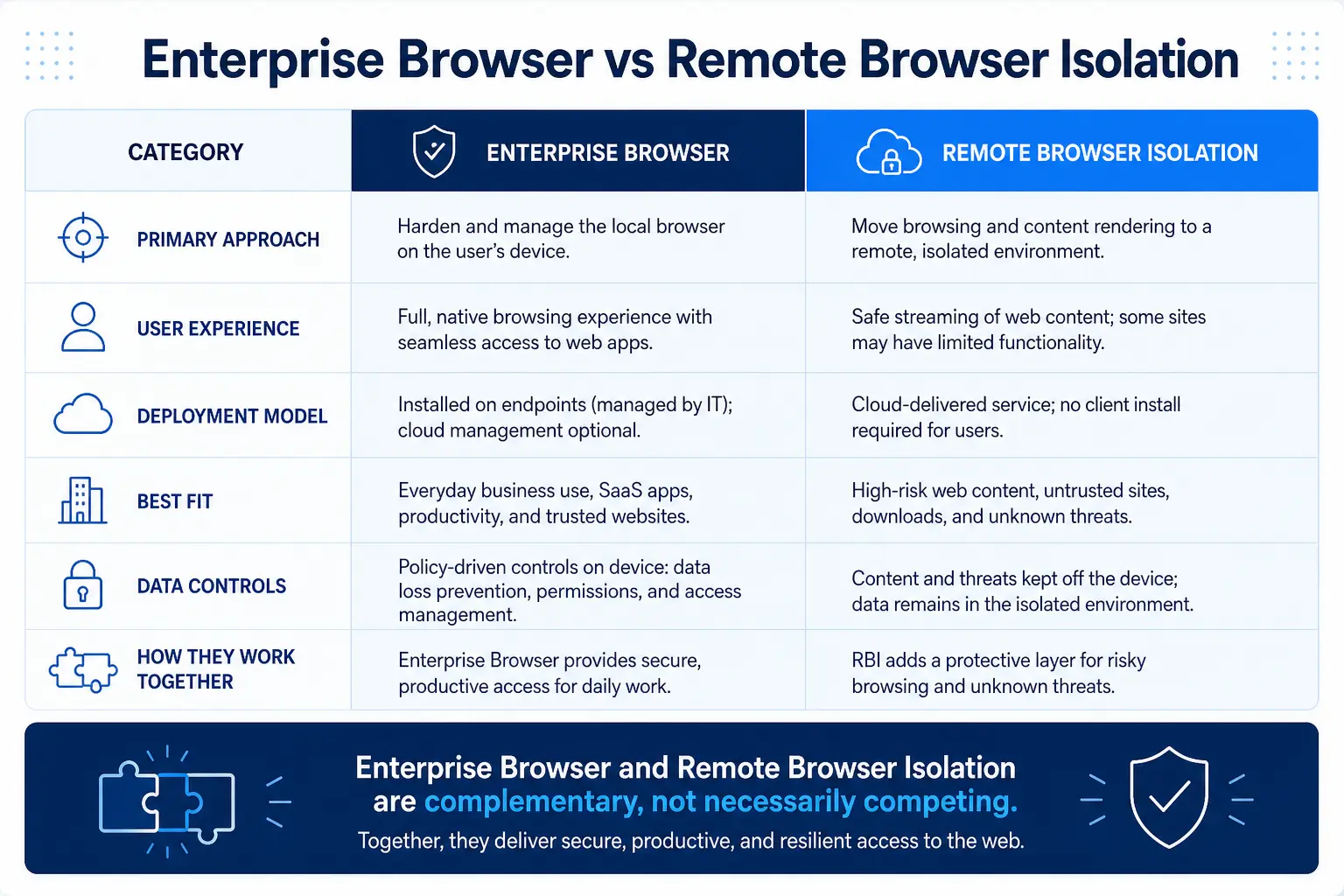
متى ينبغي استخدام وكيل RBI مقابل وكيل CASB القياسي:
متى يجب استخدام وكيل RBI مقابل وكيل CASB القياسي
المرحلة الثالثة: توسيع نطاق ZTNA ليشمل التطبيقات الخاصة
تُعد تطبيقات SaaS مجرد جزء من الصورة الكاملة. فالعديد من عقود العمل مع المقاولين تتطلب الوصول إلى تطبيقات الويب الداخلية — مثل البوابات المخصصة، ومواقع الويكي الداخلية، وبيئات التطوير — التي لا تكون متاحة عبر الإنترنت.
توفر شبكات VPN التقليدية للمتعاقدين نفقًا على مستوى الشبكة للوصول إلى بيئتك، وهو ما ينتهك كل مبادئ نهج «الثقة الصفرية». فإذا كان لدى أحد هؤلاء المتعاقدين الـ200 برنامج ضار على حاسوبه المحمول الشخصي، وقمت بمنحه حق الوصول عبر VPN، فإن هذا البرنامج الضار يمكنه مسح شبكتك الداخلية، ومحاولة الانتقال الأفقي، والوصول إلى أنظمة تتجاوز نطاق العمل المقصود للمتعاقد بكثير.
Private Access نظام ZTNA / Private Access الشبكة الافتراضية الخاصة (VPN) من خلال الوصول على مستوى التطبيقات. يقوم المتعاقد بالمصادقة، ثم يقوم محرك السياسات بتقييم هويته وسياق الجهاز وإشارات المخاطر، ويمنح حق الوصول فقط إلى التطبيقات الداخلية المحددة المصرح بها لدوره — ولا شيء غير ذلك. ولا يرى المتعاقد أبدًا الشبكة الأساسية ولا يتعامل معها.
تتيح مراحل النضج في نموذج نضج «الصفر ثقة» (Zero Trust) التابع لوكالة الأمن السيبراني والبنية التحتية (CISA) للمؤسسات تقييم الاستثمارات اللازمة والتخطيط لها والحفاظ عليها من أجل التقدم نحو نموذج «الصفر ثقة»، وذلك عبر خمسة ركائز هي: الهوية، والأجهزة، والشبكات، والتطبيقات وأحمال العمل، والبيانات. ويُعد الانتقال من شبكة VPN إلى نموذج الوصول الآمن القائم على الثقة الصفرية (ZTNA) لتوفير الوصول للمتعاقدين خطوة قابلة للقياس من مرحلة النضج «التقليدية» إلى مرحلة النضج «الأولية» في كل من ركيزتي «الأجهزة» و«الشبكات».
في حالة شركة الاستشارات، تعني تقنية ZTNA أن المتعاقدة «جين» يمكنها الوصول إلى البوابة الداخلية لتتبع المشاريع من جهاز الكمبيوتر المحمول الشخصي الخاص بها في المنزل، لكن لا يمكنها مسح الشبكة أو الوصول إلى وحدة التحكم في المجال أو الانتقال إلى تطبيق الشؤون المالية. وإذا انتهت مدة تعاقدها يوم الجمعة، يتم إلغاء صلاحية وصولها على مستوى طبقة التطبيق — دون الحاجة إلى تتبع شهادات VPN أو إزالة قواعد جدار الحماية.
لماذا لا تفي تقنيات VDI وMDM بمتطلبات نموذج «أحضر جهازك الخاص» (BYOD) ووصول المتعاقدين
غالبًا ما يقوم مسؤولو الأمن بتقييم تقنيتي VDI وMDM قبل النظر في استخدام آليات التحكم القائمة على المتصفح. فلكل منهما حالات استخدام مشروعة، لكن لا تعتبر أي منهما مناسبة تمامًا لمجموعات الأجهزة المؤقتة غير المدارة ذات الحجم الكبير.
البنية التحتية للسطح المكتبي الافتراضي (VDI): تُنشئ تقنية VDI بيئة سطح مكتب مركزية على الخادم، حيث تُبث جلسة عمل مرئية إلى جهاز المستخدم. وهي مثالية للبيئات الخاضعة لرقابة صارمة والتي تتطلب تطبيقات «العميل الثقيل». لكن بالنسبة لـ 200 متعاقد يستخدمون تطبيقات SaaS لمدة ستة أشهر، فإن تقنية VDI تُعد مبالغة. عادةً ما تبلغ تكلفة حلول VDI المستضافة في السحابة عشرات الدولارات لكل مستخدم شهريًّا، بينما تتطلب VDI المُثبَّتة محليًّا رأس مال كبيرًا للخوادم والشبكات وبرامج المحاكاة الافتراضية. بالنسبة لمشروع يضم 200 متعاقد، يمكن أن تصل تكاليف الاشتراك الإجمالية في VDI وحدها إلى عشرات الآلاف من الدولارات على مدار ستة أشهر — وذلك قبل احتساب تكاليف البنية التحتية والتراخيص وتكاليف الدعم الإدارية. كما تتسبب VDI في حدوث تأخير وانقطاعات في الجلسات وفترات طويلة للتأهيل، مما يثير إحباط المستخدمين ويقلل من الإنتاجية.
إدارة الأجهزة المحمولة (MDM): تتطلب إدارة الأجهزة المحمولة (MDM) تثبيت ملف تعريف إداري على الجهاز الشخصي للمقاول، مما يمنح المؤسسة السيطرة على إعدادات الجهاز، والقدرة على مسح البيانات عن بُعد، وإمكانية الاطلاع على التطبيقات المثبتة. سيرفض معظم المقاولين ذلك. فأجهزتهم هي ملكهم الشخصي، ويستخدمونها في المعاملات المصرفية والبريد الإلكتروني الشخصي والصور العائلية. ويؤدي مطالبة المقاول بالانضمام إلى نظام إدارة الأجهزة المحمولة (MDM) إلى خلافات قانونية واعتراضات تتعلق بالخصوصية، كما يؤدي إلى تأخير عملية التحاق الموظف الجديد بالعمل لعدة أيام أو أسابيع.
عناصر التحكم القائمة على المتصفح (CASB + RBI + SWG + ZTNA): لا حاجة إلى وكيل، ولا تسجيل للأجهزة، ولا بنية تحتية تحتاج إلى التوسع. يفتح المتعاقد متصفحه، ويقوم بالمصادقة عبر مزود الهوية (IdP) الخاص بك، ويتم تطبيق السياسات الأمنية على مستوى طبقة الجلسة. وينخفض وقت التسجيل من أيام إلى دقائق. يعكس سوق أمن BYOD هذا التحول: فقد بلغت قيمة السوق 60.64 مليار دولار في عام 2025، ومن المتوقع أن تصل إلى 120.36 مليار دولار بحلول عام 2032 بمعدل نمو سنوي مركب يبلغ 10.28% (GII Research، 2026).
الجدول 2: مقارنة بين VDI و MDM ووسائل التحكم القائمة على المتصفح
نقاط التكامل: ضمان توافق إجراءات أمان المتصفح مع البنية الحالية لديك
لا تعمل ضوابط «أحضر جهازك الخاص» (BYOD) القائمة على المتصفح بمعزل عن غيرها. بل تتضاعف قيمتها عند دمجها مع البنية التحتية الأمنية الحالية لديك.
مزود الهوية (IdP) والوصول المشروط: يُعد مزود الهوية (IdP) (مثل Azure AD أو Okta أو Ping) بمثابة «حارس البوابة». قم بتكوين سياسات الوصول المشروط التي تكتشف الأجهزة غير المدارة — عادةً من خلال عدم وجود شهادة عميل أو إشارة امتثال — وتوجيه تلك الجلسات تلقائيًّا عبر الوكيل العكسي CASB أو RBI. عندما يقوم أحد المتعاقدين بتسجيل الدخول إلى SharePoint من جهاز غير مسجل، يجب أن يفرض مزود الهوية تلقائيًّا مسار الوصول الأكثر صرامة دون تدخل يدوي.
توحيد سياسات DLP: يجب أن تمتد سياسات DLP نفسها التي تحمي البيانات على النقاط الطرفية الخاضعة للإدارة لتشمل جلسات المتصفح من الأجهزة غير الخاضعة للإدارة. فإذا كانت سياسة DLP الخاصة بك تحظر التصدير الجماعي لسجلات العملاء بالنسبة للموظفين، فيجب أن تحظره أيضًا بالنسبة للمتعاقدين الذين يدخلون عبر RBI. يحدد تقرير IBM حول تكلفة خرق البيانات (2024) حجم المخاطر: فقد بلغ متوسط التكلفة العالمية لخرق البيانات 4.88 مليون دولار في عام 2024 — بزيادة قدرها 10% على أساس سنوي، وهو أكبر ارتفاع منذ بدء الجائحة. ويقلل التطبيق المتسق لسياسات DLP عبر كل من الوصول المُدار وغير المُدار من احتمالية أن تصبح شركًا في هذه الإحصائية.
تكامل SIEM و UEBA: قم بتوجيه سجلات الجلسات الواردة من CASB و RBI و ZTNA إلى نظام SIEM الخاص بك لإنشاء خطوط أساس سلوكية لأنشطة المتعاقدين. فإذا قام متعاقد، الذي عادةً ما يصل إلى 20 سجلًا في Salesforce يوميًا، بتصدير 2,000 سجل فجأة، فإن هذا الانحراف يجب أن يؤدي إلى إصدار تنبيه. تعد الرؤية والتحليلات إحدى القدرات الثلاث الشاملة في نموذج نضج «الصفر ثقة» (Zero Trust) التابع لوكالة الأمن السيبراني والبنية التحتية (CISA)، وتعد القياسات عن بُعد على مستوى الجلسات من خلال عناصر التحكم في المتصفح تطبيقًا عمليًّا لتلك القدرة.
أتمتة إنهاء الخدمة: عند انتهاء عقد المتعاقد، قم بتعطيل هويته لدى مزود الهوية (IdP). ونظرًا لأن الوصول يعتمد على الجلسة ويتم فرضه على مستوى الوكيل أو طبقة RBI، فلا توجد شهادات VPN يجب إلغاؤها، ولا وكلاء نقاط النهاية التي يجب إلغاء تثبيتها، ولا ملفات تعريف الأجهزة التي يجب إزالتها. ببساطة، يتوقف الوصول عن الوجود.
المقاييس ومعايير النجاح
قم بقياس ما يهم. توضح هذه المقاييس ما إذا كانت ضوابط الوصول الخاصة ببرنامج «أحضر جهازك الخاص» (BYOD) والمقاولين، القائمة على المتصفح، تعمل بشكل فعال وتبرر استمرار الاستثمار فيها.
مقاييس الأداء التشغيلي:
متوسط الوقت المستغرق حتى يتمكن المقاول من الوصول: بدءًا من توفير الهوية وحتى أول جلسة عمل. الهدف: أقل من 30 دقيقة. إذا كنت تقيس هذا الوقت بالأيام، فهذا يعني أن العملية تحتاج إلى تحسين.
حجم جلسات الأجهزة غير المدارة: إجمالي عدد الجلسات الأسبوعية من الأجهزة المصنفة على أنها غير مدارة. من المتوقع أن يكون الاتجاه صعوديًا مع تزايد معدل الاستخدام؛ أما الاتجاه الهبوطي في ظل استقرار عدد الموظفين المتعاقدين فيشير إلى حدوث تجاوز للنظام.
معدل انتهاك السياسات: عدد الإجراءات المحظورة (عمليات التنزيل، والنسخ واللصق، والوصول غير المصرح به إلى التطبيقات) لكل 1,000 جلسة. وقد يشير المعدل المرتفع باستمرار إلى أن السياسات مفرطة في تقييدها أو أن التواصل مع المستخدمين غير كافٍ.
مقاييس الأمان:
صفر حوادث بقايا البيانات: عدد حوادث تسرب البيانات التي تم تتبع مصدرها إلى جهاز غير خاضع للإدارة. والهدف هو الوصول إلى الصفر بالنسبة للجلسات المحمية بواسطة RBI.
معدل اكتشاف تطبيقات SaaS الخفية: عدد تطبيقات SaaS غير المصرح بها التي يتم الوصول إليها من خلال أجهزة غير خاضعة للإدارة، وفقًا لما رصده نظام CASB. ومن المفترض أن ينخفض هذا المؤشر بمرور الوقت مع تشديد سياسات SWG.
حوادث سرقة بيانات الاعتماد من الأجهزة غير الخاضعة للإدارة: شكلت الهجمات التي تستهدف بيانات الاعتماد 16% من إجمالي الانتهاكات، واستغرقت أطول فترة في الكشف عنها واحتوائها، حيث بلغت قرابة 292 يومًا (IBM، 2024). ومن المتوقع أن يؤدي نظام عزل الجلسات الذي يوفره RBI إلى خفض سرقة بيانات الاعتماد الناتجة عن الهجمات التي تستهدف المتصفح إلى ما يقارب الصفر.
مقاييس التكلفة:
التكلفة لكل وصول للمقاول: قارن إجمالي تكلفة ترخيص SSE لجلسات الأجهزة غير المدارة بالتكلفة المكافئة لنظام VDI. الفرق بينهما هو مبرر التجديد.
حجم تذاكر الدعم الفني المتعلقة بوصول المقاولين: من المفترض أن تؤدي آليات التحكم القائمة على المتصفح إلى عدد أقل من تذاكر الدعم مقارنةً بتقنيات VDI أو MDM، وذلك لعدم وجود برامج عميل يتعين استكشاف أعطالها وإصلاحها.
الأخطاء الشائعة
معاملة جميع الأجهزة غير المدارة بنفس الطريقة. فالمقاول الذي يطلع على وثائق المشروع غير الحساسة لا يحتاج إلى نفس الضوابط التي يحتاجها المقاول الذي يتعامل مع المعلومات الشخصية للعملاء. ويؤدي الإفراط في تطبيق آلية RBI على كل جلسة إلى زيادة التكلفة وزيادة زمن الاستجابة. لذا، استخدم نظام التصنيف القائم على المخاطر: استخدام وكيل CASB للتطبيقات منخفضة الحساسية، وتطبيق آلية RBI للتطبيقات عالية الحساسية.
التغاضي عن البيانات التي تنتقل بين التطبيقات. لقد قمت بتقييد الوصول إلى Salesforce باستخدام RBI، لكن المقاول لا يزال بإمكانه نسخ اسم عميل من Salesforce، ولصقه في أداة ذكاء اصطناعي توليدية في علامة تبويب مجاورة، والحصول على استجابة تتضمن بيانات مُثريّة. قم بدمج RBI مع سياسات SWG التي تقيد الوصول إلى أدوات الذكاء الاصطناعي التوليدية من جلسات الأجهزة غير المُدارة — أو قم بتوجيه الوصول إلى أدوات الذكاء الاصطناعي عبر العزل أيضًا. تحدد Skyhigh ضوابط إضافية لهذا السيناريو في إرشاداتها حول حماية التطبيقات السحابية من الأجهزة غير المُدارة.
تجاهل إجراءات إنهاء الخدمة. يُنصب كل الاهتمام على إجراءات منح الصلاحيات؛ أما إجراءات سحبها فلا تحظى سوى بملاحظة صغيرة. قم بأتمتة محفزات إنهاء الخدمة المرتبطة بتواريخ انتهاء التعاقد في نظام الموارد البشرية أو نظام المشتريات لديك. فالمتعاقد الذي لا يزال يتمتع بحق الوصول بعد ثلاثة أشهر من انتهاء مشروعه يمثل تهديدًا داخليًّا، سواء كان ذلك عن قصد أم لا.
تجاهل التواصل مع المستخدمين. قد يذكر المتعاقدون الذين يواجهون نظام RBI لأول مرة أن «التطبيق يبدو مختلفًا» أو أن ميزة النسخ واللصق لا تعمل. وبدون تواصل استباقي يشرح سبب وجود هذه الضوابط والسلوكيات التي تقيدها، ستظهر حلول بديلة خفية — مثل قيام المتعاقدين بإرسال البيانات عبر البريد الإلكتروني إلى حساباتهم الشخصية للتحايل على قيود التنزيل.
نشر ضوابط المتصفح دون استخدام data loss prevention (DLP). data loss prevention عزل المتصفح دون data loss prevention بابًا مغلقًا مع نافذة مفتوحة. تعمل تقنية RBI على منع وصول البيانات إلى الجهاز، لكن نظام DLP يضمن عدم إمكانية تسريب البيانات الموجودة داخل الجلسة عبر القنوات المعتمدة — مثل التحميل إلى حساب تخزين سحابي شخصي، أو إرسال بريد إلكتروني إلى عنوان غير تابع للشركة، أو الطباعة إلى ملف PDF محلي. وقد وجدت شركة IBM أن 35% من حالات الاختراق تضمنت «بيانات الظل» — وهي المعلومات المخزنة في مصادر بيانات غير خاضعة للإدارة (IBM، 2024) — مما يؤكد كيف أن حركة البيانات غير الخاضعة للرقابة تتسبب في تكاليف ومخاطر.
بافتراض أن نموذج نشر واحد يناسب الجميع. قد تستفيد بعض الفئات من ملحق متصفح خفيف الوزن على الأجهزة الخاضعة للإدارة، بينما يستخدم المتعاقدون نظام RBI الذي لا يعتمد على الوكلاء. قم بمواءمة آلية التحكم مع حالة الجهاز ونوع المستخدم، بدلاً من فرض نهج واحد على جميع موظفيك.