


Securing SaaS Applications Through Browser-Level Controls

Quick Summary
  • CASB alone leaves browser action blind spots. API and inline proxy controls govern file transfers and sharing policies but cannot.
  • Browser level controls close the session action gap. RBI, SWG enforced DLP, and session policies enforce copy/paste restrictions,.
  • You don't need a proprietary browser. These controls work through the browsers your employees already use — Chrome, Edge, Safari,.
  • Phased implementation reduces risk and adoption friction. Start with high risk scenarios (unmanaged devices, sensitive SaaS.
  • Frameworks mandate these controls. NIST SP 800 53 AC 4 (information flow enforcement) and SC 7 (boundary protection), the CSA.
  • Measurable outcomes matter. Track clipboard block events, download policy violations, watermark triggered investigations, and.

Your CASB blocks a contractor from downloading a customer list from Salesforce to an unmanaged laptop. Five seconds later, the same contractor selects the entire table, copies it to the clipboard, pastes it into a personal Gmail compose window, and clicks Send. The CASB never sees it. The browser did — and with the right controls, could have stopped it. This guide walks SaaS security administrators and CASB operators through a phased approach to closing that gap by layering browser level controls — remote browser isolation (RBI), secure web gateway (SWG) policies, DLP, and session actions — on top of existing CASB deployments.

Prerequisites: What to Have in Place Before You Start

Before enabling browser level controls, confirm that your environment meets four foundational conditions. Skipping these leads to policy conflicts, user frustration, and incomplete coverage.

1. CASB with forward and reverse proxy modes already deployed. You need inline traffic inspection for sanctioned SaaS apps (reverse proxy) and shadow IT visibility (forward proxy) as your enforcement baseline. If your CASB deployment is API only, you lack the inline path that browser controls extend.

2. Unified DLP policy engine. Browser level controls must reference the same data classifications — PII, PHI, financial records, source code, intellectual property — used by your CASB and email DLP policies. If your DLP definitions live in separate silos, start by consolidating them. Inconsistent classification leads to one channel blocking what another allows. A centralized DLP platform avoids this fragmentation.

3. Identity provider (IdP) integration and device posture assessment. Browser controls become far more useful when they adapt based on who the user is and what device they're on. A marketing contractor on a personal MacBook should get stricter controls than a full time finance analyst on a managed Windows endpoint. This requires SAML/OIDC federation with your IdP and device posture checks (managed vs. unmanaged, OS patch level, disk encryption status).

4. SaaS application inventory with sensitivity classification. You can't scope browser policies without knowing which SaaS apps hold sensitive data. Map your top 20 50 SaaS apps by data sensitivity tier (critical, high, medium, low). CSA's SaaS Governance Best Practices recommends assessing risks during all stages of the SaaS lifecycle — evaluation, adoption, usage, and termination. This inventory becomes your policy scoping input.

Phase 1: Close the Clipboard and Download Gap on High-Risk Scenarios

Start where the risk is highest and the user population is smallest: unmanaged devices accessing sensitive SaaS applications.

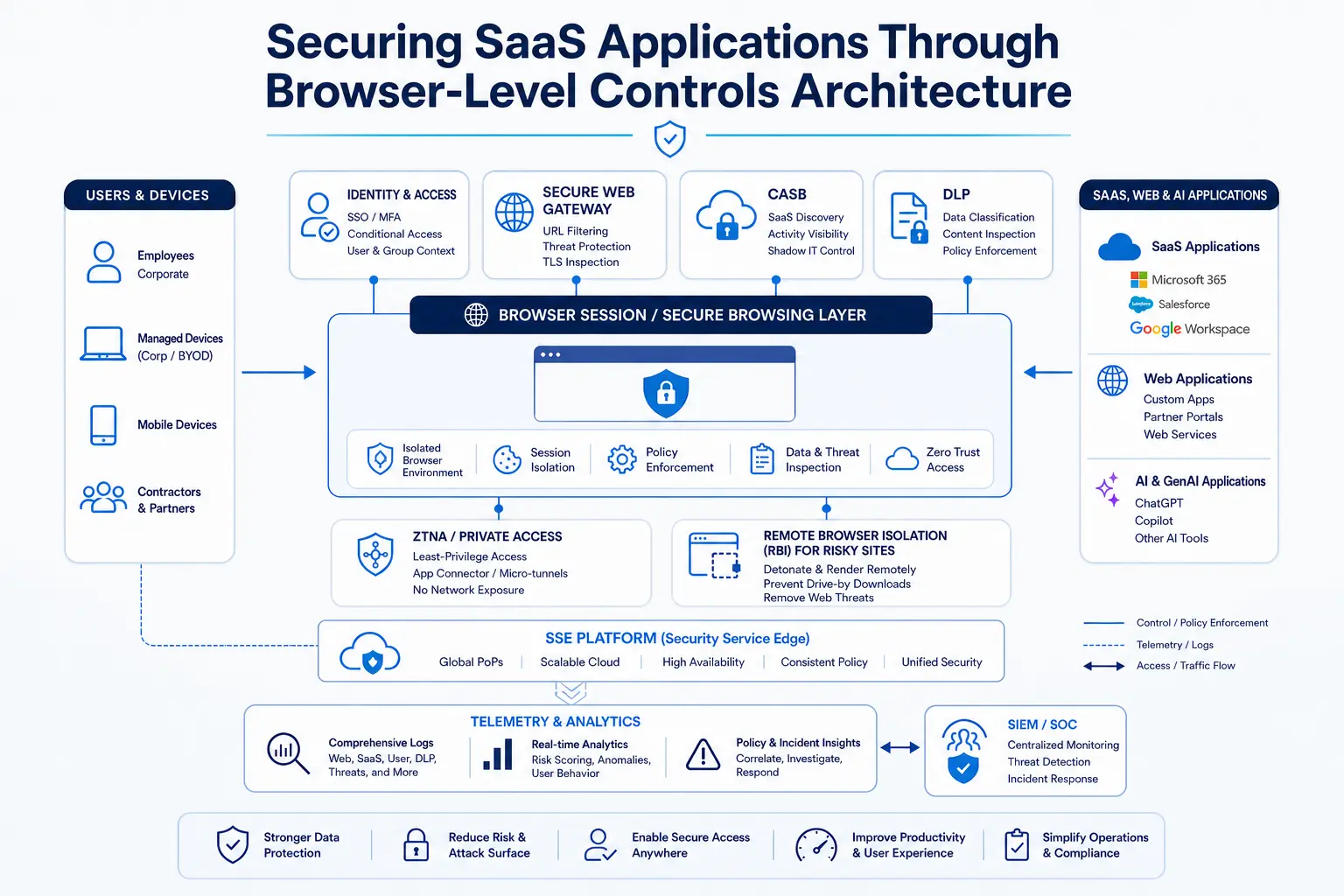
Overview of browser-level security controls for SaaS applications including DLP, session controls, and access policies

The scenario that justifies Phase 1: A third party auditor logs into your Workday instance from a personal laptop using SSO. Your CASB reverse proxy authenticates the session and blocks file downloads per policy. But the auditor opens an employee compensation report, selects thirty rows of salary data, copies them, opens a new tab to a personal Google Sheet, and pastes. The CASB saw an authenticated Workday session and a Google Sheets session — two separate, individually permissible events. It never saw the data move between them because the clipboard operation happened entirely inside the browser's rendering context.

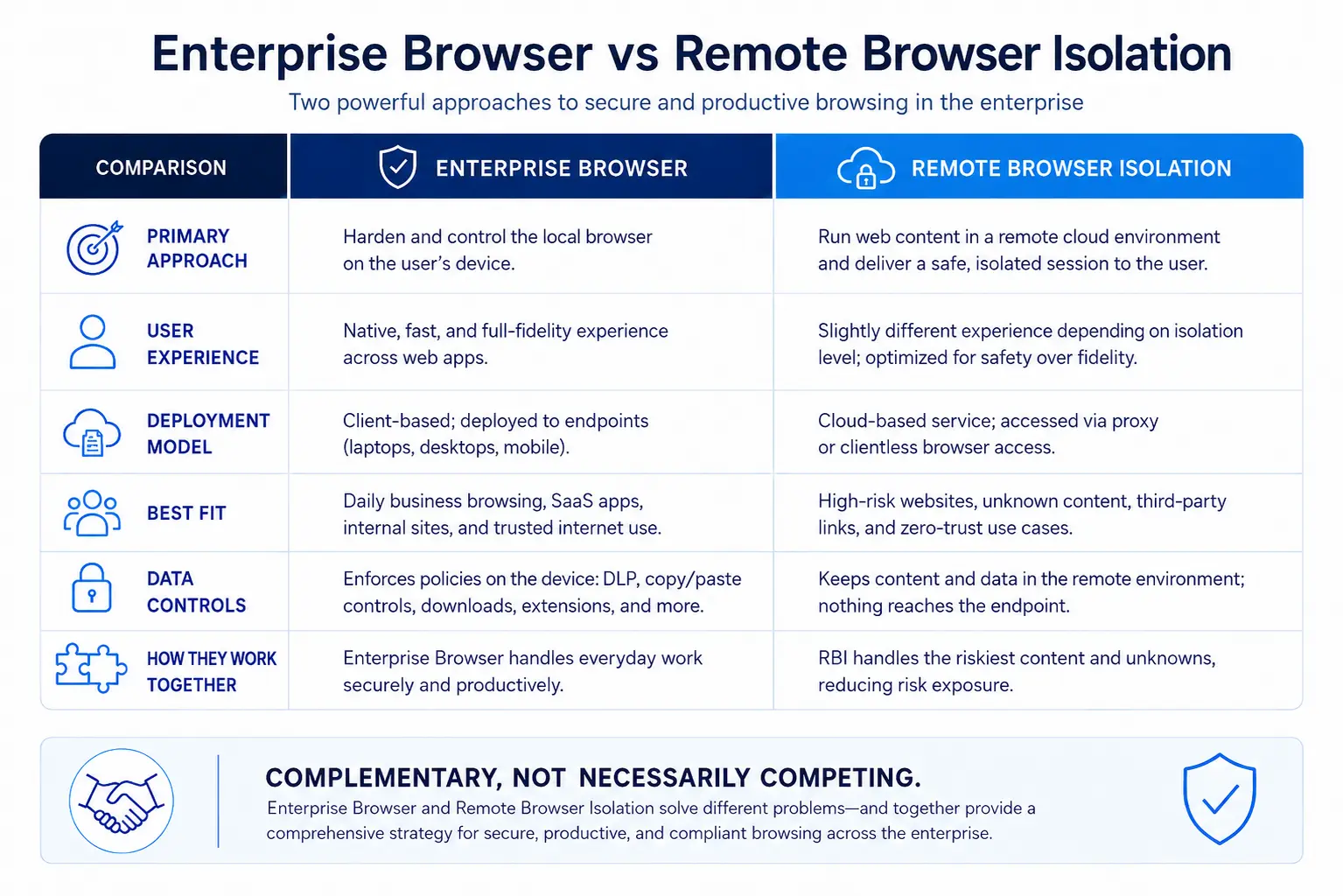
What to deploy: Enable remote browser isolation for all unmanaged device sessions accessing Tier 1 (critical) and Tier 2 (high) SaaS applications. RBI renders the SaaS application in a cloud hosted container and streams only pixels to the user's browser. This architecture gives you granular control over session actions:

Copy/paste restriction: Block clipboard write/read operations from the isolated session, or allow paste in but block copy out to prevent data leaving the SaaS app context.

Download suppression: Prevent file downloads from the rendered session entirely, or restrict downloads to specific file types.

Print blocking: Disable print and print to PDF commands.

Screenshot watermarking: Inject a visible or forensic watermark containing the user's email and timestamp into the rendered stream, deterring screen capture.

NIST SP 800 53 SC 7 mandates isolating system components with boundary protection mechanisms to control information flows and limit the potential harm from hostile attacks and errors. RBI creates exactly this boundary between the SaaS application's data and the user's local device, enforcing information flow controls that a network proxy cannot.

Scope limitation: Apply these controls only to unmanaged devices and contractor populations in Phase 1. Managed endpoints with a deployed agent and verified posture can receive lighter controls (such as watermarking without clipboard blocking) to maintain productivity.

Phase 2: Extend Browser DLP to Managed Endpoints and Broader SaaS Coverage

Once Phase 1 stabilizes — typically after 4 6 weeks of telemetry collection and policy tuning — expand coverage to managed devices and a broader set of SaaS applications.

Architecture diagram showing how browser security integrates with CASB and SSE to protect SaaS application data

The scenario that justifies Phase 2: A full time sales representative on a managed laptop accesses Salesforce through Chrome. They open a customer account record, copy the contact's name, company, and phone number, then paste it into ChatGPT to generate a personalized outreach email. No file was downloaded. No Salesforce sharing rule was violated. But customer PII just left your controlled SaaS environment and entered a third party AI tool through the browser clipboard.

According to CSA's State of SaaS Security Report (2025), 63% of organizations report external data oversharing, and 56% say employees upload sensitive data to unauthorized SaaS apps — often through exactly these clipboard and upload paths that traditional controls miss. Browser level DLP is the control that intercepts these actions before data reaches the unsanctioned destination.

What to deploy:

SWG enforced DLP inspection on managed endpoints. Your secure web gateway agent intercepts browser traffic and applies DLP classification to data in motion — including form field submissions, clipboard paste events to web apps, and file uploads via browser. This catches the Salesforce to ChatGPT scenario above.

Selective RBI for sensitive categories. Rather than isolating all browsing, route sessions to Tier 1 and Tier 2 SaaS apps through RBI when the user's behavior triggers a risk signal (e.g., accessing a customer data object, opening an export view, navigating to an AI tool with corporate credentials).

Watermarking for session recording deterrence. Apply visible watermarks to sessions displaying sensitive data so that if a user photographs their screen, the watermark traces the image back to a specific user, session, and timestamp.

Policy design principle from NIST SP 800 53 AC 4: Access enforcement mechanisms can be employed at the application and service level to provide increased information security and control information flows beyond what network level controls achieve. Browser level DLP and RBI operate at exactly this application and service level, adding enforcement that network level CASB proxies cannot reach.

Phase 3: Integrate Browser Controls Into Your SSE Policy Fabric

Deploying browser controls as a standalone layer creates operational overhead: separate policies, separate consoles, separate incident queues. Phase 3 unifies browser level enforcement with your broader Security Service Edge (SSE) platform so that one policy engine governs CASB, SWG, DLP, RBI, and ZTNA decisions.

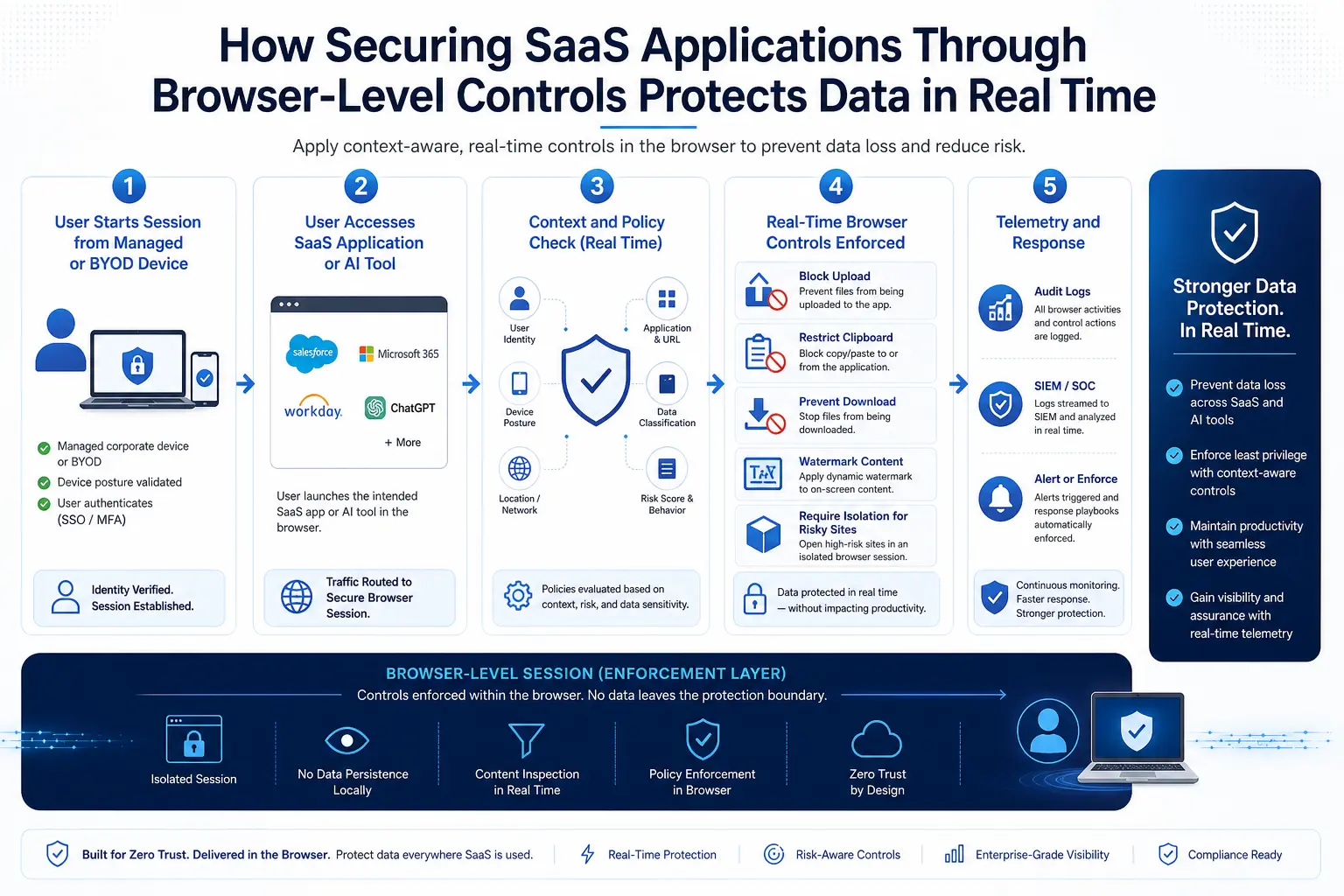
Workflow showing how browser-level controls enforce data protection policies across SaaS applications in real time

The scenario that justifies Phase 3: Your SOC receives three alerts: a CASB alert that a user accessed a shadow SaaS app, a SWG alert that the same user's browser session triggered a DLP pattern match, and an RBI alert that a clipboard copy was blocked. Three consoles, three analysts, three tickets — for one user performing one action sequence. Unified SSE policy collapses this into a single correlated event with a single response workflow.

What to deploy:

Unified policy rules that reference user identity, device posture, SaaS app sensitivity tier, data classification, and browser action type (download, clipboard, print, upload) in a single conditional statement.

Adaptive isolation that automatically escalates a session to full RBI when the SSE platform detects a combination of signals — such as an unmanaged device accessing a Tier 1 app while DLP detects sensitive content in the page.

Session telemetry feed to SIEM/SOAR so that browser level events (clipboard blocks, watermark injections, download suppressions) are visible alongside CASB, SWG, and ZTNA events for correlation and investigation.

CISA's Zero Trust Maturity Model calls on organizations to manage and secure deployed applications with granular access controls and integrated threat protections, building toward optimal maturity across the Applications & Workloads and Data pillars. Integrating browser level controls into SSE policy is how you operationalize that guidance for SaaS applications accessed through the browser.

Integration Points: Where Browser Controls Connect to Your Existing Stack

Browser level controls don't replace existing security tools — they fill the enforcement gap between them. Map the integration points clearly to avoid duplication and ensure coverage.

Consider a real world integration sequence: a healthcare organization uses CASB API mode to scan PHI at rest in Box and enforce sharing policies. But when a nurse practitioner on a personal tablet opens a patient document through the browser, the API scan already ran — it won't prevent a clipboard copy of the patient's diagnosis into a messaging app. An RBI session with clipboard restrictions and watermarking closes that gap without requiring an endpoint agent on the personal tablet. Skyhigh Security's approach to protecting cloud apps from unmanaged devices addresses exactly this use case by combining reverse proxy, RBI, and DLP in an integrated policy.

Metrics and Success Criteria

Browser level controls generate telemetry that previous CASB only deployments couldn't produce. Define metrics before deployment so you can demonstrate value and tune policies.

Operational metrics (track weekly):

Clipboard block events per user/app/device type. A spike in clipboard blocks for a particular user may indicate attempted exfiltration or may signal a policy that's too restrictive for a legitimate workflow. Investigate outliers.

Download suppression events. Track by SaaS app and user role. A high volume of blocked downloads from a particular app may mean users need a secure alternative (e.g., a read only viewer or a controlled export workflow).

Watermark triggered investigations. Count how many times a watermarked screenshot or printed document was traced back to a user through an investigation. Even a low number proves the deterrent value.

Policy exception requests. Track how many users request exceptions to browser controls and the reasons cited. High exception volume for a specific app suggests the policy needs refinement.

Risk reduction metrics (track quarterly):

Reduction in sensitive data incidents involving SaaS clipboard or upload paths. Compare incident volume before and after browser controls for the same SaaS apps and user populations.

Unmanaged device session control coverage. Measure the percentage of unmanaged device SaaS sessions that pass through RBI versus those that bypass it. Target 95%+ coverage for Tier 1 apps.

Mean time to detect browser based exfiltration attempts. Browser telemetry should reduce detection time from days (when relying on after the fact DLP scan alerts) to seconds (real time clipboard block).

The Verizon 2025 DBIR found that 60% of breaches involved the human element — the user clicking, copying, uploading, and pasting. Browser level controls generate enforcement telemetry on exactly these human actions, giving your SOC visibility into a vector that network and API controls miss entirely. Meanwhile, Forrester reports that roughly one in five data breaches stems from insider incidents (2026), and browser session controls provide direct, real time enforcement against the clipboard and upload paths that insiders exploit most frequently.

Common Mistakes

Mistake 1: Deploying full RBI isolation for all users on day one. Full pixel streaming isolation changes the browsing experience. Latency increases slightly, some browser extensions stop working, and complex web apps may render differently. If you push this to 5,000 employees simultaneously, the help desk will revolt, and leadership will kill the project. Start with unmanaged devices and high risk apps. Expand gradually.

Mistake 2: Applying identical browser policies to managed and unmanaged devices. An unmanaged contractor laptop warrants full clipboard blocking and download suppression. A managed corporate endpoint with an agent, verified disk encryption, and current patches may only need watermarking and selective paste restrictions. Differentiate policies by device posture. The risk profile of a compromised credential on a managed device with EDR is fundamentally different from one on an unmanaged device with no visibility — your browser policies should reflect that asymmetry.

Mistake 3: Ignoring AI tool destinations in DLP policy. Many organizations configured browser DLP to block uploads to traditional shadow IT categories — personal cloud storage, webmail — but forgot to include AI assistants. AI tools are now among the most common unauthorized destinations for pasted and uploaded data. Update your SWG and DLP URL categories to include generative AI services, and apply the same clipboard and upload restrictions you enforce on other unsanctioned apps.

Mistake 4: Treating browser controls as a standalone project rather than an SSE policy extension. If browser controls live in a separate console with separate policies, they become one more tool the SOC ignores. Integrate them into your SSE platform from Phase 3 onward so that browser events correlate with CASB, SWG, and ZTNA events in a single incident workflow.

Mistake 5: Neglecting to classify SaaS apps by sensitivity before writing policies. Without a sensitivity tiered SaaS inventory, you either over block (isolating low risk apps and frustrating users) or under block (leaving critical apps without controls). Large enterprises routinely consume dozens to hundreds of SaaS offerings, and classification is not optional — it's the foundation of targeted policy that avoids both security gaps and user revolt.

Frequently Asked Questions

RBI controls clipboard copy/paste, print, print to PDF, screenshot capture, file upload via drag and drop, and keyboard input within the isolated session. CASB — whether API based or inline proxy — operates at the network or API layer and governs file downloads, sharing permissions, and access policies. CASB cannot see or intercept actions that occur within the browser rendering engine because those actions never cross a network boundary.
No. RBI based browser controls work by rendering web content in a cloud hosted container and streaming the visual output to whatever browser the user already has — Chrome, Edge, Safari, or Firefox. The user does not install a new browser. SWG enforced DLP and policy controls are delivered through a lightweight agent or PAC file configuration. The approach is to secure the browsers employees already use through SSE integrated controls, not through wholesale browser replacement.
AC 4 (Information Flow Enforcement) mandates approved authorizations for controlling information flows — which directly maps to clipboard and upload restrictions. SC 7 (Boundary Protection) and its enhancement SC 7(10) (Prevent Exfiltration) require boundary mechanisms that prevent data from leaving controlled environments. RBI creates precisely this boundary at the browser session level, while SWG enforced DLP adds application layer flow enforcement that network controls alone cannot provide.
Modern pixel pushing RBI adds 20 50ms of latency to page rendering in most deployments. For standard SaaS workflows — reading dashboards, editing records, reviewing reports — users typically notice little difference. Complex web apps with heavy JavaScript rendering (e.g., design tools, code editors) may feel slower. Most organizations handle this by applying full RBI selectively (unmanaged devices, high risk apps) and using lighter inline controls (SWG DLP, watermarking) for managed endpoints with standard SaaS usage.
Build an exception workflow before you deploy. Users will need to request exceptions for legitimate reasons — for example, a developer who needs to paste code snippets from an internal wiki into a sandboxed test environment. Require business justification, manager approval, and a time bound exception window (30/60/90 days). Log all exception granted sessions with full telemetry. Review exceptions quarterly and convert recurring exceptions into refined policy rules.
Browser controls reduce the downstream damage of session hijacking. If an attacker steals a session token and replays it from an unrecognized device, the SSE platform can detect the posture mismatch and force the session into full RBI with all restrictions enabled — clipboard blocked, downloads blocked, watermark injected. The attacker gets a view only, traceable session instead of unrestricted access. Third party involvement in breaches doubled year over year, now accounting for nearly a third of all breaches per the Verizon 2025 DBIR, making session level controls a critical defense layer against compromised third party credentials.
Prioritize by data sensitivity and access pattern. Start with apps that store PII, PHI, financial data, or intellectual property — typically your CRM, HCM, ERP, cloud storage, and collaboration platforms. Then prioritize apps accessed by third parties, contractors, or users on unmanaged devices. Finally, add generative AI tools that employees access through the browser. CSA's State of SaaS Security Report (2025) found SaaS security is a high priority for 86% of organizations, with 76% increasing budgets — most organizations have the executive support to justify phased rollout across these categories.
Forensic watermarks embed an invisible or semi visible pattern — typically the user's email, session ID, and timestamp — into the rendered browser stream. If a watermarked screenshot surfaces on social media, a competitor's system, or in a leak investigation, your security team can trace it to the exact user, session, and time. Even the knowledge that watermarks exist deters casual exfiltration attempts. With Gartner projecting the SASE market will reach $28.5 billion by 2028, SSE integrated watermarking is becoming a standard capability rather than a niche add on.
CISA's Zero Trust Maturity Model is structured around five pillars — Identity, Devices, Networks, Applications & Workloads, and Data — each with maturity levels from traditional through optimal. Browser level controls directly serve the Applications & Workloads and Data pillars by enforcing granular, per session access controls on SaaS applications. At the optimal maturity level, access should be determined on a per request, least privilege basis — which is exactly what adaptive RBI and browser DLP deliver when they evaluate user identity, device posture, data sensitivity, and action type in real time. Ready to close the browser action gap in your SaaS security? Skyhigh Security's Cloud Access Security Broker integrates CASB, RBI, SWG, and DLP into a unified SSE policy fabric — giving you clipboard control, download restriction, watermarking, and session level enforcement without requiring a proprietary browser. See how Skyhigh CASB works →
Protect Your Data Everywhere
Skyhigh Security delivers unified data protection with industry-leading DLP, CASB, and DSPM — all in a single converged SSE platform.
See How Skyhigh Security Can Help
Learn how Skyhigh Security protects your sensitive data across cloud, web, and private applications.
데모 요청하기
Securing SaaS Applications Through Browser-Level Controls 0% read