




एंटरप्राइज़ ब्राउज़र सुरक्षा समाधानों का मूल्यांकन कैसे करें
- Define the problem before the product. Map your browser based risk scenarios—contractor access, AI tool usage, copy/paste.
- Evaluate eight criteria systematically: security depth, user experience impact, deployment complexity, SSE integration, data.
- Test with real users on real workflows. POC success means measuring task completion time and user satisfaction alongside security.
- SSE integration is non negotiable. Any browser security solution that creates a separate policy silo defeats the purpose of a.
- Proprietary browsers are not mandatory. Gartner's October 2025 report "Focus on Securing Browsers, Not Forcing a Secure Browser".
- Browser compatibility matters more than vendor demos suggest. Certificate pinned apps, complex single page applications, and.
- Factor in the AI browsing threat surface. AI browsers, AI enhanced traditional browsers, and autonomous AI browsing agents create.
Browser security has quietly become the highest stakes decision on your SSE roadmap. By 2028, Gartner predicts 25% of organizations will augment existing secure remote access and endpoint security tools by deploying at least one secure enterprise browser technology—yet the majority have not adopted one yet. That gap between intent and adoption means most security teams are somewhere in the middle: aware the browser needs protection, unsure which approach to buy, and under pressure to choose before the next breach forces the issue.
This practitioner guide gives you a structured evaluation framework covering the full spectrum of enterprise browser security approaches—proprietary replacement browsers, browser extensions, remote browser isolation (RBI), and SSE integrated controls—so you can run a defensible selection process, not a vendor driven demo cycle.
Prerequisites: What to Have in Place Before You Evaluate
Running a browser security evaluation without prerequisites is like buying a firewall without knowing your network topology. Before you shortlist a single vendor, complete these four steps.
1. Inventory your browser estate. Know which browsers employees actually use—not which ones IT deploys. Chromium based browsers account for approximately 75% of total browser market share, according to Gartner (2025), so your solution must work across Chrome, Edge, and likely Brave or Arc variants. If your workforce includes Mac heavy departments using Safari, that is a hard compatibility requirement, not a nice to have.
2. Map your SaaS and private application portfolio. Identify which applications run exclusively in the browser and which involve thick client components. A marketing team member who accesses Salesforce, uploads customer lists to a campaign platform, and occasionally pastes segments into a GenAI writing tool creates a fundamentally different risk profile than a developer accessing internal code repos through ZTNA.
3. Catalog your existing security stack. Document your current SWG, CASB, DLP, ZTNA, and endpoint detection tools. Forrester's SSE evaluation framework (Q1 2024) identifies three primary security technologies—ZTNA, CASB, and SWG—and several secondary ones including RBI and DLP. Your browser security solution must integrate with—not duplicate—these controls.
4. Identify your unmanaged device exposure. Contractors using personal laptops to access your Workday instance or third party auditors accessing SharePoint from hotel business centers represent your most acute browser risk. Quantify how many users fall into managed, lightly managed, and fully unmanaged device categories—this directly determines which approaches are viable.
Phase 1: Define Your Evaluation Criteria and Threat Scenarios
An evaluation that starts with vendor demos ends with the loudest salesperson winning. Start instead with threat scenarios that reflect your actual risk.
Build a scenario library
Create five to eight scenarios that represent your highest frequency, highest impact browser based risks. Practical examples:
Contractor SaaS access: An external consultant accesses your CRM from an unmanaged device, views customer PII, and tries to download a contact list to a personal drive.
AI tool data leakage: A product manager copies a competitive analysis document from SharePoint, pastes it into an unapproved GenAI tool, and the tool's response includes proprietary revenue data.
Phishing in a browser session: A finance analyst clicks a link in a Teams message that opens a credential harvesting page designed to mimic your SSO provider—inside an active authenticated session.
Copy/paste exfiltration: A departing employee opens Salesforce in one tab and a personal Gmail draft in another, then copies pipeline data across tabs.
These scenarios become your POC test scripts. Any vendor that cannot demonstrate meaningful control against your top five scenarios is eliminated, regardless of analyst quadrant placement.
Align with your zero trust architecture
CISA's Zero Trust Maturity Model v2.0 (2023) structures zero trust across five pillars—Identity, Devices, Networks, Applications and Workloads, and Data—providing organizations a roadmap for continuous modernization. Browser security evaluation should map directly to at least three of these pillars: Device (is the browser session device aware?), Application (can you enforce per app policies at the browser level?), and Data (can the solution inspect and control data in motion within the browser?).
Phase 2: Assess the Four Browser Security Approaches
Not every organization needs the same approach. The market currently offers four distinct architectural models, each with meaningful trade offs.
Proprietary replacement browsers
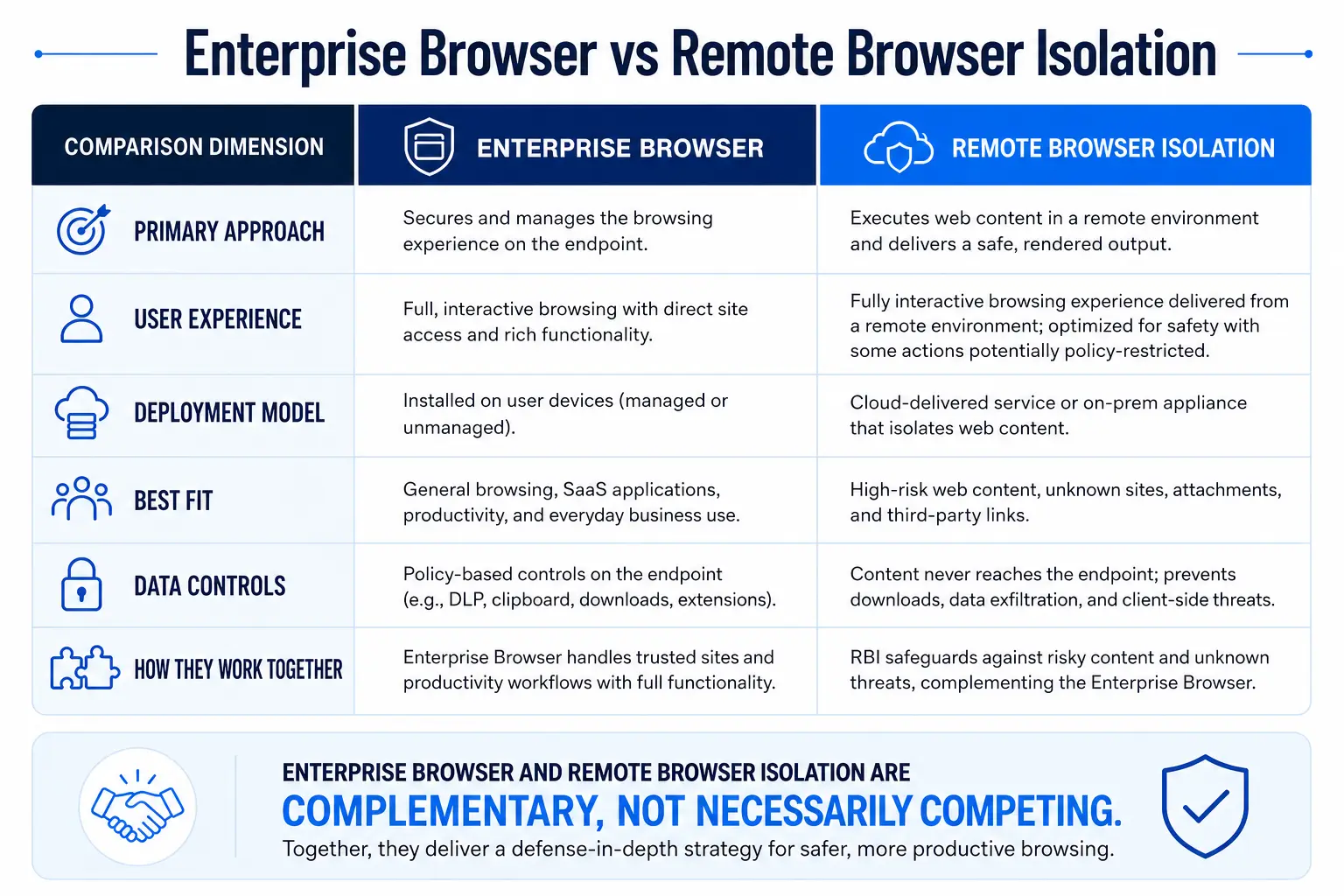
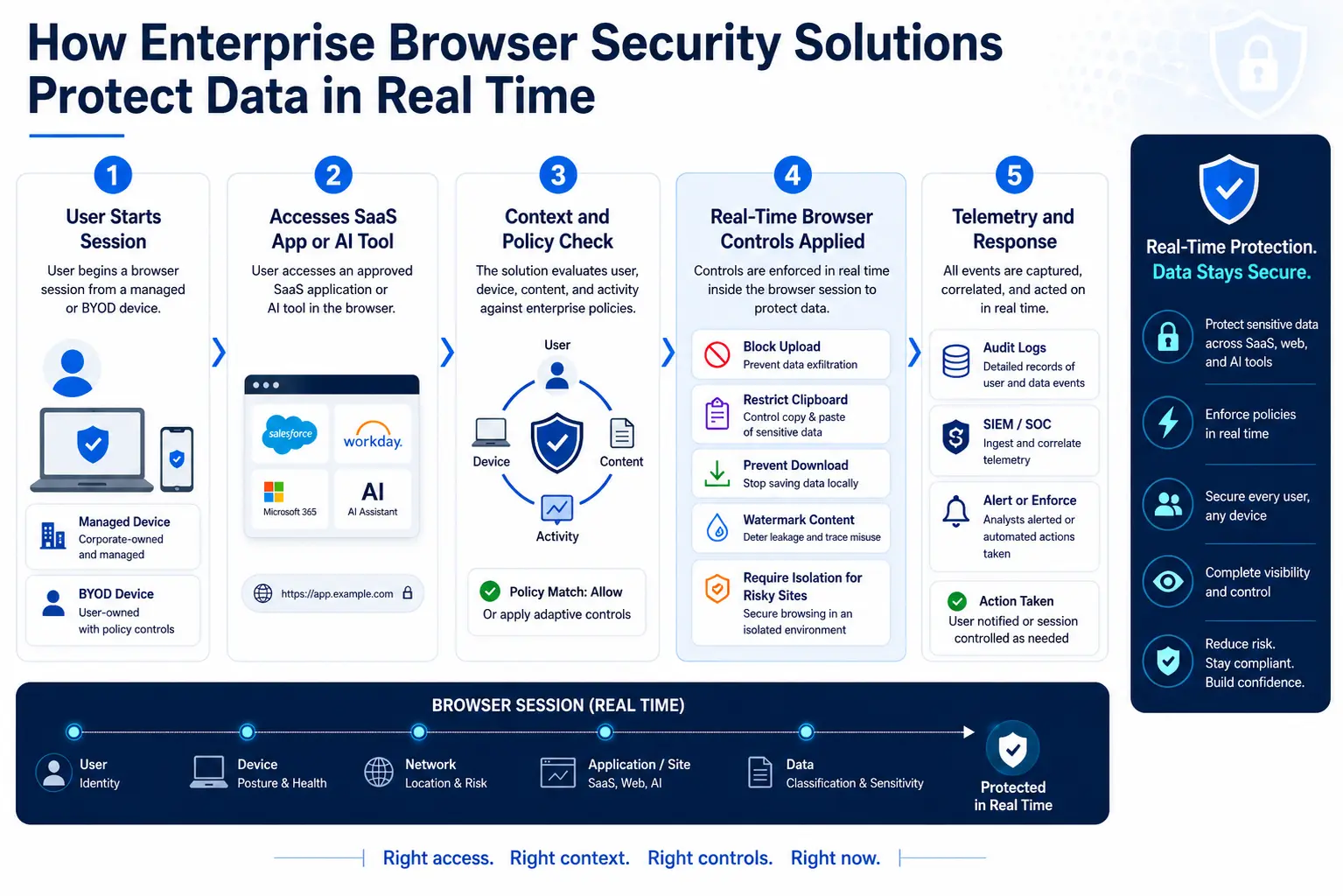
A full stack custom browser replaces Chrome, Edge, or Firefox with a vendor controlled Chromium fork that embeds DLP, identity, and policy enforcement at the rendering engine level. Gartner defines a secure enterprise browser as a solution that delivers enterprise security policies and controls through a centrally managed browser extension, and optionally, a full stack custom web browser, providing security and policy enforcement for web, SaaS, and private applications.
The security depth is high—you control the entire rendering pipeline. But the deployment friction is equally high. You are asking thousands of users to abandon the browser they have used for years, retrain their muscle memory, and accept that their bookmarks, extensions, and saved passwords may not migrate cleanly. The procurement team discovers that this means IT owns a new software lifecycle—browser patches, compatibility testing, version management—that previously belonged to Google or Microsoft.
Browser extensions
A lightweight agent installs into the user's existing browser, inspecting page activity, controlling clipboard actions, and enforcing DLP policies without replacing the browser itself. Extensions preserve user familiarity and avoid the migration overhead of replacement browsers. However, extension based security depends on browser vendor APIs, which can change with any browser update—and some critical operations (like deep JavaScript engine inspection) may be architecturally limited.
Remote browser isolation (RBI)
RBI executes web content in a cloud based container and streams only safe visual output to the user's local browser. CISA's Capacity Enhancement Guide (2023) recommends browser isolation combined with web content filtering, DLP, and secure gateways as a layered defense. The security model is architecturally strong—no web code runs on the endpoint. When integrated with an SSE platform, RBI operates as a graduated policy response: known safe destinations pass through, known bad destinations are blocked, and risky or uncategorized sites are isolated.
SSE-integrated browser controls
Rather than treating browser security as a standalone product, this approach layers SWG URL filtering, CASB inline policy, DLP content inspection, and selective RBI through a unified secure web gateway. The browser itself is unmodified—security is enforced at the network and proxy layer with policy based escalation to isolation when risk warrants it. This is the approach that most closely matches how enterprise security stacks already work.
Phase 3: Score Vendors Against Eight Weighted Criteria
Use the following evaluation framework to score each shortlisted solution. Weight each criterion according to your organization's priorities—an organization with a large contractor workforce will weight unmanaged device support differently than one with predominantly managed endpoints.
Vendor Scoring Framework
Score each criterion on a 1–5 scale (1 = does not meet requirement, 5 = exceeds requirement). Multiply by the weight to produce a weighted score. Any solution scoring 1 on Security Depth or SSE Integration should be eliminated regardless of total score.
Phase 4: Run a Proof of Concept That Actually Proves Something
Most POCs fail because they test the wrong things. A 30 minute vendor demo on a clean VM with two test users tells you nothing about how the solution behaves when hundreds of real users hit it on a Monday morning.
POC design principles
Use real users, not the security team. Recruit 50–100 users from at least three departments—finance, engineering, and a business unit with heavy SaaS usage. Users who did not select the tool will surface friction that vendor champions will miss.
Test your actual SaaS stack. Run the POC against your production Salesforce instance, your Workday environment, and your internal apps. Mandiant’s M-Trends 2025 report found that exploits accounted for 33% of initial infections while stolen credentials rose to 16%—the second most common vector—meaning your browser security must handle credential theft and session hijacking scenarios, not just malware downloads.
Measure both security and usability. Track three categories of metrics:
Security metrics: Blocked phishing attempts, DLP policy triggers, isolated sessions, malware prevented
Usability metrics: Average page load delta (compared to baseline), task completion time for five standard workflows, help desk ticket volume
Adoption metrics: Active users vs. enrolled users, bypass attempts, user satisfaction score (simple 1–5 survey)
A solution that blocks every threat but adds three seconds to every page load will face a user revolt that makes it operationally worthless. Conversely, a frictionless solution that misses data exfiltration via copy/paste is security theater.
POC duration and scope
Run the POC for a minimum of three weeks. The first week covers initial deployment friction and user onboarding. The second week reveals steady state performance. The third week catches edge cases—the quarterly reporting cycle that generates unusual data volumes, the contractor who needs temporary access to a restricted app, the user who tries to paste proprietary data into a GenAI tool.
Phase 5: Evaluate SSE Integration and Policy Unification
This is where most browser security evaluations go wrong. Teams evaluate browser security in isolation, then discover during deployment that it creates a parallel policy universe disconnected from their SWG, CASB, and DLP controls.
A practical test: configure a DLP policy that blocks Social Security numbers from being uploaded to unsanctioned cloud storage. Then verify that the same policy fires when a user types those numbers into a GenAI prompt in an isolated browser session, copies them between browser tabs, and attempts to print a page containing them. If each of those actions requires a separate policy in a separate console, your browser security is creating operational debt, not reducing it.
Forrester's SSE evaluation (Q1 2024) found that data residency remains a critical concern, especially outside the US, and that some vendors have more ability to keep data in a specific country than others. During your evaluation, verify where browser isolation sessions are processed, where inspection logs are stored, and whether you can control session routing to specific regions—especially if you operate under GDPR, CCPA, or sector specific data sovereignty requirements.
The threat landscape demands this level of integration. The CSA State of SaaS Security Report (2025) found that 56% of organizations say employees upload sensitive data to unauthorized SaaS apps. Browser security that does not share context with your CASB and DLP cannot address these risks in real time. Skyhigh Security's SSE platform, for example, unifies SWG, CASB, DLP, and RBI policy within a single console—eliminating the dual policy problem that plagues standalone browser security products.
Common Mistakes That Derail Browser Security Evaluations
Mistake 1: Evaluating security depth without testing user experience. A CISO selects a replacement browser based on a security feature checklist, deploys it to thousands of users, and discovers that three critical SaaS applications render incorrectly. Within two weeks, shadow IT workarounds proliferate—users switch to personal browsers, access corporate apps from personal devices, and the security posture actually degrades.
Mistake 2: Treating browser security as a standalone purchase. A procurement team buys a browser security solution from a vendor outside their SSE stack, then spends six months trying to integrate it with existing SWG and CASB policies. The result is two policy consoles, duplicate DLP rules with slightly different logic, and alert fatigue from conflicting telemetry. Gartner's evaluation guidance (October 2025) explicitly recommends asking how solutions integrate with your SIEM, SOAR, SSE, and EDR stack—not whether they can theoretically do so.
Mistake 3: Ignoring the unmanaged device use case. Teams evaluate browser security on managed corporate laptops, then realize post deployment that a significant share of their browser risk comes from contractors and BYOD users who cannot install an agent or MDM profile. Solutions that require endpoint control—like some replacement browsers that need local admin installation—fail silently for the users who need protection most.
Mistake 4: Skipping the cost model analysis. RBI costs scale with usage volume—isolating every web session for every user is expensive. Selective isolation (risky and uncategorized sites only) dramatically reduces cost while maintaining security posture. Evaluate whether the vendor's pricing rewards targeted isolation or penalizes it.
Mistake 5: Running a two day POC with five security team members. This tells you the product works for technical users in a controlled environment. It tells you nothing about how an accounts payable clerk in the Houston office will react when her browser session pauses during isolation or when her favorite Chrome extension stops working. Run a real POC with real users for at least three weeks.
Metrics and Success Criteria for Your Final Decision
After the POC, use these benchmarks to make a defensible recommendation to leadership:
Page load delta within acceptable range. If average page loads increase substantially over baseline (measured across your top 20 applications), expect user complaints that will undermine adoption. Track the precise millisecond delta per application.
DLP policy coverage at parity or better. The browser security solution should catch DLP violations that your existing inline DLP catches, plus add coverage for browser specific vectors (clipboard, print, screen capture).
User satisfaction at or above 3.5 on a 5 point scale. Below this threshold, expect escalations, bypass attempts, and executive exceptions that erode the security value.
Help desk ticket volume within manageable range. A sharp spike indicates deployment friction that will not resolve naturally. Track tickets per 100 enrolled users per week.
Mean time to policy change under four hours. If updating a browser specific DLP rule takes longer than updating your SWG rule, the integration is insufficient.
Zero critical application breakages. Any application in your top 20 that renders incorrectly or fails functional testing is a deployment blocker, not a "known issue."
Mandiant’s M-Trends 2026 report found that the median time between initial compromise and hand-off to a second threat group collapsed to just 22 seconds in 2025, down from over eight hours in 2022. Your browser security must operate at wire speed—detecting and blocking threats in the browser session before an attacker pivots from a compromised credential to lateral movement.
Understanding the role of browser isolation in your broader security architecture helps contextualize these metrics. Isolation is not a standalone defense—it is a policy driven escalation within a layered security model.